How Superhuman Teaches Speed in a Live Onboarding Call
 +20 XP
Case study
How Superhuman Teaches Speed in a Live Onboarding Call
A new Superhuman user joins a one-on-one onboarding call and learns the email app entirely through keyboard shortcuts, practiced on their own inbox. You will see which moments build lasting habits, where contrast and goal setting fall short, and which small details create delight.
+20 XP when you reach the endWhat you will learn
- Use hands-on practice and reinforcement to make new behaviors stick
- Spot where a minimal visual style hurts contrast and scanning
- End onboarding with real progress, not just product knowledge
Scroll to follow the story. The screen changes with you.
Based on the learnings from Growth.Design: Superhuman's Secret 1-on-1 Onboarding Revealed, presented in our own format.
Step 1 of 12
- Personal welcome
01
The setup
Getting into Superhuman starts with a one-on-one video call.
Access to the email app is gated, and new users are booked onto a personal onboarding call with a specialist who guides them through setup on their own inbox. The first screen greets them with a photo, a welcome and a short promise.
TakeawayA human guide can turn setup from a chore into an event people remember.
Why run live onboardingAccording to Superhuman CEO Rahul Vohra, the calls began as user research. Growth.Design reports they were kept for four reasons: to create power users, increase retention, drive word of mouth and build a real human connection.
- Twice as fast
02
The first lesson
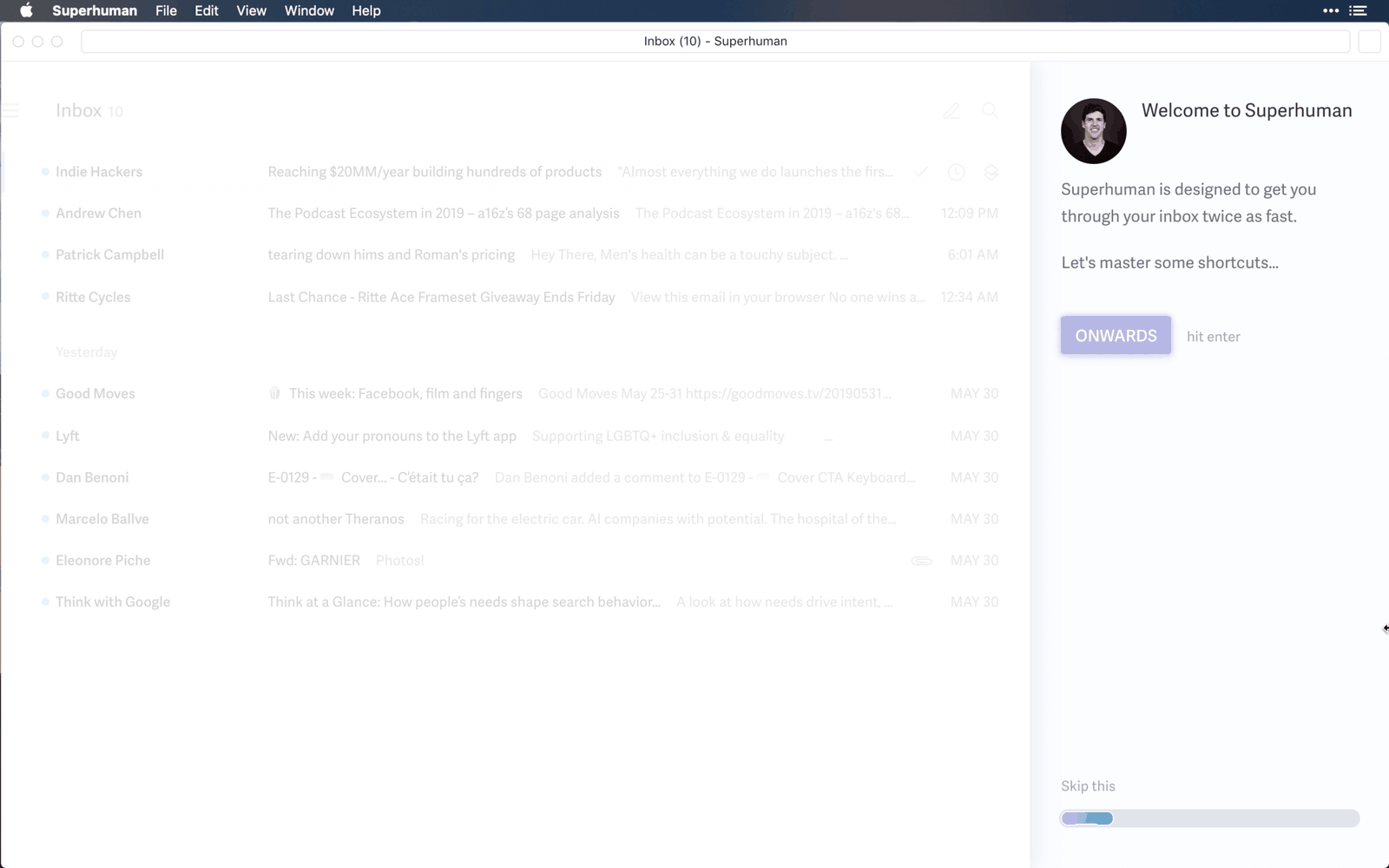
The first screen states the benefit, then takes the mouse away.
The panel says Superhuman is built to get you through your inbox twice as fast, then moves straight into shortcuts. The 'Onwards' button only responds to the Enter key, so the user learns from the first second that this app is driven by the keyboard.
TakeawayOpen with the value people will get, then make the first action demonstrate it.
Unexpected moments stickGrowth.Design cites Chip and Dan Heath's Made to Stick: people remember things better when faced with something unexpected. Going through a mailbox without a mouse is exactly that.
 Faint icons
03
A weak spot
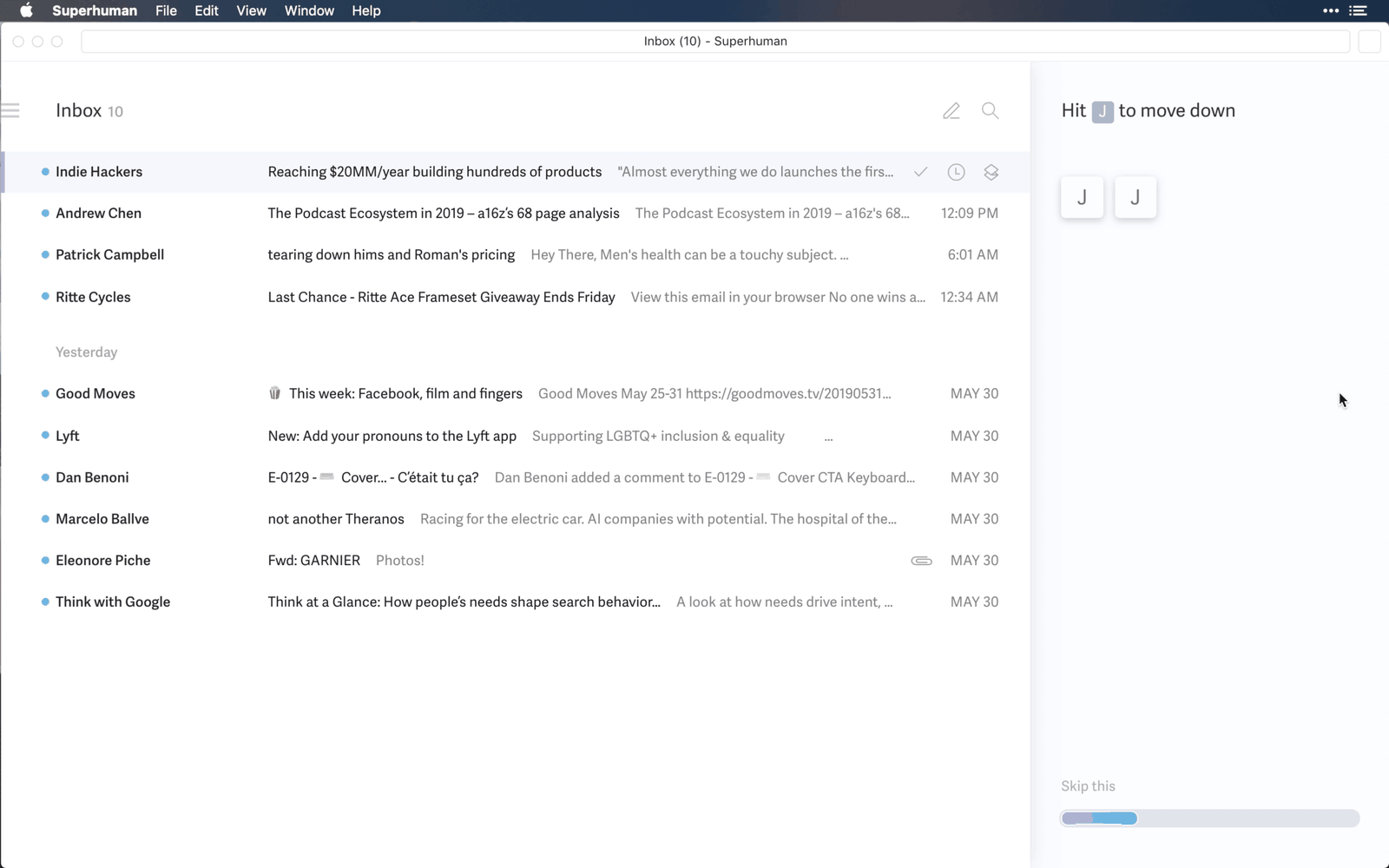
The minimal style makes the interface hard to scan.
The selected row is a barely visible tint, and the action icons beside it are pale grey on white. Growth.Design measured the selection state and icons and found they fail the WCAG contrast guidelines.
TakeawayA clean look should never cost people the ability to see where they are.
Contrast is necessaryEvery product has contrast rules it should respect, unless it serves a narrow luxury audience. Rahul Vohra told Growth.Design the low contrast was a deliberate choice to look attractive and different, with plans to raise it as the audience broadens.
- Hit J to move
04
Practice, not reading
Moving through the inbox is taught by pressing J, then pressing it again.
The side panel asks the user to hit J to move down, showing each key press as a tile. After a few presses a small line of text says this will soon be muscle memory. J and K feel odd at first, since they do not map to up and down the way arrows do.
TakeawayLet people repeat the new behavior on real data until it feels natural.
Easy is not always bestArrow keys are easier to remember. Rahul Vohra explained to Growth.Design that J and K are faster because they need no arm movement and match Gmail and Vim, and the live call gives them room to add that bit of friction.
 Next email
05
The core loop
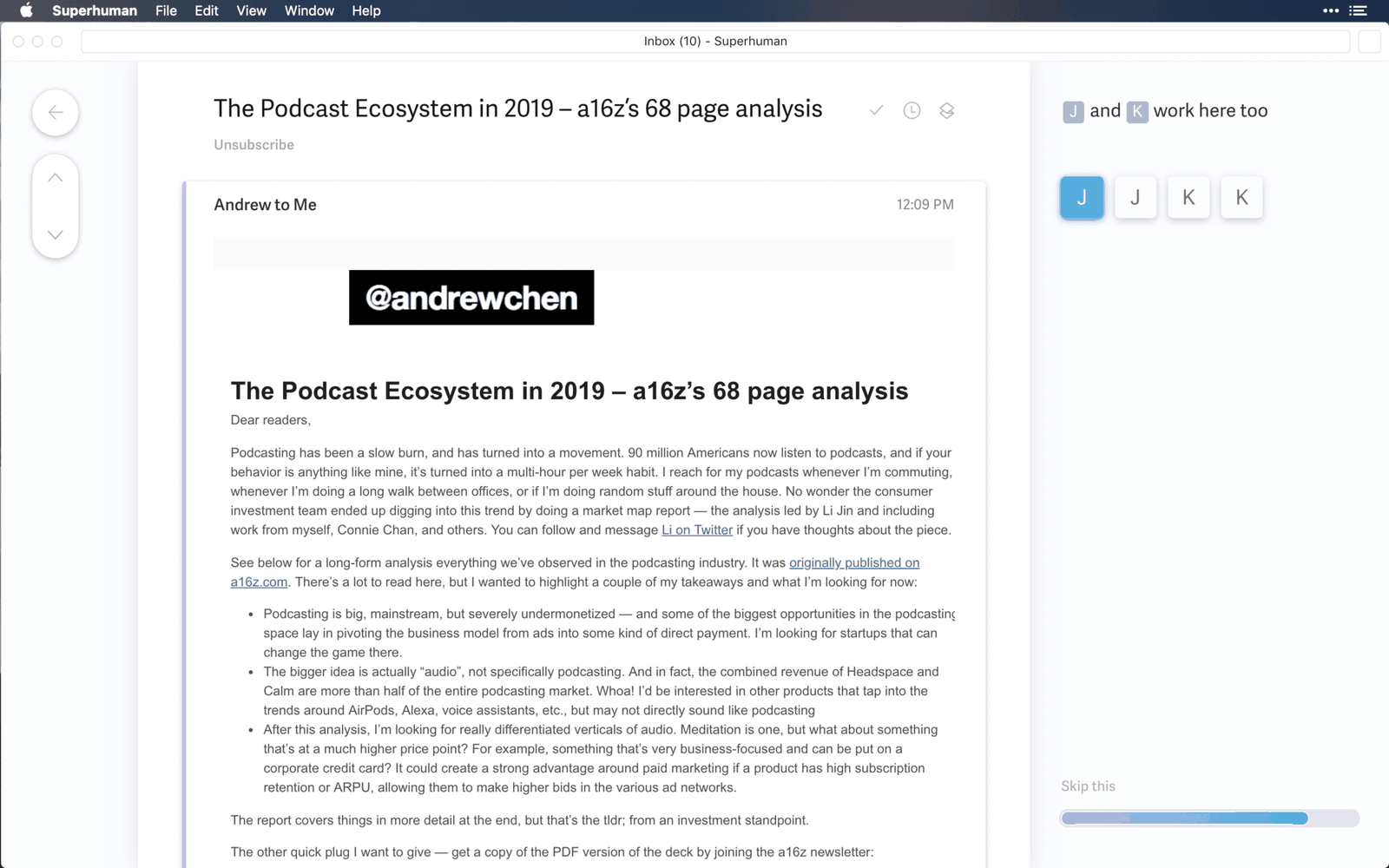
J and K keep working inside an email, so you never go back to the list.
While reading a message, the same keys jump straight to the next or previous email. The left rail with arrow buttons acts as a visual anchor, although the white menu bar and pale sections still make the reading view hard to divide at a glance.
TakeawayRemove the trips back to a menu or list, and people can stay focused on the task.
Getting into the zoneLooking at a list slows the brain down, while skipping it lets people stay immersed. Rahul Vohra told Growth.Design that not returning to the inbox increases speed by about 15 percent.
 Every action here
06
The last shortcut
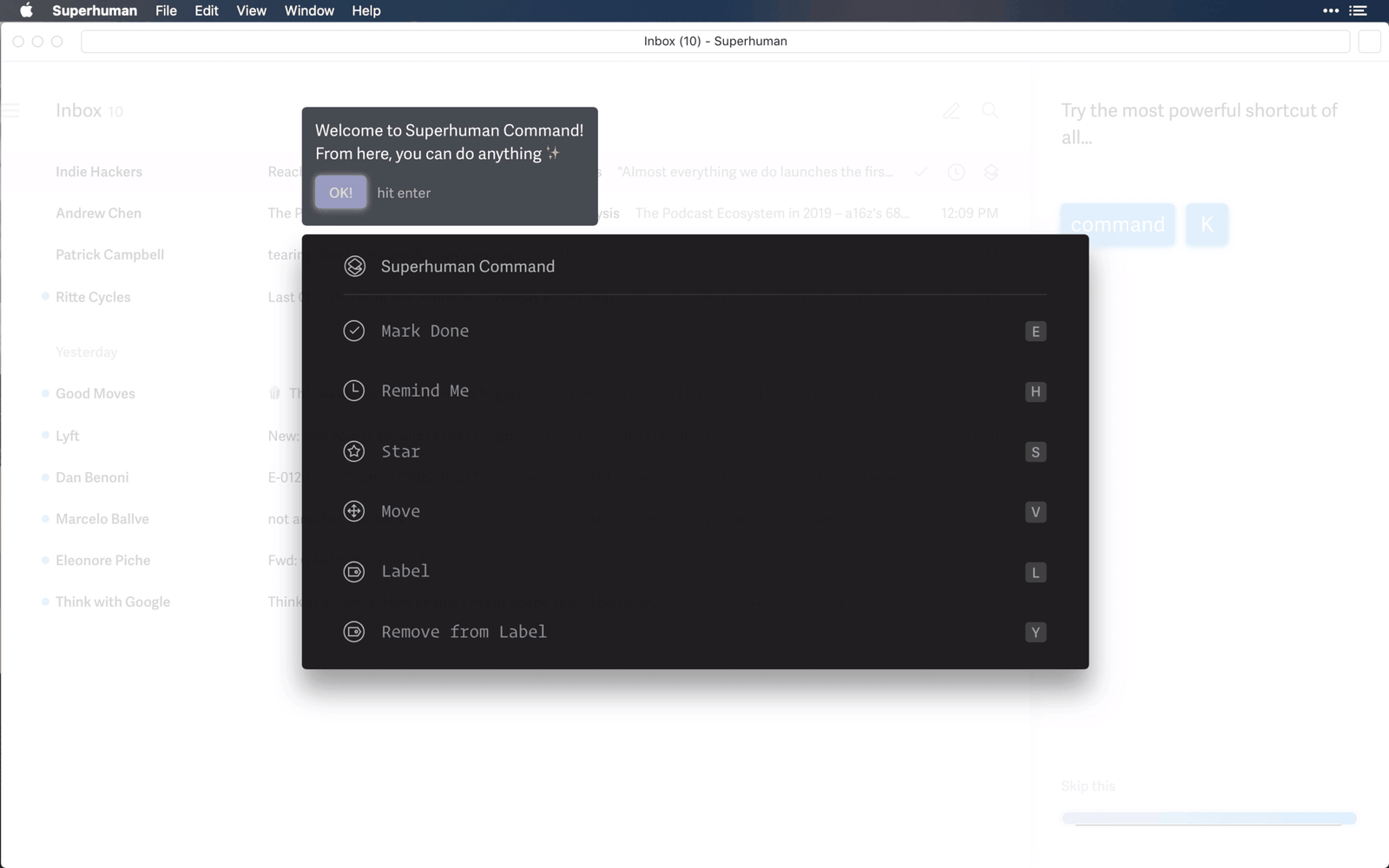
One shortcut opens every action, and it is saved for the end.
Command and K opens Superhuman Command, a searchable list of every action with its own shortcut shown beside it. Anyone who forgets a key can find it here, and learn it along the way.
TakeawayGive people one entry point to everything, and they never feel stuck.
One shortcut to rule them allPutting every function in one place reduces complexity for users, at a development cost. Growth.Design notes that showing it last is deliberate: according to the peak-end rule, people remember endings best.
 Written for you
07
Positive reinforcement
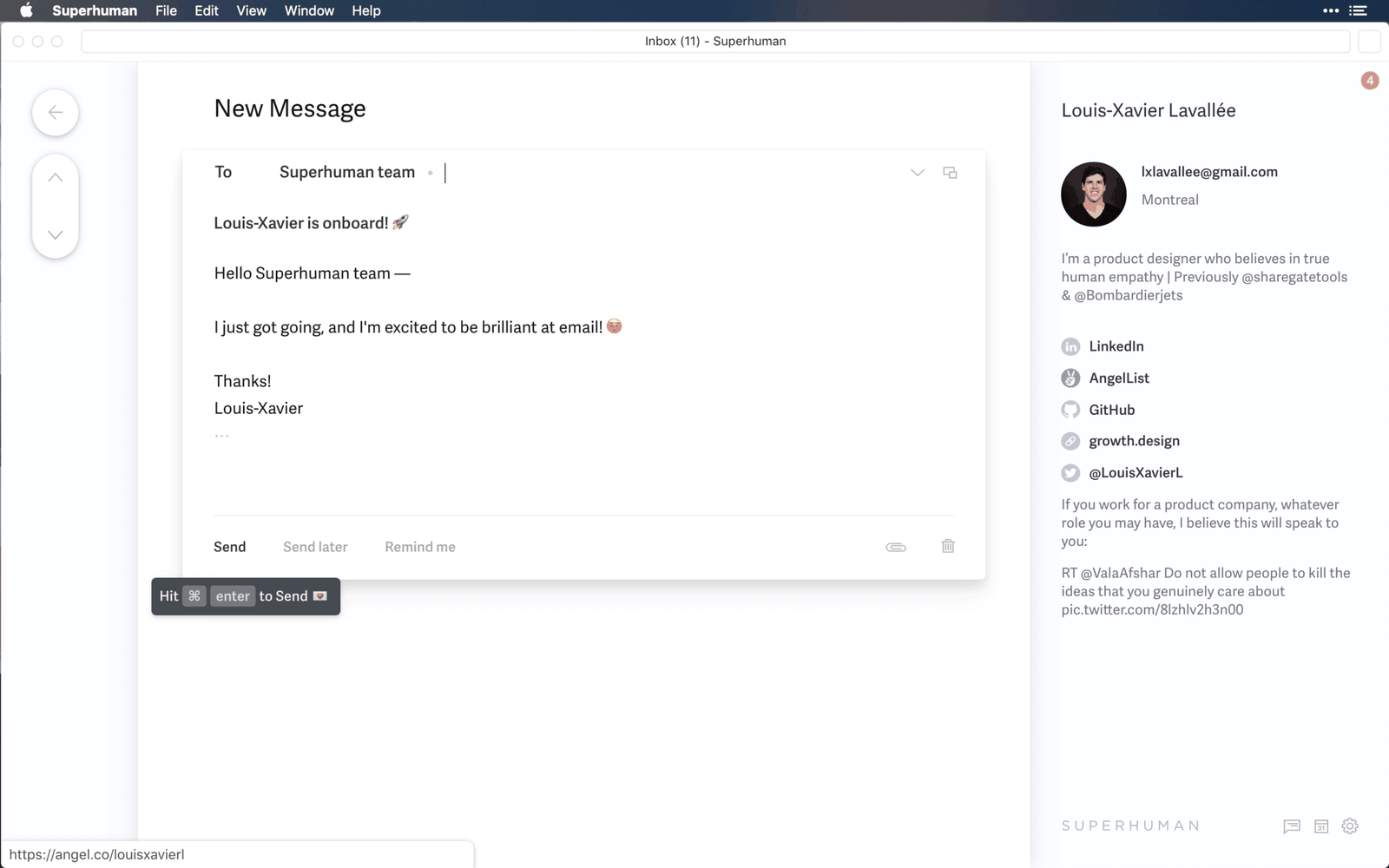
The first email is already written, so sending it feels like a small win.
Compose opens a message to the Superhuman team announcing that the user is on board, and a tooltip shows Command and Enter to send. The right panel fills with the recipient's profile and links, another quiet demonstration of the product.
TakeawayPre-fill the first task so people succeed on the first try.
An idea to test: soundSound shapes mood and can act as a strong reward. Growth.Design suggests Superhuman could design its own sound and play it when people type the correct shortcut, not when an email arrives, to reinforce the behavior it wants.
 Undo option
08
A safety net
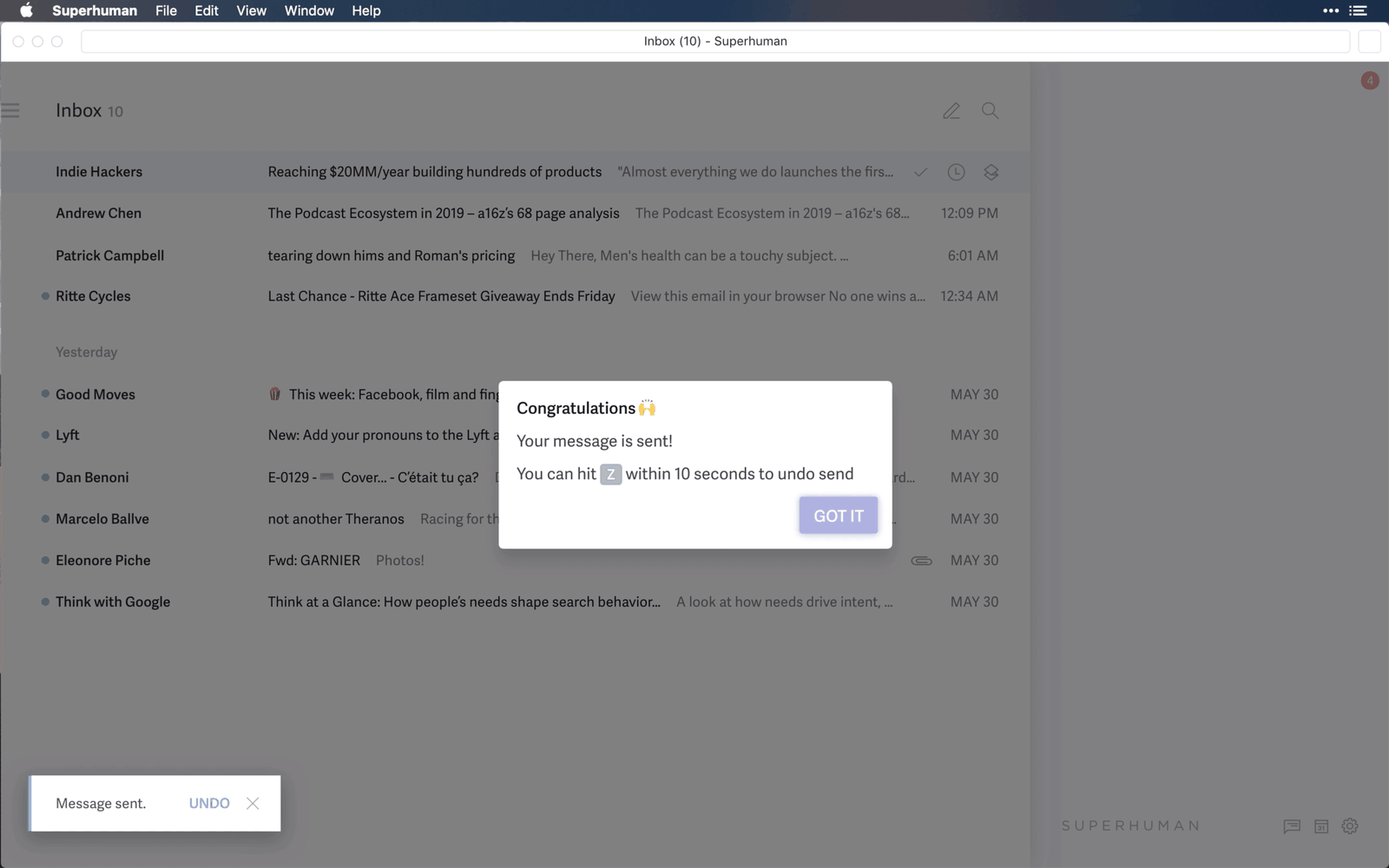
After sending, the user learns they can undo it within 10 seconds.
A congratulations dialog confirms the message is sent and teaches the Z shortcut to undo, while a toast in the corner offers the same option. Growth.Design notes that Gmail has since added a similar feature.
TakeawayCelebrate the action, then remove the fear of making a mistake.
 Still 10 emails
09
A missed opportunity
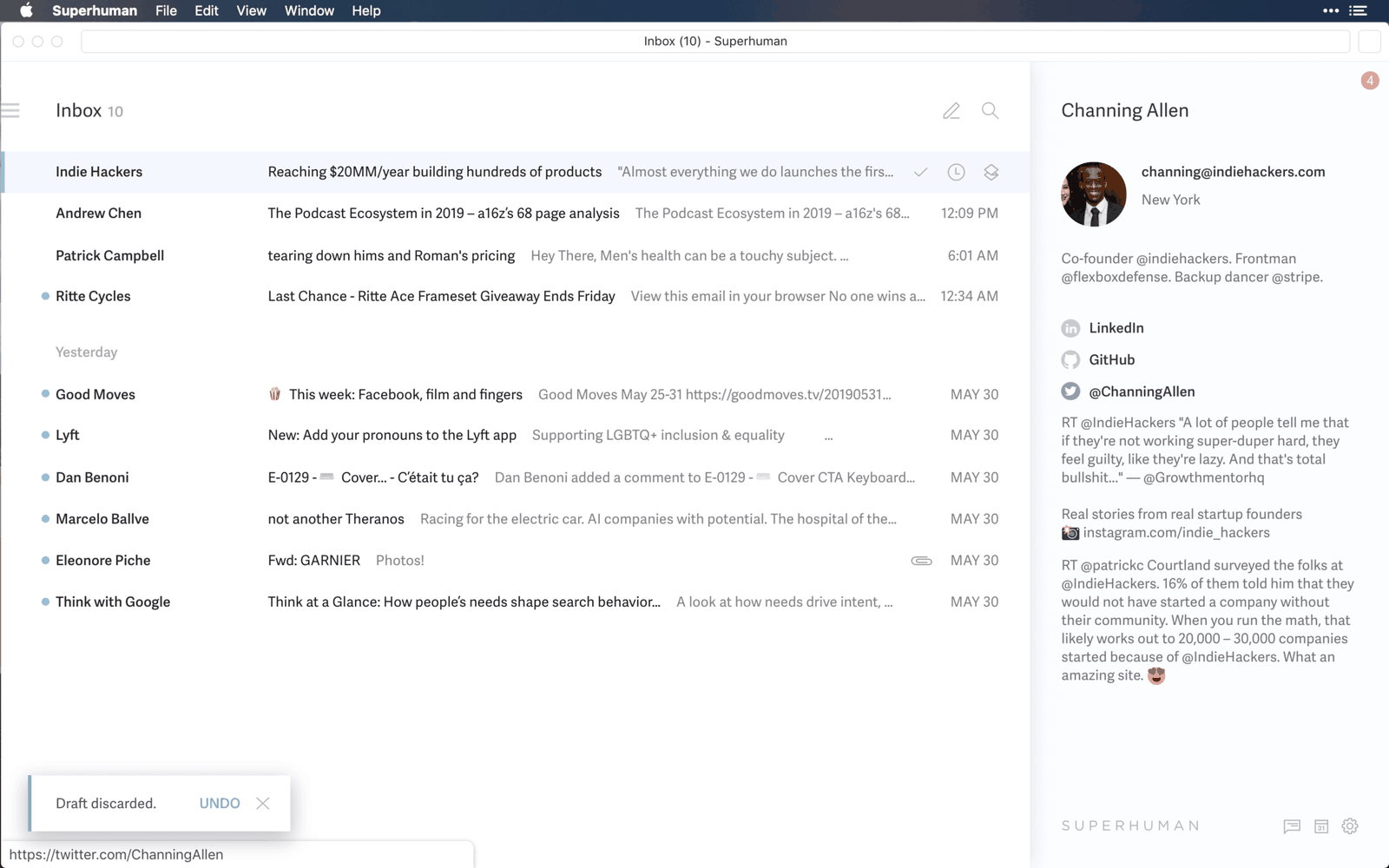
The tutorial ends, and the inbox still holds the same 10 emails.
The user knows every shortcut but has made no progress on their actual mail, and the 'Draft discarded' toast is the only sign anything happened. The tutorial taught the interface, not the outcome the person came for, so the ending feels flat.
TakeawayOnboarding should end with progress on the user's own goal, not just knowledge of the product.
Goal oriented onboardingGrowth.Design cites Samuel Hulick's Bulletproof Onboarding: guide users into actions that lead to real progress in their lives, not just a better understanding of the interface. Here, that could mean teaching each shortcut on an email that genuinely needs handling.
 Paris time, converted
10
A moment of delight
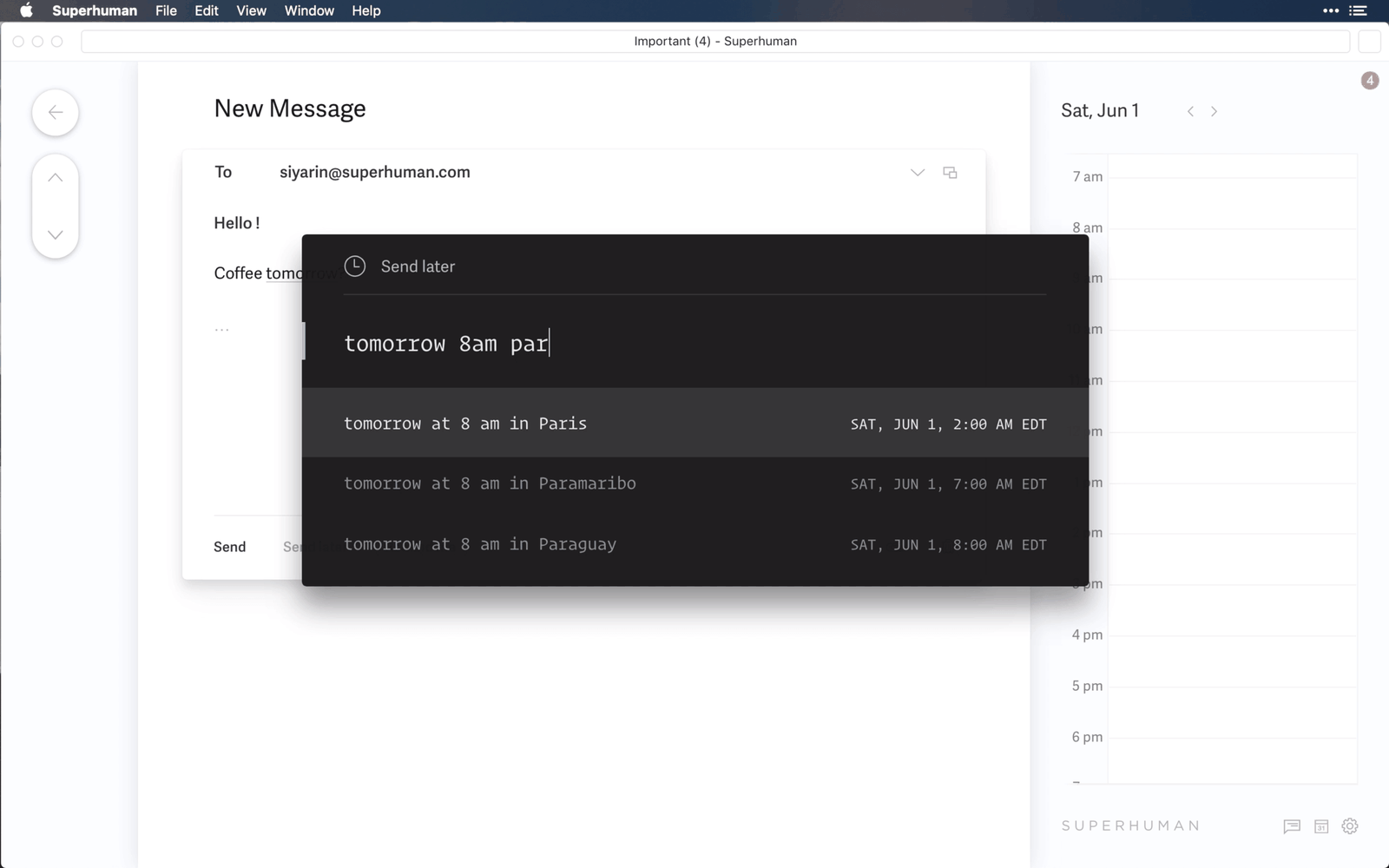
Send later understands plain language, including cities in other time zones.
Typing 'tomorrow 8am par' suggests 8 am in Paris and converts it to the user's own time. Nobody has to work out a time difference in their head.
TakeawaySmall, unexpected conveniences are what people remember and talk about.
DelightersPeople respond warmly to small, unexpected and playful pleasures. Growth.Design cites Jared Spool's writing on the Kano model: a feature that saves you a calculation is useful and a delight at the same time.
 Redirect choice
11
Breaking the old habit
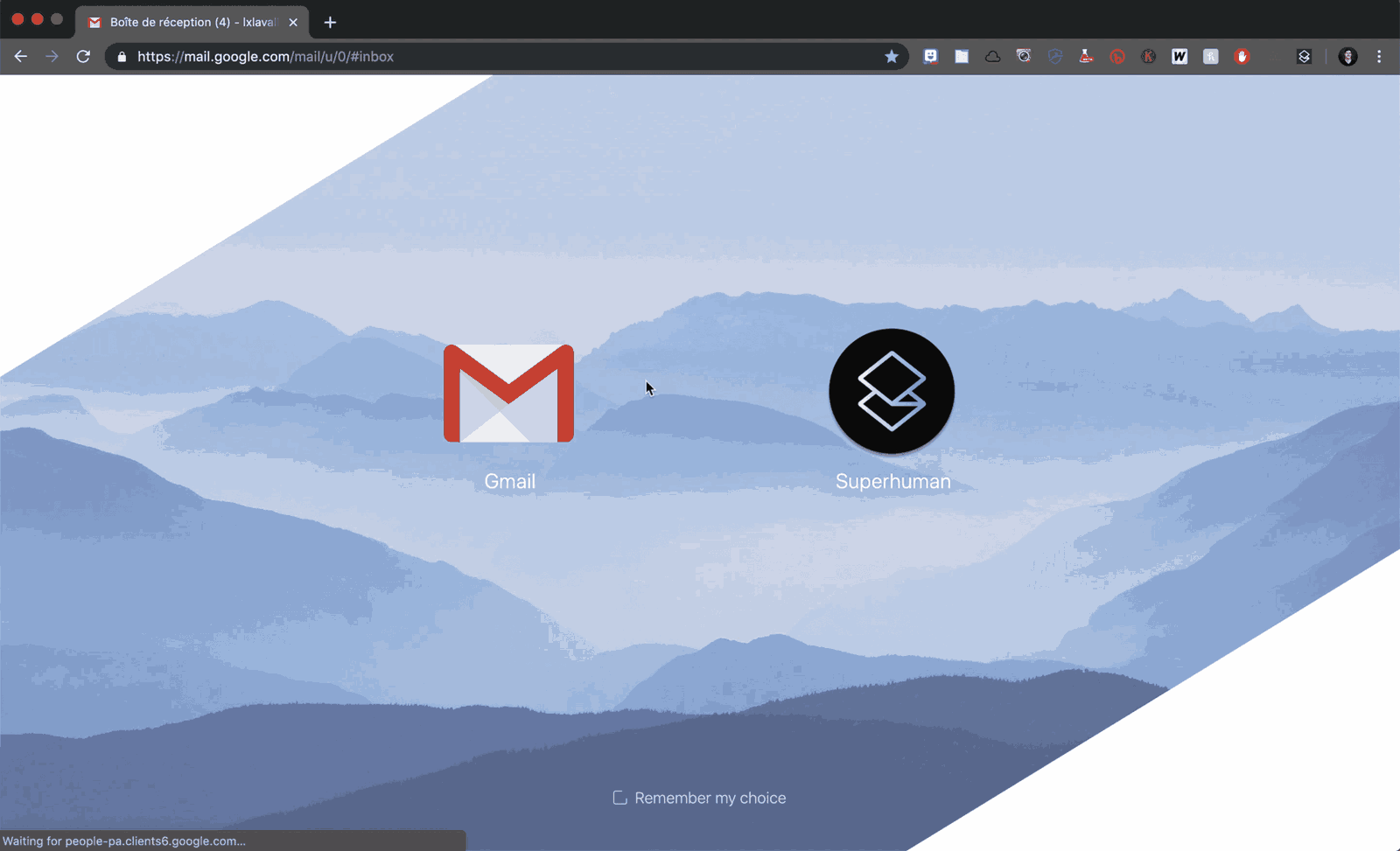
Hours later, opening Gmail offers a choice to go to Superhuman instead.
Before the call, users are asked to install a Chrome extension that improves the web version and enables offline mode. As a side effect, it intercepts Gmail and offers Superhuman, interrupting the old habit at the exact moment it happens.
TakeawayMeet people at the moment of their old habit, and be transparent about why the tool is there.
An ethical questionGrowth.Design flags this as a gray area: the extension is installed for performance, but it also redirects users away from Gmail. Clever for retention, and worth being open about.
Low point Pale first screenHigh point Peak moment12
The result
An onboarding with clear highs, one dip and one missed ending.
The live call, jumping between emails and Command K lift the experience, and the time zone feature is a peak. The pale first screens are the low point, and the tutorial ends without progress on the user's goal. Growth.Design still rates the overall experience an A.
TakeawayMap the emotional highs and lows of onboarding, then fix the dips and design a strong ending.
Priming for the next stepAt the end of the call, users hear they will get one email a day from the CEO for two weeks, each showing a new feature. Growth.Design notes this primes people to expect and open those emails.
Every takeaway, in one place
- The setupA human guide can turn setup from a chore into an event people remember.
- The first lessonOpen with the value people will get, then make the first action demonstrate it.
- A weak spotA clean look should never cost people the ability to see where they are.
- Practice, not readingLet people repeat the new behavior on real data until it feels natural.
- The core loopRemove the trips back to a menu or list, and people can stay focused on the task.
- The last shortcutGive people one entry point to everything, and they never feel stuck.
- Positive reinforcementPre-fill the first task so people succeed on the first try.
- A safety netCelebrate the action, then remove the fear of making a mistake.
- A missed opportunityOnboarding should end with progress on the user's own goal, not just knowledge of the product.
- A moment of delightSmall, unexpected conveniences are what people remember and talk about.
- Breaking the old habitMeet people at the moment of their old habit, and be transparent about why the tool is there.
- The resultMap the emotional highs and lows of onboarding, then fix the dips and design a strong ending.
Source: Growth.Design: Superhuman's Secret 1-on-1 Onboarding Revealed
Turn your onboarding into the moment people become power users.
Many products explain their interface and stop there. Zyxware can map your first-run experience, find the actions that actually predict retention, and redesign onboarding so new users practice those actions and leave with visible progress on their own goal.