When a Free Gift Looks Like a Paywall
 +20 XP
Case study
When a Free Gift Looks Like a Paywall
A runner returns to Strava after months away and is offered 30 days of premium for free, with no card and no catch. Most people will still read it as an upsell and close it, and this story shows the six details that cause that and how to fix them.
+20 XP when you reach the endWhat you will learn
- See how quick judgments turn a gift into a perceived upsell
- Spot the paywall signals hidden in an honest offer
- Rewrite the screen so the value is obvious at a glance
Scroll to follow the story. The screen changes with you.
Based on the learnings from Growth.Design: Strava: When good UX intentions fail without psychology, presented in our own format.

Step 1 of 9
- Back after months
01
The setup
A runner opens Strava again after months without a run.
They have laced up their shoes for the first time in a while and open the app to track the run. This is a returning user with fresh motivation, exactly the person a product wants to welcome back well.
TakeawayA comeback moment is fragile: the first screen decides whether the habit restarts.
 Assumed upsell
02
First impression
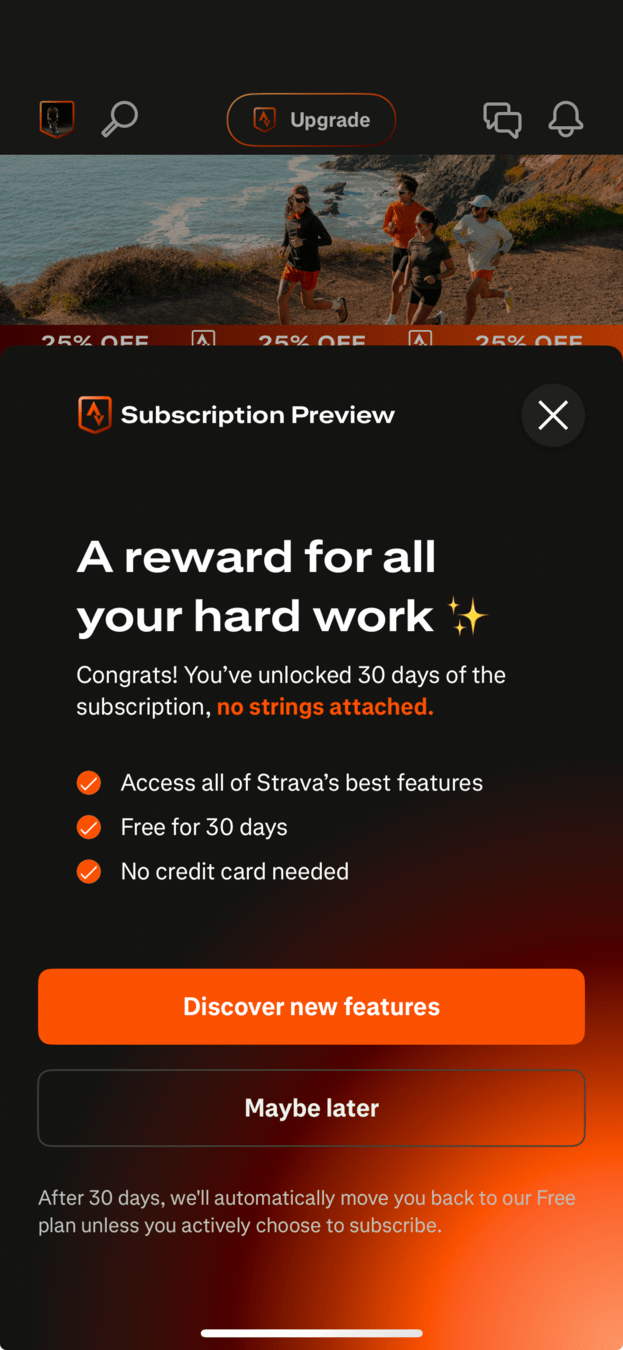
A sheet slides up, and the first thought is 'here comes the upsell'.
Before reading a word, the runner assumes Strava wants money. In fact the sheet gives 30 days of the subscription for free, with no credit card and no automatic billing. The generous offer is almost dismissed anyway.
TakeawayIf people misread your offer in the first second, the details below never get read.
- The actual gift
03
The real offer
It says 'no strings attached', and it means it.
The small line of body copy explains that 30 days are unlocked, and the footer says the account returns to the free plan unless the person chooses to pay. This is a genuine gift, but it is buried in small text that most people skip.
TakeawayWhen the best part of an offer lives in small print, it is effectively invisible.
System 1 thinkingPeople make fast judgments based on patterns they have seen before. Growth.Design points to this as the reason teams need to understand the biases that shape how a screen is read.
- Upgrade and discount
04
Why it misfires
The screen around the offer is full of selling.
At the top there is an 'Upgrade' button, and just below it a repeating '25% OFF' banner. Both tell the brain that this is a shop, so a sheet appearing on top of them is read as one more sales pitch.
TakeawayDesign every prompt for the context it appears in, not in isolation.
Contextual designA chair sits in a room, a room in a house, and a prompt sits in an app. Growth.Design, citing UX World, reminds teams to design each element with its wider setting in mind.
- Sounds like billing
05
Signals in the sheet
The words 'Subscription' and a vague title add to the doubt.
The header reads 'Subscription Preview', which sounds like something you will be charged for, even when it is labeled a preview. The title 'A reward for all your hard work' is pleasant but does not say what the reward is.
TakeawayA title has to state the value plainly. Nice words that say nothing leave room for suspicion.
- Decline option
06
The overall look
A feature list plus two buttons is the classic paywall shape.
Checkmarked benefits, a bright main button and a 'Maybe later' decline are the exact pattern people have learned to associate with a paywall. The button 'Discover new features' also does not match the offer, which is a free month.
TakeawayFamiliar patterns carry familiar meanings. Borrow the paywall layout and you get the paywall reaction.
Original Vague titleRewritten 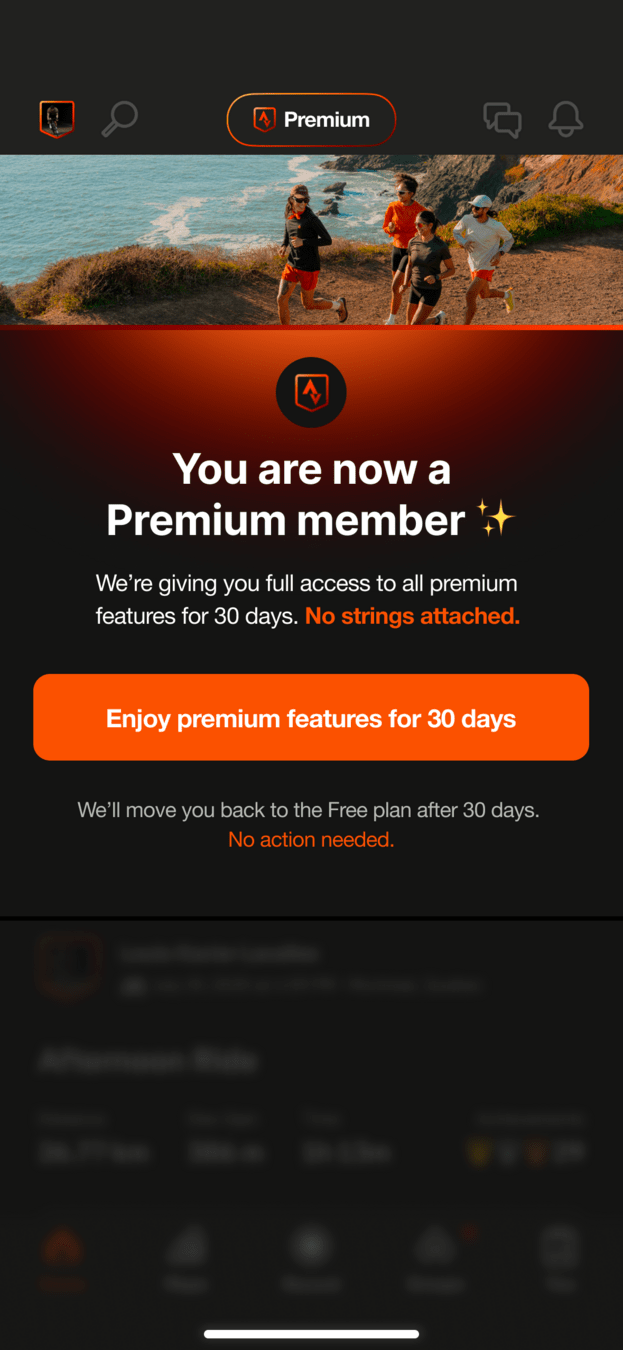 Clear title
07
The fix
State the result, not the sales process: 'You are now a Premium member'.
The rewritten screen tells the runner what has already happened. Premium is switched on, the header badge changes from 'Upgrade' to 'Premium', and the discount banner is gone.
What changed
- Title changes to 'You are now a Premium member'
- The 'Upgrade' button becomes a 'Premium' badge
- The 25% OFF banner is removed
TakeawayDescribe the outcome the person already has, and there is nothing left to be suspicious of.
Original Decline removedRewritten Matches the offer08
The fix, continued
One button that matches the offer, and no way to decline a gift.
'Enjoy premium features for 30 days' tells people exactly what they get. The 'Maybe later' button is gone, because there is nothing to refuse, and the footer now ends with 'No action needed'.
What changed
- Button reads 'Enjoy premium features for 30 days'
- 'Maybe later' is removed
- Footer adds 'No action needed'
TakeawayMake the call to action describe the offer, and drop choices that make a gift feel like a sale.
- No action needed
09
The lesson
The same gift, now read as a gift.
Nothing about the offer changed. By removing sales signals, naming the result in the title and matching the button to the offer, the screen can be understood in one glance, which is all the time most people give it.
TakeawayGood intentions are not enough. Design for how people actually judge a screen, and choose clear over clever.
Every takeaway, in one place
- The setupA comeback moment is fragile: the first screen decides whether the habit restarts.
- First impressionIf people misread your offer in the first second, the details below never get read.
- The real offerWhen the best part of an offer lives in small print, it is effectively invisible.
- Why it misfiresDesign every prompt for the context it appears in, not in isolation.
- Signals in the sheetA title has to state the value plainly. Nice words that say nothing leave room for suspicion.
- The overall lookFamiliar patterns carry familiar meanings. Borrow the paywall layout and you get the paywall reaction.
- The fixDescribe the outcome the person already has, and there is nothing left to be suspicious of.
- The fix, continuedMake the call to action describe the offer, and drop choices that make a gift feel like a sale.
- The lessonGood intentions are not enough. Design for how people actually judge a screen, and choose clear over clever.
Source: Growth.Design: Strava: When good UX intentions fail without psychology
Make sure your best offers are read the way you meant them.
A good offer can still fail if the screen around it looks like something people have learned to ignore. Zyxware can review your offers, trials and win-back prompts, find the signals that trigger a quick 'no', and redesign them so the value is understood in the first second.