How Strava Could Convert More Free Users to Premium
 +20 XP
Case study
How Strava Could Convert More Free Users to Premium
A runner who has used Strava's free plan for almost three years finishes a run and checks his stats, yet has never felt the need to pay. Follow his post run flow and see seven changes that would make the free version stickier and the premium offer more tempting.
+20 XP when you reach the endWhat you will learn
- Make weekly stats easy to remember and compare
- Use goals to create an investment loop
- Replace static upgrade widgets with real, changing previews
Scroll to follow the story. The screen changes with you.
Based on the learnings from Growth.Design: Strava: 7 Strategies To Convert More Freemium Users, presented in our own format.
Step 1 of 11
- Save Activity
01
The setup
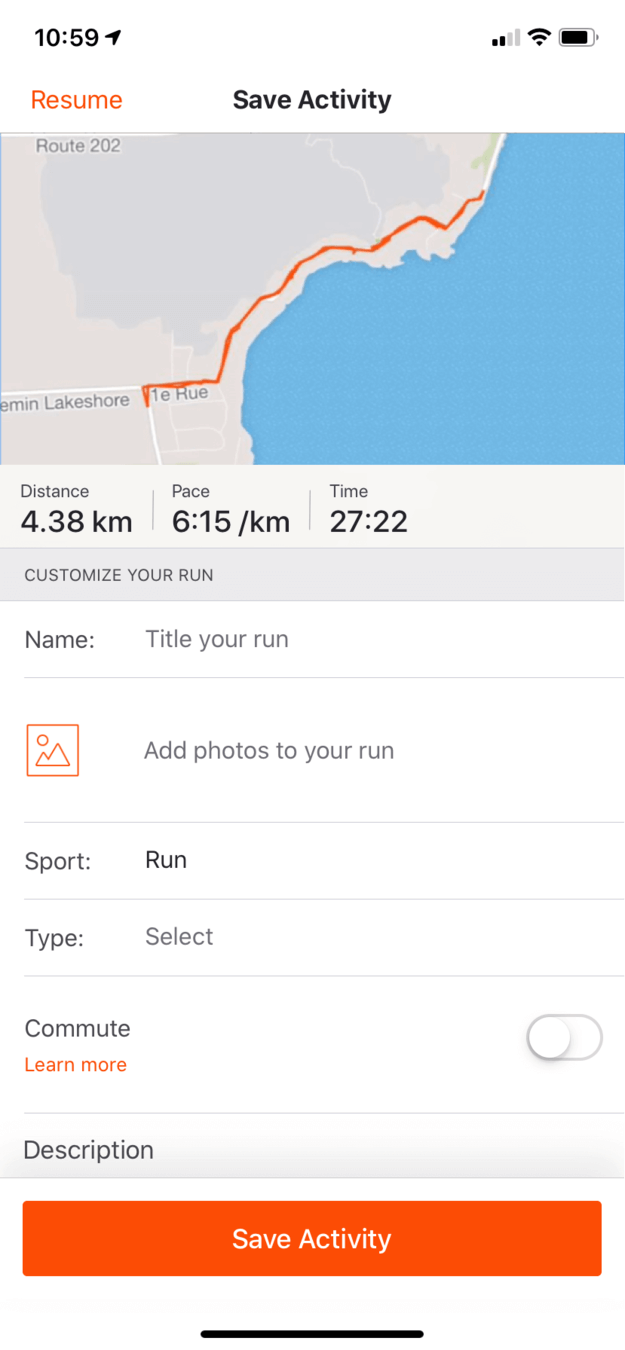
A tired runner saves his activity, as he has for almost three years.
The 'Save Activity' screen shows the route, 4.38 km, a 6:15 pace and 27:22 of time, with fields to name the run and add photos. Strava's free plan is good enough that he keeps coming back, but he has never been compelled to buy premium.
TakeawayA generous free plan builds the habit. The paid plan still has to earn the upgrade.
Make sure people come backWhen building a freemium model, keep retention high by giving real value in the free version. Play the long game and keep users happy. Treat freemium as an acquisition tool, not a revenue tool.
 Two time frames
02
Problem 1
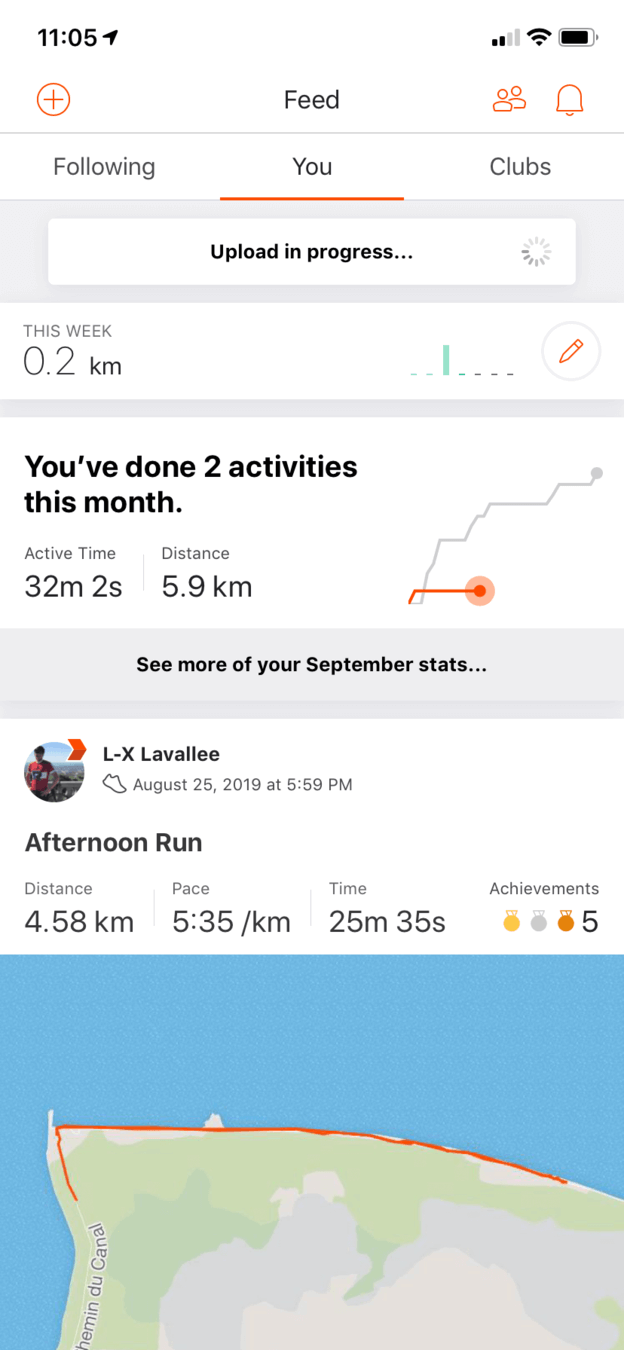
The feed splits his summary across two sections and two time frames.
A 'This week' row shows 0.2 km next to a tiny graph, and below it 'You've done 2 activities this month' has a line chart that looks like a placeholder. For someone out of breath, two time frames in two places is a lot to take in.
TakeawayShow one summary, in one time frame, at a glance.
Original Placeholder graphRedesign 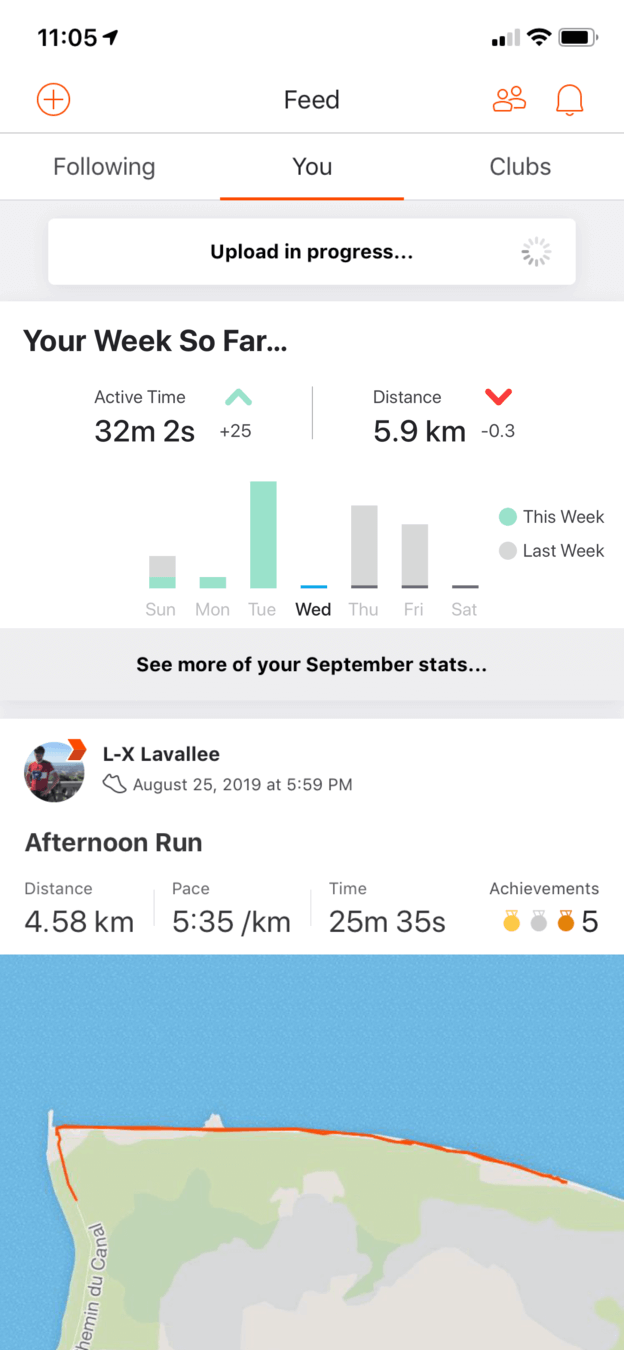 Week vs. last week
03
Fix 1
Merge both summaries into 'Your Week So Far', compared with last week.
The redesign keeps only weekly stats, because people remember what they did last week far better than last month. Active time and distance show the change from the previous week, with arrows so no mental math is needed.
What changed
- Two summaries become one weekly card
- Active time and distance show a change from last week
- A bar chart shows each day, this week against last week
TakeawayPick the time frame people can actually remember, and do the comparison for them.
Miller's LawThe average person can keep about 7 (plus or minus 2) items in working memory. A week has 7 days, so people are more likely to remember last week's workouts, which makes weekly stats motivating and easy to track.
Stats only Nothing to aim forWith goal 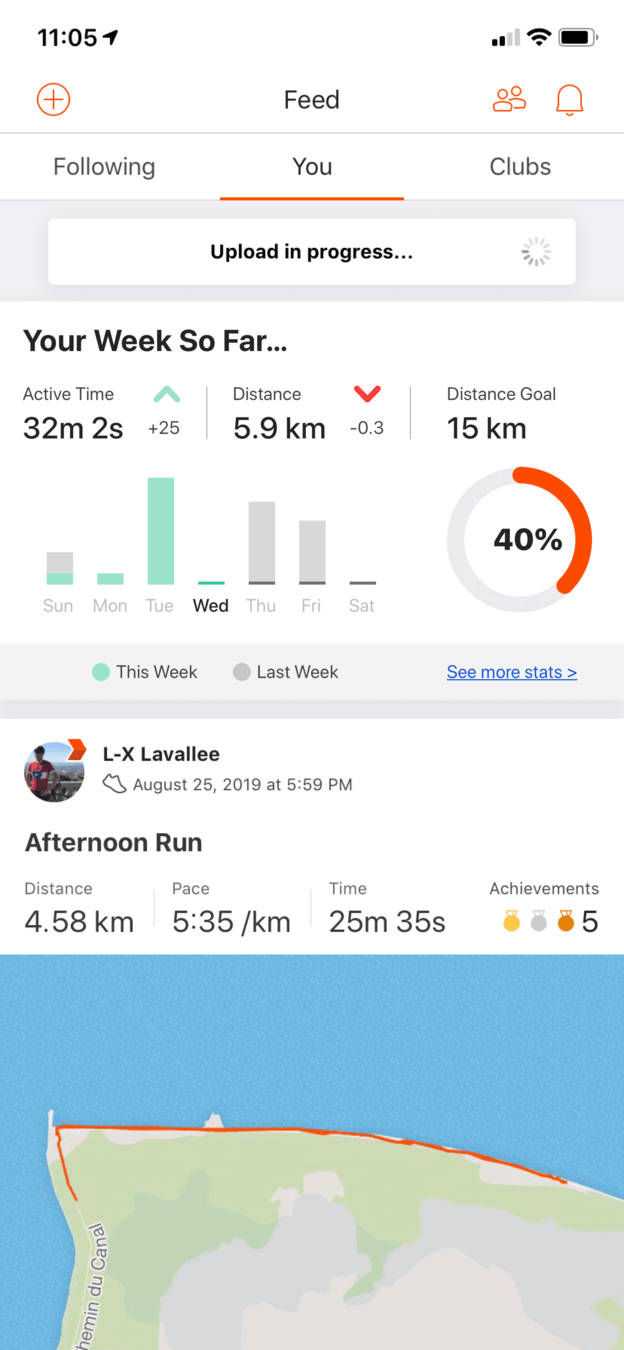 40% of goal
04
Fix 2
Add a personal distance goal right in the weekly card.
A 'Distance Goal' of 15 km with a 40% progress ring turns the weekly summary into something to work toward. Strava currently sells goals as a premium feature on the profile page, but here they would bring people back every week.
TakeawayLet people invest in the product, and they will return to see it pay off.
Investment loopWhen users put something into a product in anticipation of a future benefit, it increases perceived value and loads the next trigger. Personal goals would help Strava move from a feed of activities to a lifestyle companion.
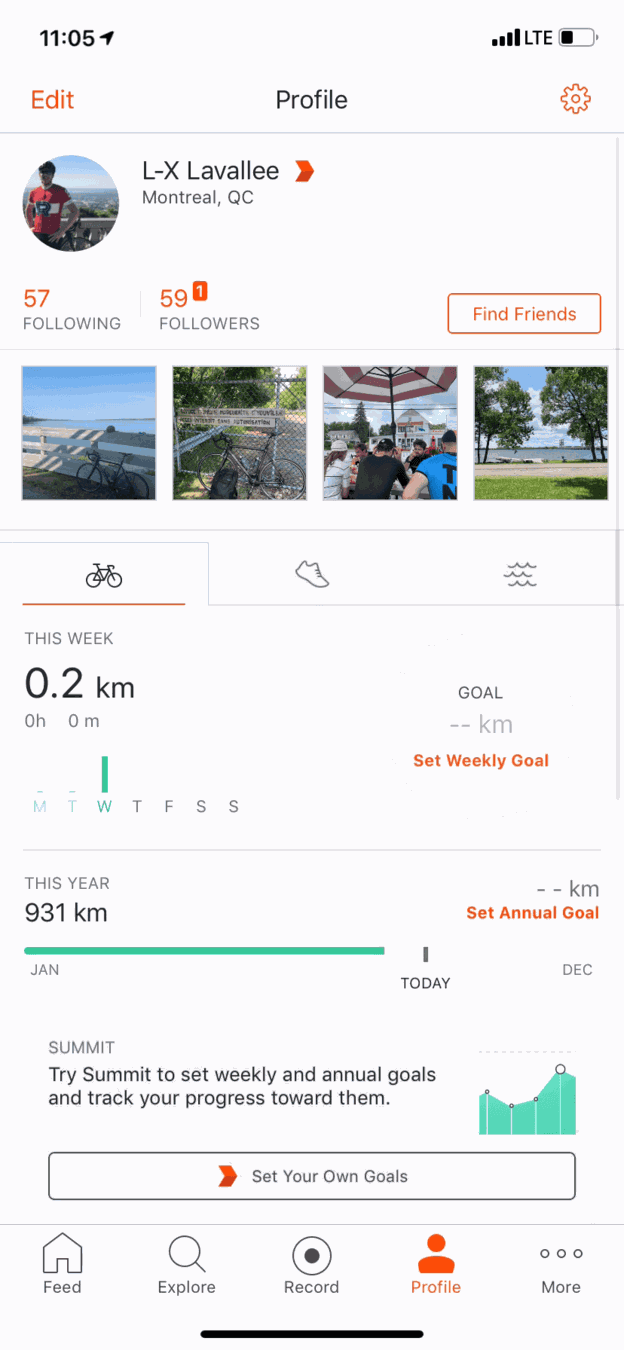 Set Weekly Goal
05
The trade off
Today, goals sit on the profile under a 'Summit' upsell.
'Set Weekly Goal' and 'Set Annual Goal' lead to a Summit prompt at the bottom of the profile, a page runners rarely visit after a run. Giving basic goals away could be worth more than selling them, if premium offers something stronger in return.
TakeawaySometimes the best retention feature is one you stop charging for.
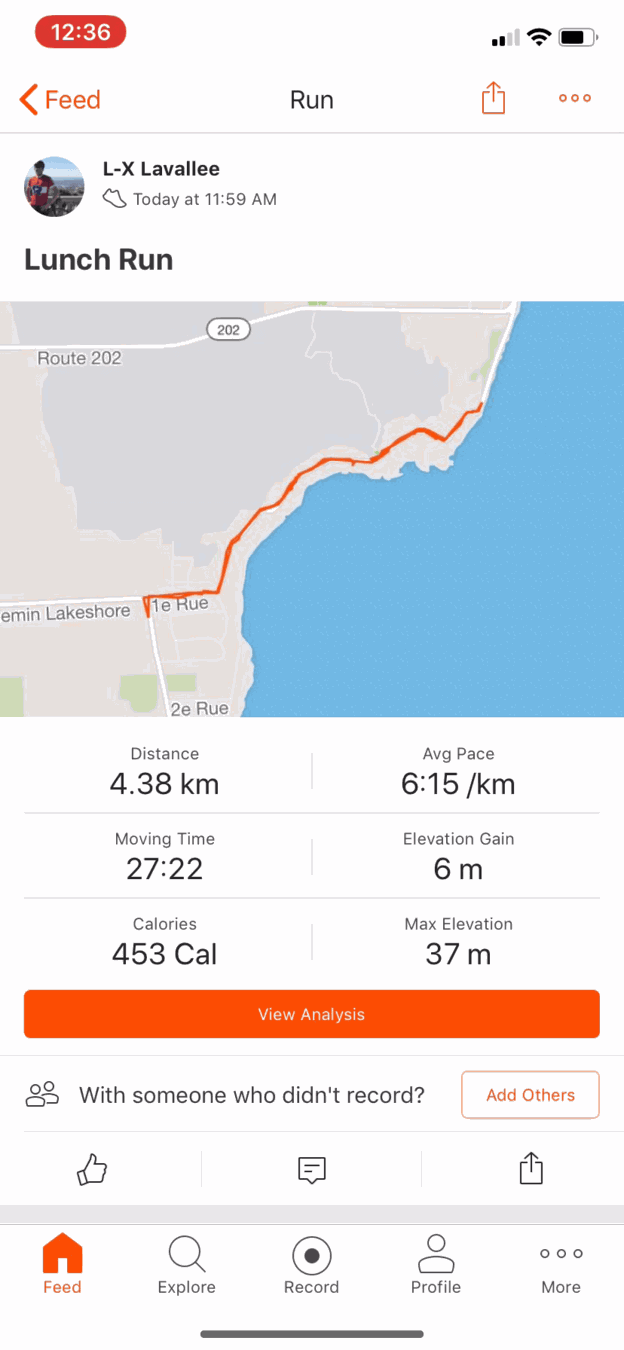 View Analysis
06
Problem 2
The run summary has everything he needs, and nothing he is missing.
Distance, pace, moving time, calories and elevation are all here with a 'View Analysis' button. It is the perfect place for a subtle reminder of the premium features he does not have, and it could be more explicit about which stats stand out for this run.
TakeawayThe moment people review their results is a natural place to hint at more.
Subtle remindersOnce you find the right balance between free and premium, remind users what they are missing out on without interrupting their flow. Be careful how many triggers you include.
 Same every time
07
Problem 3
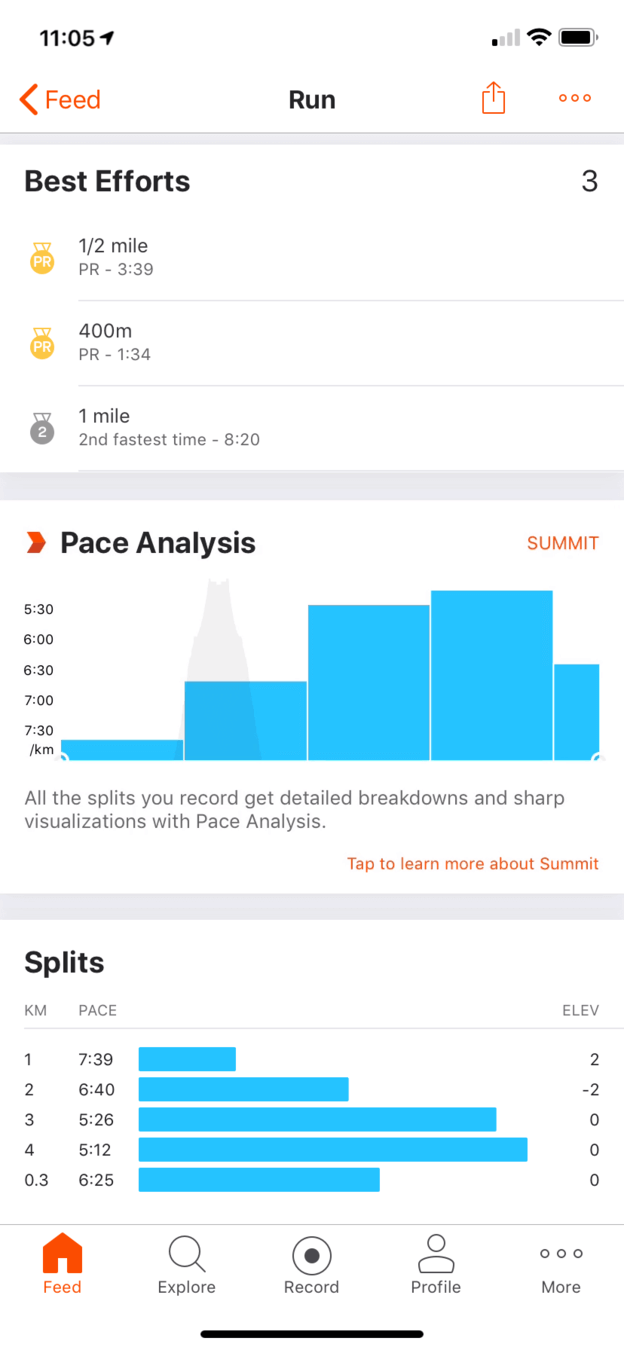
'Best Efforts' has the highest willingness to pay, but the upsell is a static graph.
Scrolling down, the first thing he looks at after an effort is his personal records. Below them, a 'Pace Analysis' widget labeled 'Summit' shows the same graph every time. It looks similar to the free 'Splits' section, so it is unclear why it is premium.
TakeawayIf the premium preview looks like a placeholder, people cannot see what they would pay for.
Find what motivates people to convertFree gets a lot of people through the door, but the free product should match the intent of your premium offer. Growth.Design notes that Strava grows steadily from its freemium model yet still seems to be working out what people will pay for. Ask current premium members why they pay, and work backwards.
Original Static widgetRedesign 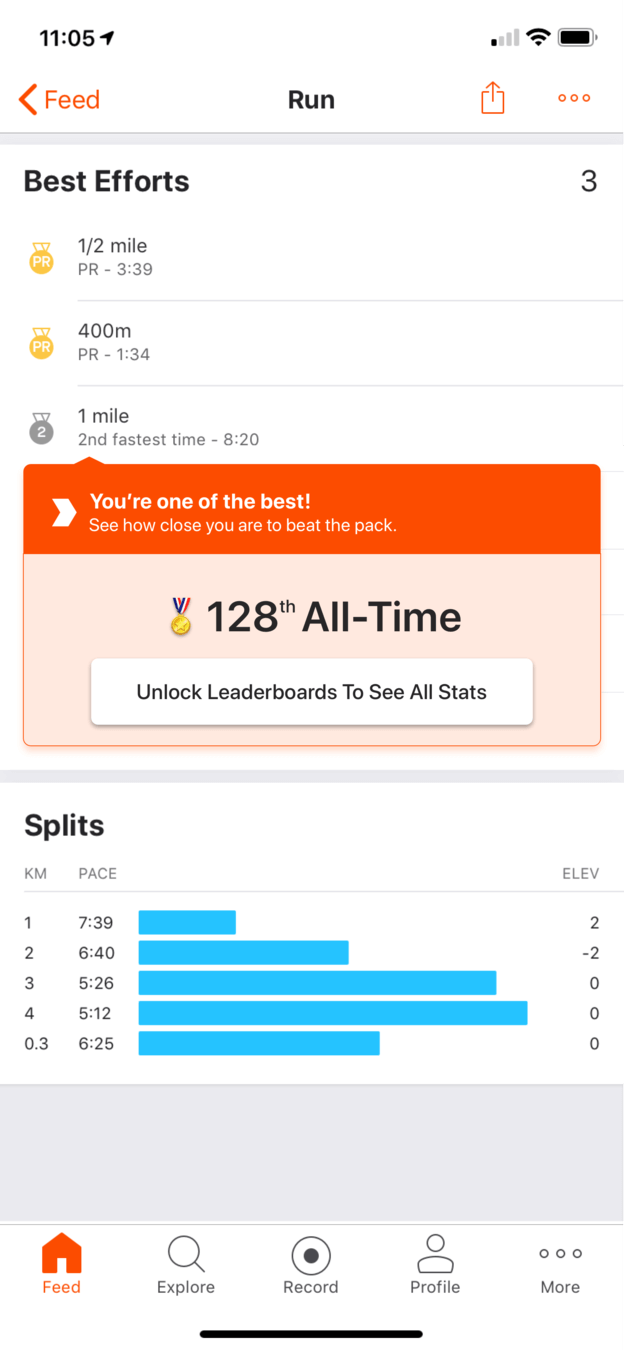 128th All-Time
08
Fix 3
Put the full leaderboard into premium and tease the result.
When a run is one of the runner's best, a card appears: 'You're one of the best!' with '128th All-Time' and a button to 'Unlock Leaderboards To See All Stats'. It shows up only when the user pushes the limits of the free plan, not everywhere.
What changed
- The static Pace Analysis card is removed from this spot
- A leaderboard teaser appears only after a standout effort
- The button names exactly what you unlock
TakeawayTrigger upgrade prompts at high intent moments instead of showing ads all the time.
The power of micro trialsWhen asking someone to switch from free to premium, make it easy to experience the value they would get, like a free trial of one specific feature.
 A friend beat you
09
Fix 4
Rotate different prompts for different motivators, like friends.
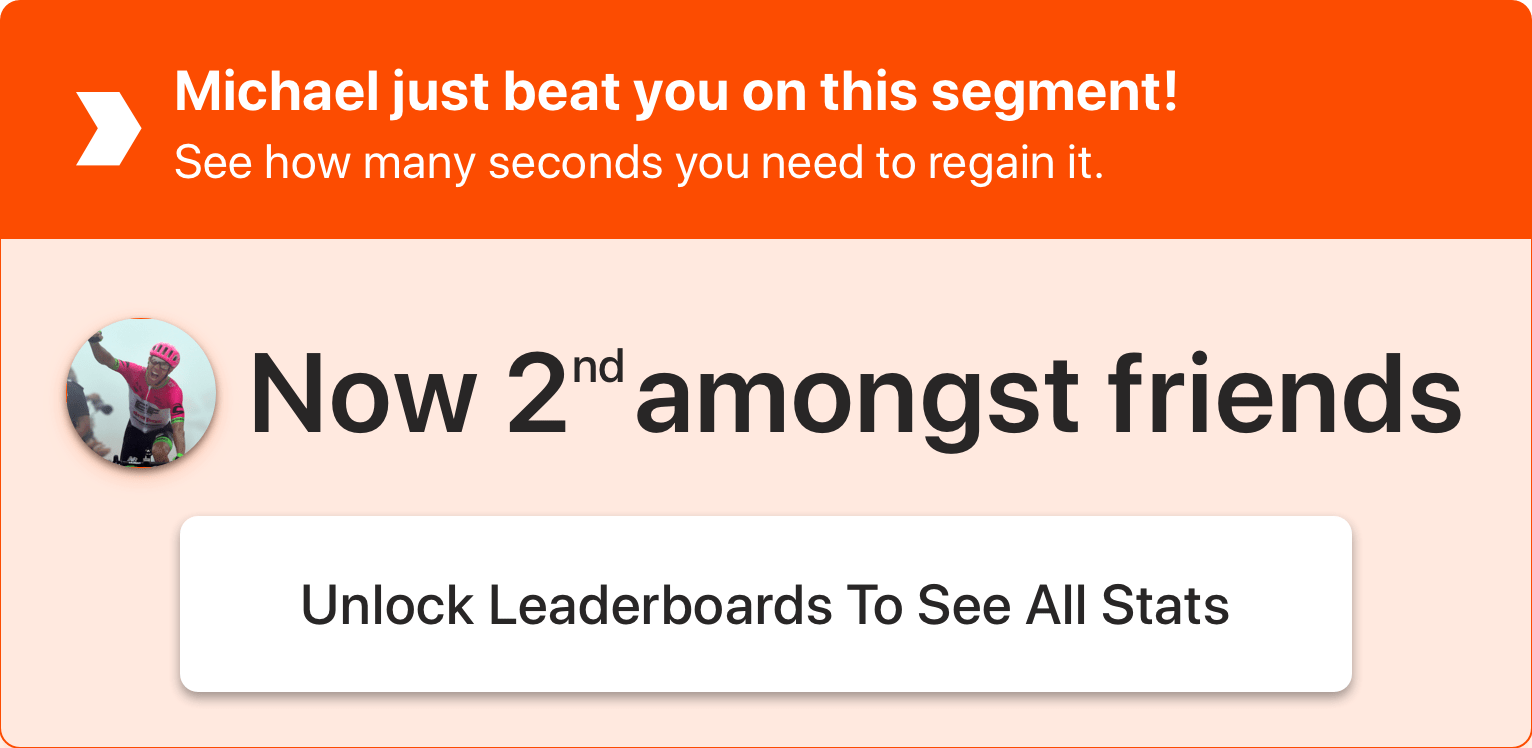
Another version reads 'Michael just beat you on this segment!' with 'Now 2nd amongst friends'. Competing with friends motivates some people more than an all time rank, so Strava can test several prompts.
TakeawayOne CTA seen every day becomes invisible. Vary the prompt and the reason.
Banner blindnessGrowth.Design cites Nielsen Norman Group's eyetracking research: once people see a CTA that does not resonate, the brain starts to filter it out. Keep things dynamic by testing new benefits in your CTAs.
Original Generic sampleRedesign 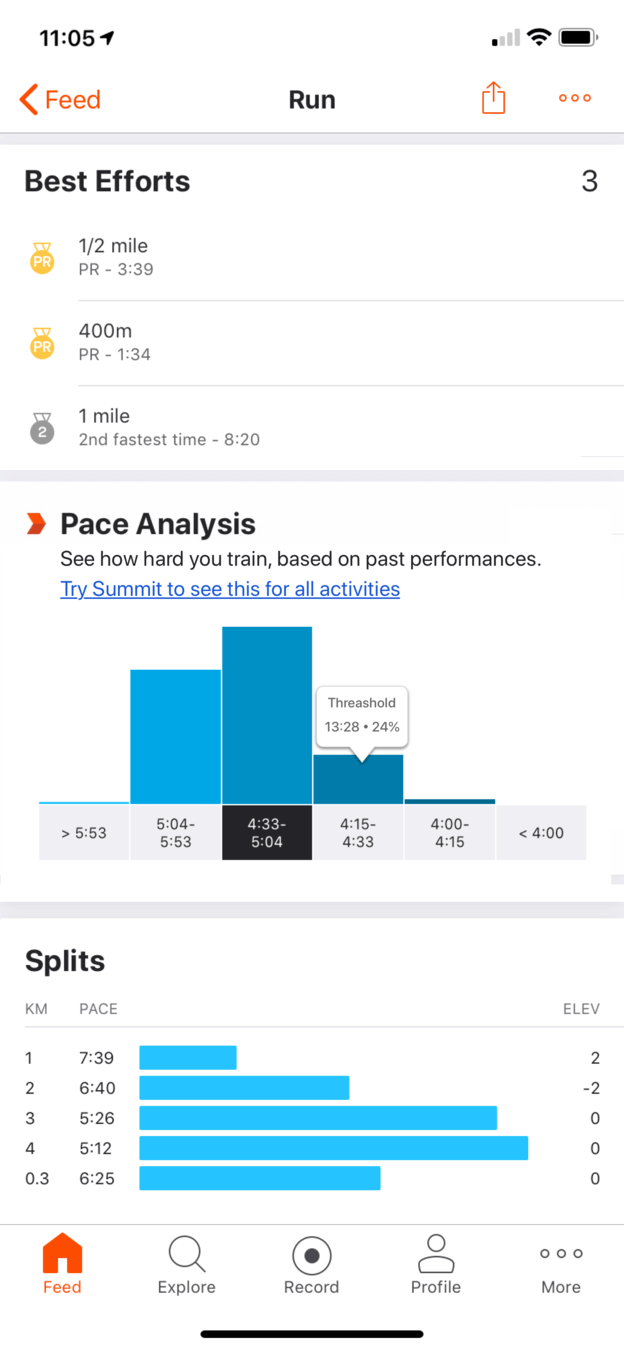 Your own data
10
Fix 5
Show the runner's own pace analysis once in a while.
Instead of the same sample graph, the redesigned widget occasionally shows the full feature with the user's real data: pace zones, a highlighted threshold and a link to 'Try Summit to see this for all activities'. Only one upsell appears on the page at a time.
What changed
- Pace Analysis uses the runner's real splits
- It appears occasionally instead of every time
- Only one premium widget per page, so attention is focused
TakeawayThe best upgrade prompt is a real taste of the paid feature.
- Reason to return
11
The result
Three changes would lift both retention and conversion.
Weekly stats and personal goals make the free plan something to invest in. A leaderboard teaser at the moment of a personal record meets the highest willingness to pay. Rotating, real previews stop the upsell from going stale.
What changed
- Retention: user investment and weekly stats
- Premium: add the leaderboard feature people want most
- Upsell: CTAs that show the actual value
TakeawayFreemium works when the free plan keeps people and the paid plan is easy to picture.
Every takeaway, in one place
- The setupA generous free plan builds the habit. The paid plan still has to earn the upgrade.
- Problem 1Show one summary, in one time frame, at a glance.
- Fix 1Pick the time frame people can actually remember, and do the comparison for them.
- Fix 2Let people invest in the product, and they will return to see it pay off.
- The trade offSometimes the best retention feature is one you stop charging for.
- Problem 2The moment people review their results is a natural place to hint at more.
- Problem 3If the premium preview looks like a placeholder, people cannot see what they would pay for.
- Fix 3Trigger upgrade prompts at high intent moments instead of showing ads all the time.
- Fix 4One CTA seen every day becomes invisible. Vary the prompt and the reason.
- Fix 5The best upgrade prompt is a real taste of the paid feature.
- The resultFreemium works when the free plan keeps people and the paid plan is easy to picture.
Source: Growth.Design: Strava: 7 Strategies To Convert More Freemium Users
Make your free plan sell your paid one.
Freemium products often give away the right things but hide the value of the paid plan behind vague labels and placeholder graphs. Zyxware can review where your free users see premium features, find the moments with the highest willingness to pay, and design prompts that show real value without cluttering the experience.