Spotify Podcasts, Part 1: A Music App Learns to Serve Listeners
 +20 XP
Case study
Spotify Podcasts, Part 1: A Music App Learns to Serve Listeners
An Apple Podcasts listener follows a tweet to a new show on Spotify and tries to make it their only audio app. The first listen goes well, then finding shows, getting notified and searching all fight a product built for music.
+20 XP when you reach the endWhat you will learn
- Use launch partners to pull people into a new feature
- Spot duplicate paths and hidden settings
- Design search and navigation around the user's context
Scroll to follow the story. The screen changes with you.
Based on the learnings from Growth.Design: Spotify vs Apple: How Spotify is betting $230M on podcasts to win over Apple users (Ep. 1), presented in our own format.
Step 1 of 11
- Spotify link
01
The setup
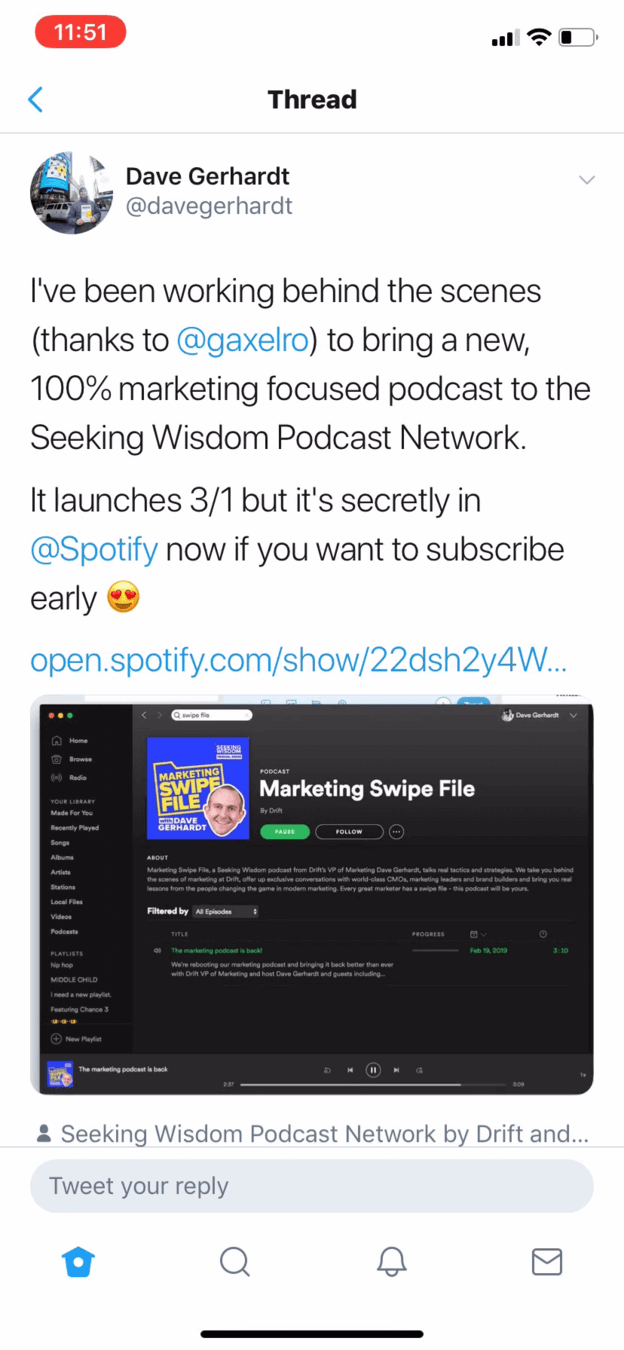
A well known marketer tweets that his new podcast is on Spotify first.
Dave Gerhardt, VP of Marketing at Drift, announces the Marketing Swipe File podcast and links to it on Spotify before launch. For someone who uses Apple Podcasts, it is a reason to try one app for all their audio.
TakeawayA trusted voice can bring the right audience to a new feature on day one.
The power of influencersWhen planning a feature launch, partner with leaders in your industry to create content or use your product. They can put the launch in front of a specific audience and help drive adoption.
Web page 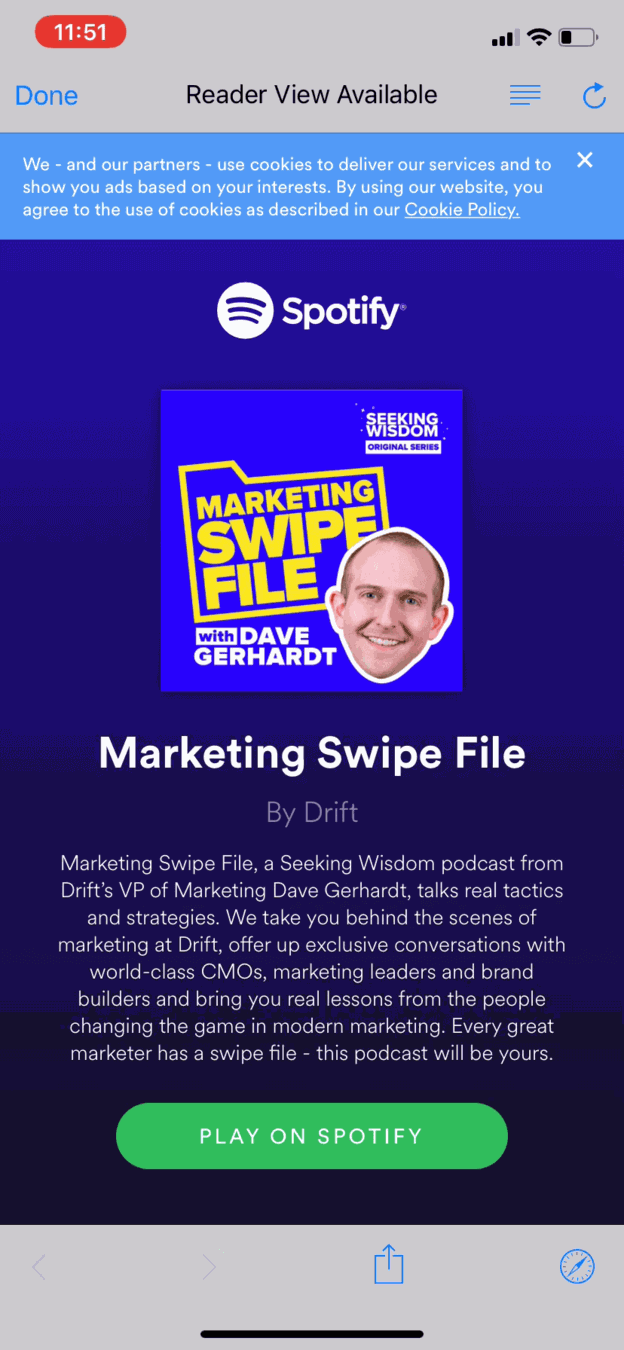 Cookie notice
In the app 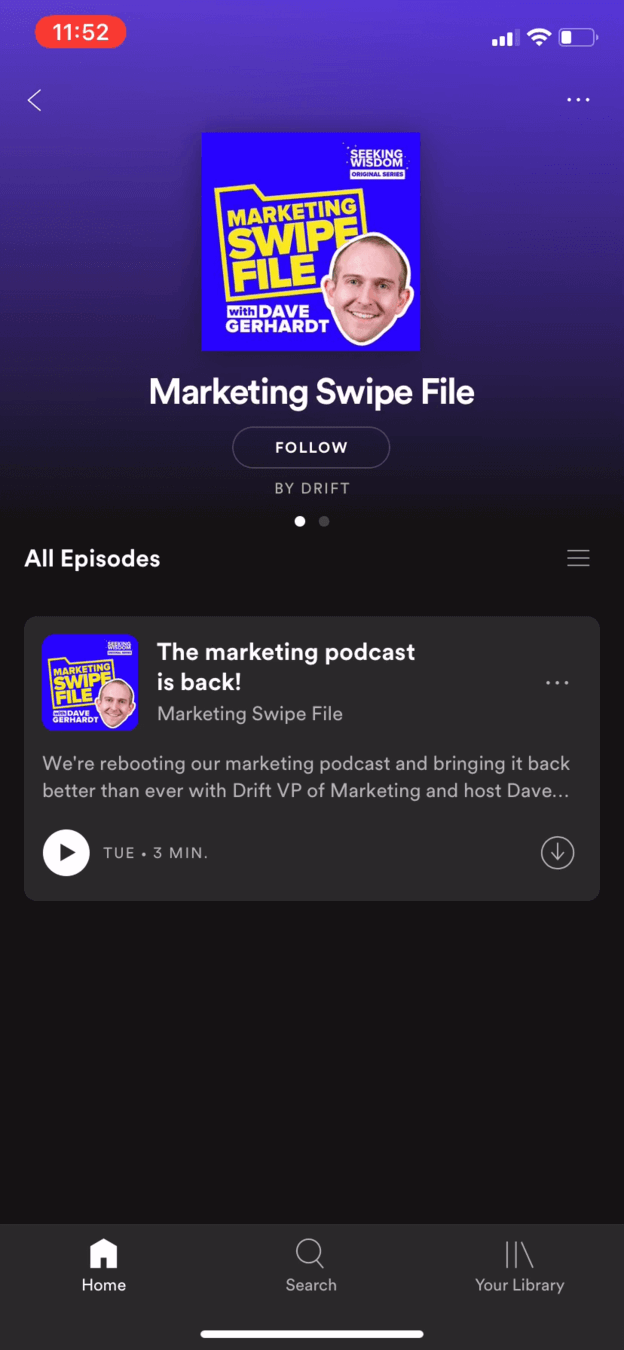 Follow
02
First friction
The link opens a web page inside Twitter, not the Spotify app.
Instead of jumping straight to the show in the app, the user lands on a web page with a cookie banner across the top and a 'Play on Spotify' button at the bottom. The fine print makes a simple listen feel like a transaction.
TakeawayApp to app linking removes a step at the exact moment interest is highest.
- 'Follow', not subscribe
03
What works
In the app, the show page reuses familiar Spotify patterns.
The page lands exactly on the show, with a 'Follow' button rather than 'Subscribe'. That word matches how people already follow artists and playlists in Spotify, so it needs no explanation.
TakeawayReusing patterns people know makes a new feature feel at home.
Familiarity biasWhen introducing a new feature, use existing patterns and visuals so people feel at home. We tend to prefer things simply because we are familiar with them.
 1.5x option
04
What works
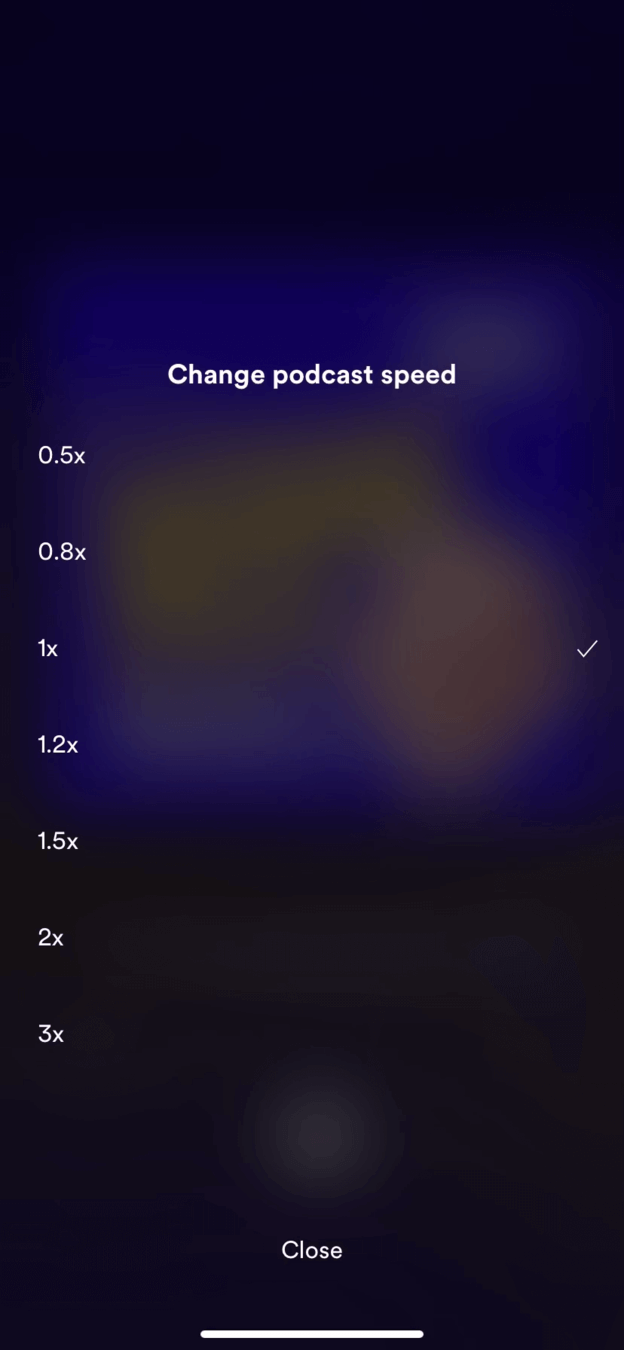
Speed control offers seven options, more than Apple's four.
The player looks like every other Spotify play screen, and the 'Change podcast speed' sheet runs from 0.5x to 3x. For podcast fans who speed up talk shows, finer increments are a real advantage over Apple.
TakeawaySmall, focused improvements can be a reason to switch.
- Episode finished
05
A missed moment
After the first episode, the app says nothing.
The user finished their first podcast on Spotify, and the show page looks the same as before. There is no welcome, no suggestion of similar shows and no request for a rating, even though this is the best moment to start a discovery path.
TakeawayThe end of a first use is the ideal time to onboard people and ask for feedback.
Make customers part of the processGive people a simple way to share feedback on a new feature. You gain insight, and users feel part of the product, which makes it more valuable to them (the IKEA effect). Make it very easy and part of the flow.
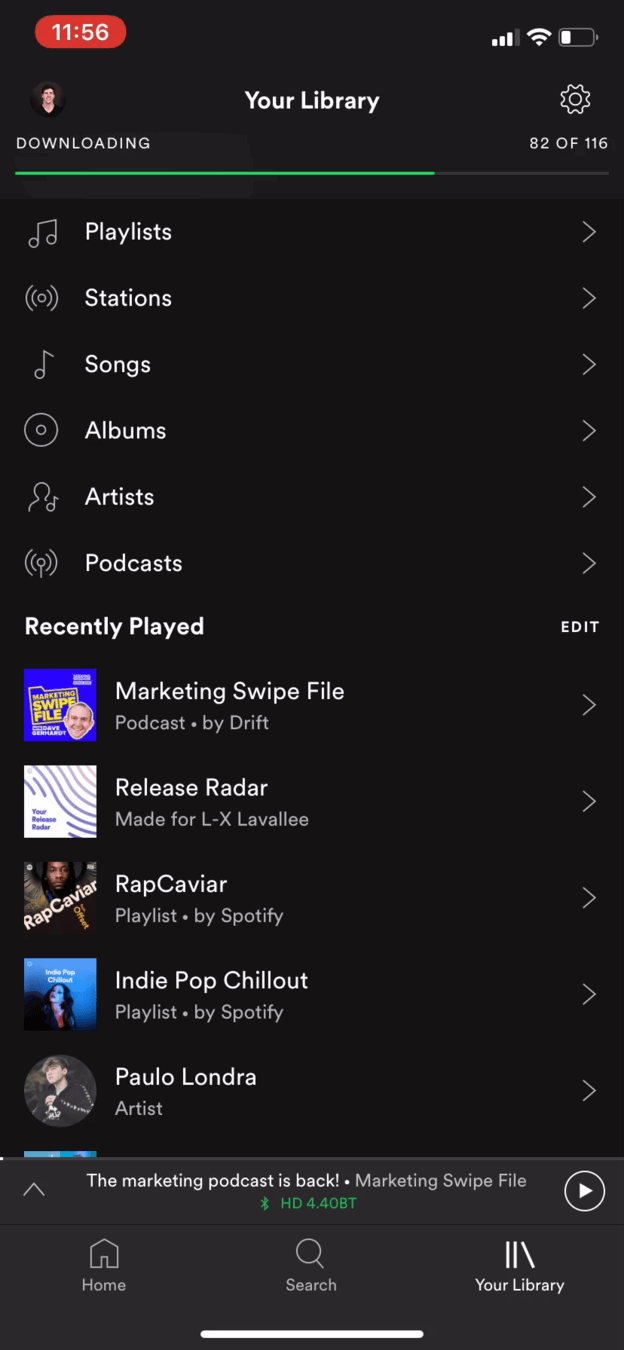 Duplicate list
06
Problem 1
The library mixes stations, songs and a second 'recently played' list.
Looking for their podcasts, the user opens Your Library and finds rows for Playlists, Stations, Songs, Albums, Artists and Podcasts, followed by a 'Recently Played' list that repeats one already on Home. It reads like a plain list, not a personal collection.
TakeawayEvery duplicate path makes people wonder which one is right.
Build for 90% of usersA product stays simple only with effort. Keep adding features for the 10% of power users and the majority will find it hard to use. Hide or remove what most people do not use, and avoid several paths to the same action.
- Podcasts row
07
Problem 2
Inside Podcasts, the user finds shows they followed long ago and forgot.
Tapping Podcasts reveals a list of shows they had followed before and never heard from again. Spotify had not been bringing them back to new episodes.
TakeawayFollowing something is worthless if the product never follows up.
In Spotify's own wordsGrowth.Design quotes a TechCrunch interview in which Spotify's Chief R&D Officer Gustav Söderström said the company had not been doing a good job serving podcast content, and that the user experience was really poor.
Spotify 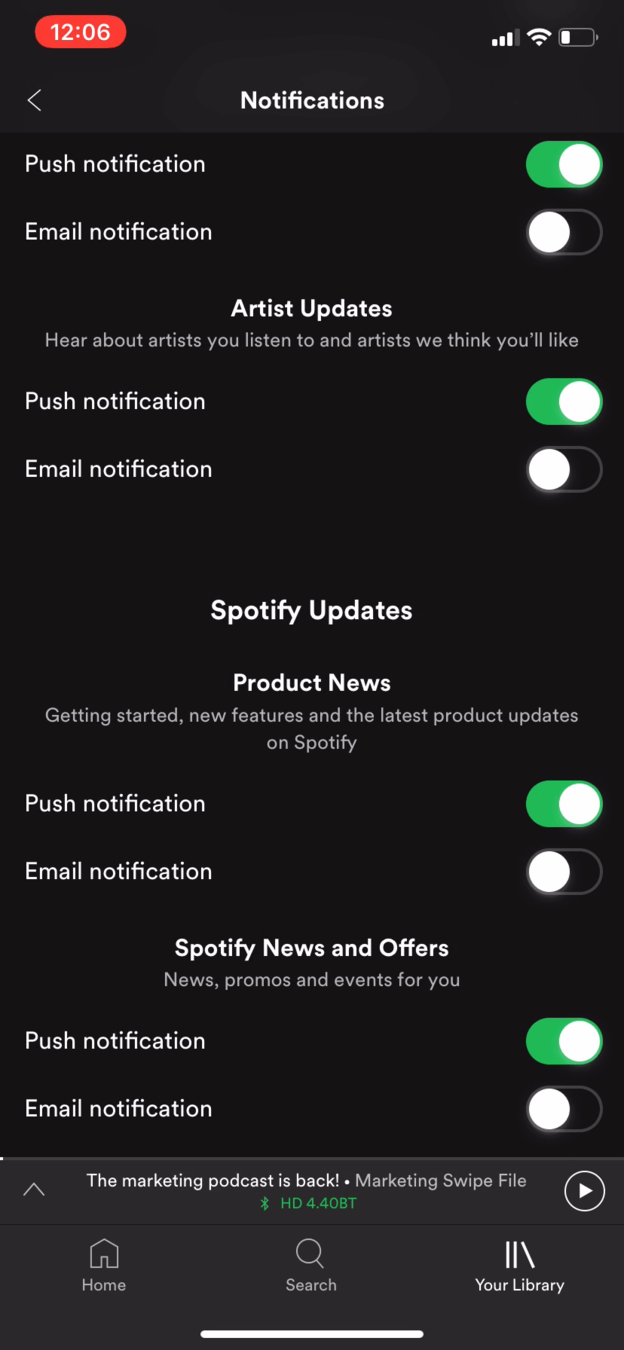 No podcast option
Apple Podcasts 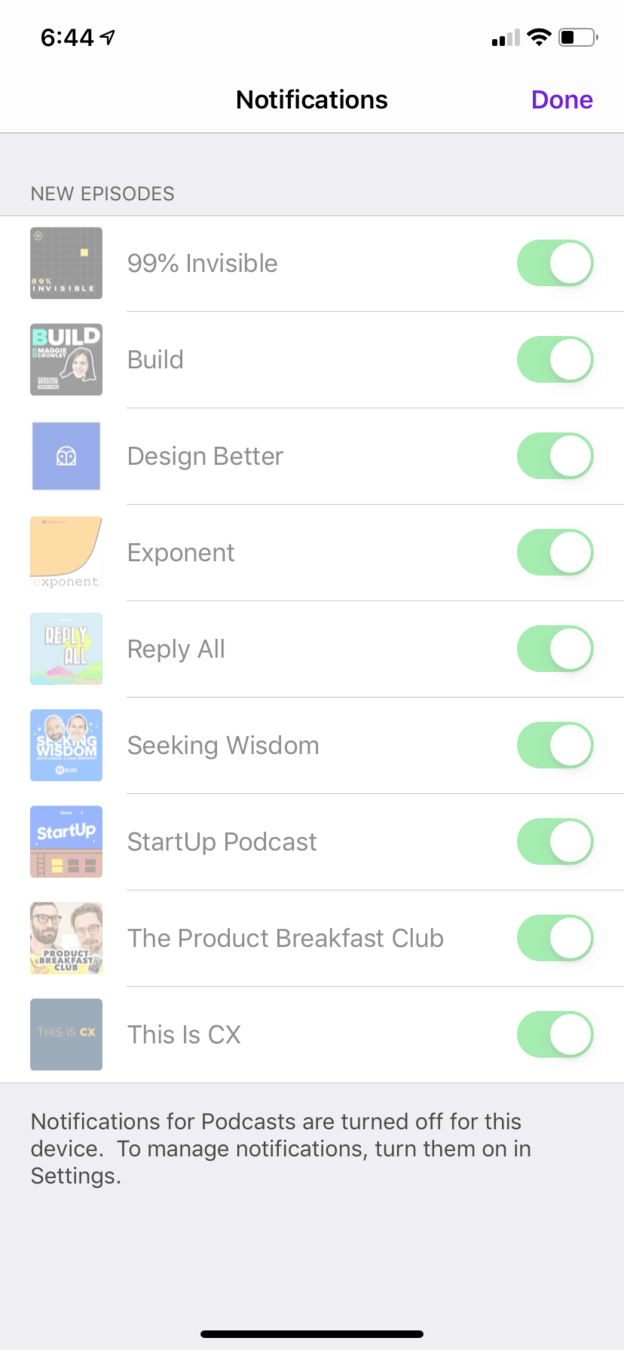 Clear warning
08
Problem 3
Spotify has no podcast notification setting. Apple has one per show.
Spotify's settings list Artist Updates, Product News and Offers, with no icons and no podcast option. Apple Podcasts lets people toggle each show, and even warns when notifications are turned off at the system level.
TakeawayKeep critical settings visible, and tell people when something is blocking them.
Recognition over recallDo not assume people remember important details about your product. Show crucial information clearly so they understand the current state and can act on it.
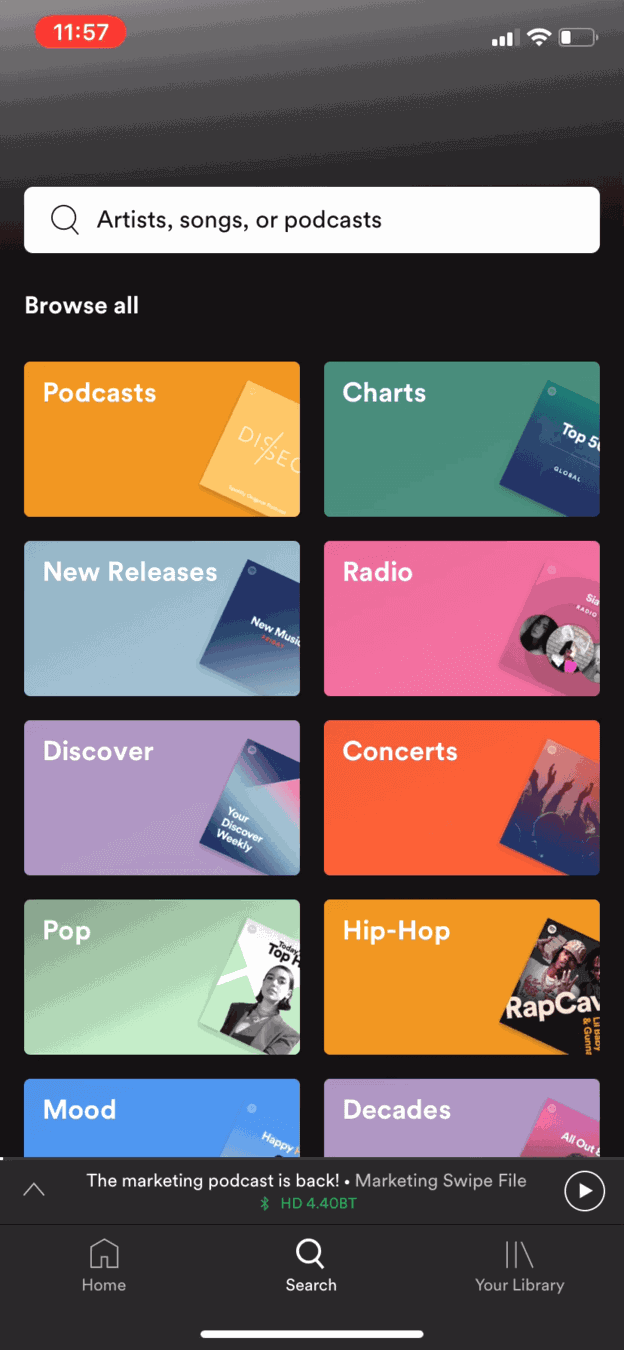 Podcasts tile
09
Problem 4
The search tab shows big tiles with mixed logic.
Podcasts, Charts, New Releases, Radio, Discover and genres like Pop sit side by side in the same grid. Some are formats, some are genres and some are intents, so it is hard to see what connects them.
TakeawayItems placed together should belong together.
Juxtaposition and connectednessOur brains assume things shown close together are related, and elements that share visual properties feel more related than those that do not. Group items by one clear logic.
 See all podcasts
10
Problem 5
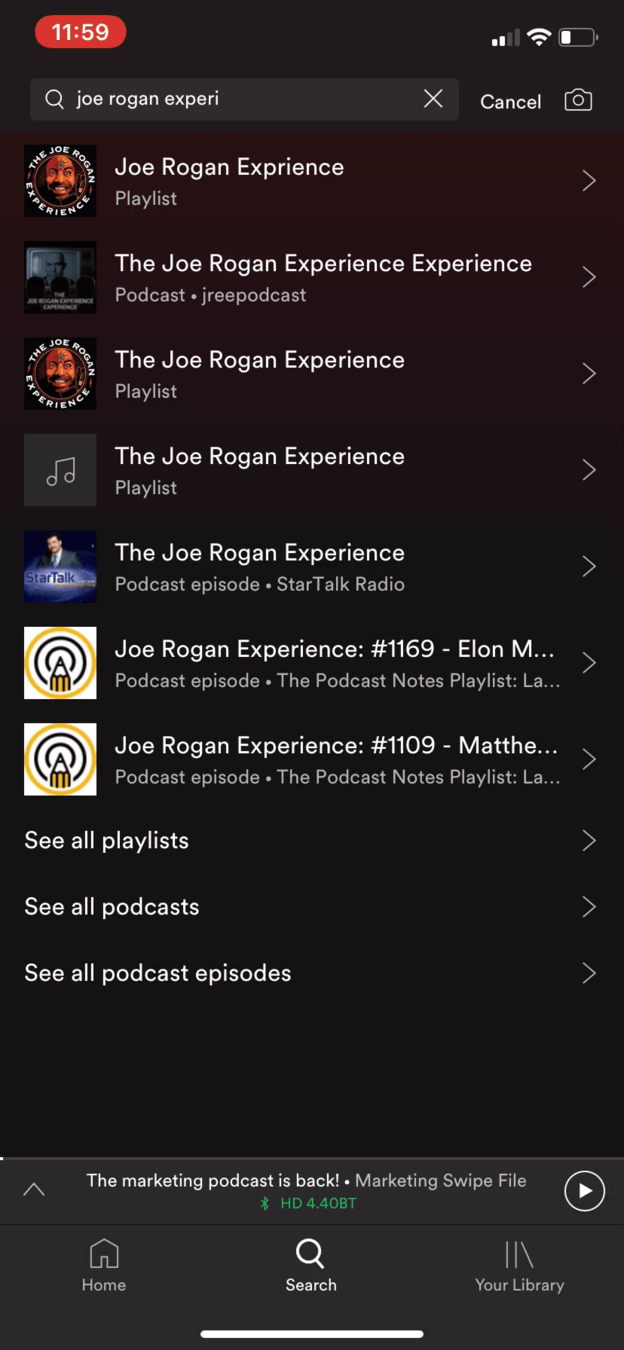
Searching for a show returns playlists first and hides podcasts in a link.
A search for a well known podcast shows playlists named after it, an unofficial copy and episodes. The real podcast results sit behind 'See all podcasts' near the bottom, often covered by the keyboard. The user's first search even led to a music artist page.
What changed
- Add simple filters on top of results, like Instagram's Top, Accounts and Tags
- Rank podcasts first when the query matches a show
- Keep key links above where the keyboard sits
TakeawaySearch results must match what people are most likely looking for in that moment.
Design for contextDesigning screen by screen makes it easy to forget how people use a product. Keyboards, pop-ups and menus can hide critical information. Ask where users are, what they were doing, what brought them and when they use it.
- Strong start
11
Where it leaves us
The first listen was a high point. Everything after it slid downhill.
The move from tweet to show was almost smooth, and playback worked well. Then retention tasks, finding shows, getting notified and searching, kept letting the user down. After following a few shows and waiting for a notification, the question is whether they will come back.
What changed
- Link from social posts straight into the app
- Onboard people after their first listen
- Add podcast notifications with per show control
- Put podcast results first when searching for a show
TakeawayA feature earns its place in the second and third session, not the first.
Every takeaway, in one place
- The setupA trusted voice can bring the right audience to a new feature on day one.
- First frictionApp to app linking removes a step at the exact moment interest is highest.
- What worksReusing patterns people know makes a new feature feel at home.
- What worksSmall, focused improvements can be a reason to switch.
- A missed momentThe end of a first use is the ideal time to onboard people and ask for feedback.
- Problem 1Every duplicate path makes people wonder which one is right.
- Problem 2Following something is worthless if the product never follows up.
- Problem 3Keep critical settings visible, and tell people when something is blocking them.
- Problem 4Items placed together should belong together.
- Problem 5Search results must match what people are most likely looking for in that moment.
- Where it leaves usA feature earns its place in the second and third session, not the first.
Make a new feature feel native, not bolted on.
When a product adds a new content type, the first session often works while the second and third fall apart. Zyxware can walk the full journey your customers take with a new feature, from first tap to repeat use, and fix the navigation, settings and search gaps that stop it becoming a habit.