How Signal Could Raise More Donations Without Pushing
 +20 XP
Case study
How Signal Could Raise More Donations Without Pushing
Signal is a free, nonprofit messaging app that asks its users for donations from inside the chat list. Follow the ask from the first banner to the thank you screen and see five honest changes that would make giving easier and more rewarding.
+20 XP when you reach the endWhat you will learn
- Place an ask where people will actually see it
- Remove choices with a sensible default
- End the flow on a memorable moment
Scroll to follow the story. The screen changes with you.
Based on the learnings from Growth.Design: Signal: How To Ethically Boost Your Revenues, presented in our own format.
Step 1 of 10
- Easy to miss
01
The setup
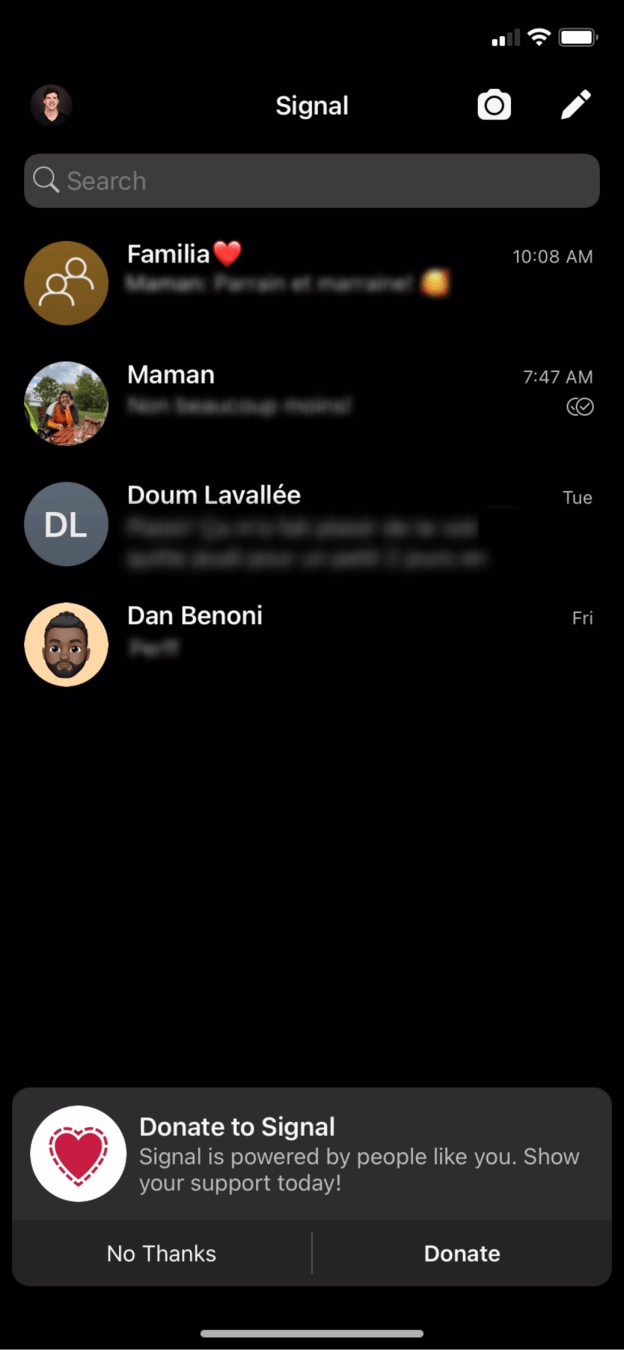
A small 'Donate to Signal' card appears at the bottom of the chat list.
A regular user opens Signal out of habit and, for the first time, notices a donation card under their conversations. It has a heart icon, one line of text and two buttons: 'No Thanks' and 'Donate'.
TakeawayThe first ask shapes whether people consider giving at all.
- Vague reason
02
Problem 1
The card says what to do, but not why it matters.
The copy tells people to donate and says Signal is 'powered by people like you', which leaves the reader guessing what that means. Nothing connects the donation to something the user values, such as private messages.
TakeawayAnswer 'why should I care?' early in the flow, before you ask for anything.
What vs. whyGrowth.Design cites User Onboard on features versus benefits: telling people what to do is not enough. They act when they recognize the benefit to them.
- Ad territory
03
Problem 2
At the bottom edge of the screen, the card looks like an ad.
A heart icon, soft wording and a spot at the very bottom of the list are all things people have learned to skip. The card sits exactly where the eye expects promotions, so it gets ignored.
TakeawayContent that looks like an ad, or sits where ads usually go, is filtered out.
Edge and banner blindnessGrowth.Design cites NN Group's 2018 research on banner blindness: users ignore content that resembles ads or appears near them, and tend to disregard the edges of a screen.
Original Buried at the edgeRedesign 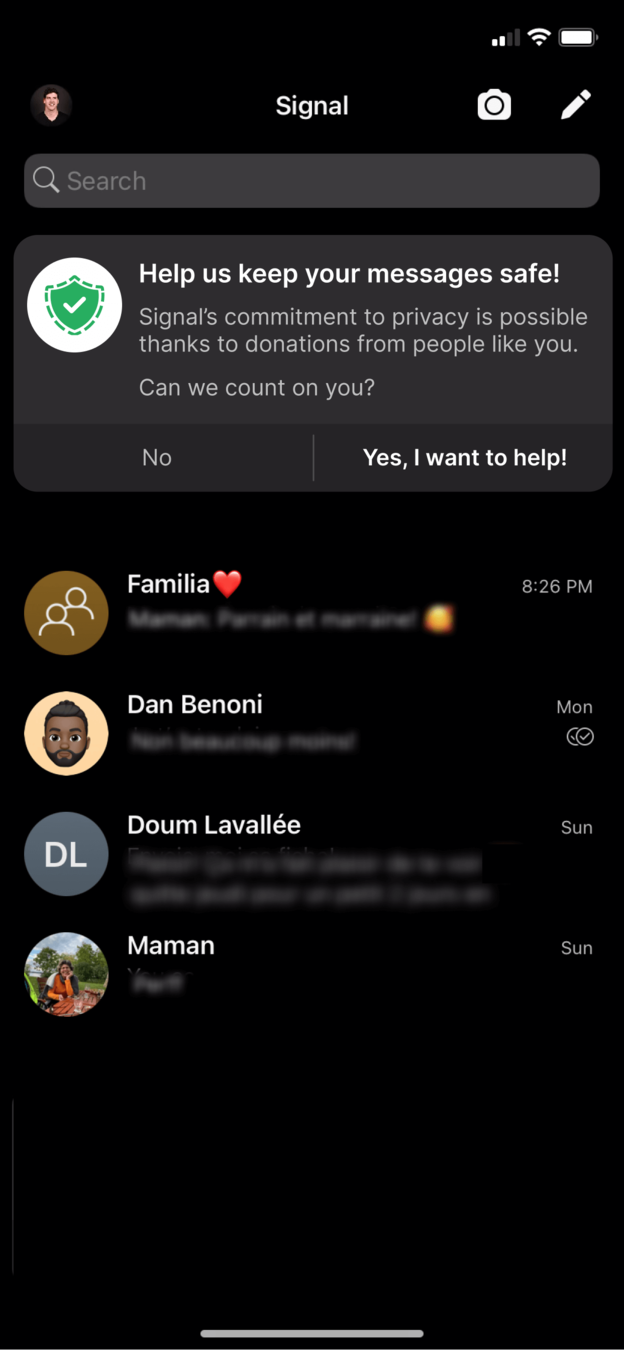 Clear benefit
04
Repair 1
Move the ask to the top and lead with the benefit.
The redesign places the card above the conversations, where attention already is. The headline 'Help us keep your messages safe!' ties the donation to privacy, and the button says 'Yes, I want to help!'.
What changed
- Card moves from the bottom edge to the top of the list
- Headline names the benefit: safe messages
- Body explains donations fund Signal's privacy work
- Button speaks in the user's voice
TakeawayPut the ask where people look, and phrase it around what they get.
 Six equal choices
05
Problem 3
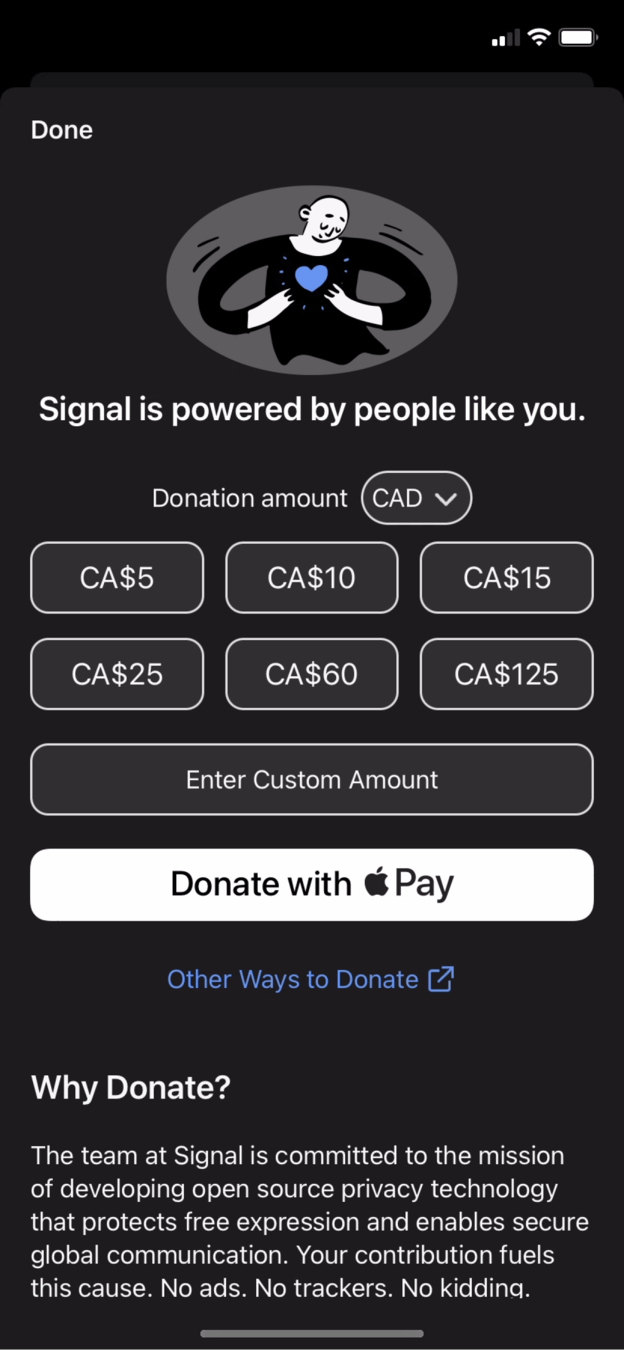
The donate screen offers six amounts and no guidance.
Tapping through opens a page with six currency buttons, a custom amount field and the same 'powered by people like you' line. Nothing is selected, so the user has to decide how much is appropriate with no help.
TakeawayA page with many equal options and no default slows people down.
- One tap to pay
06
What works
The single 'Donate with Apple Pay' button removes payment friction.
Signal recognizes the user is on an iPhone and offers one clear payment action. No card forms and no account setup: one tap completes the payment.
TakeawaySimple device based personalization can cut a whole step out of a flow.
Personalization reduces frictionPersonalization means tailoring the experience to what the user needs. Even basic segmentation by device kept the focus on a single call to action. Test your assumptions first, because a wrong guess can make the experience worse.
Signal Reason comes lastUber Eats 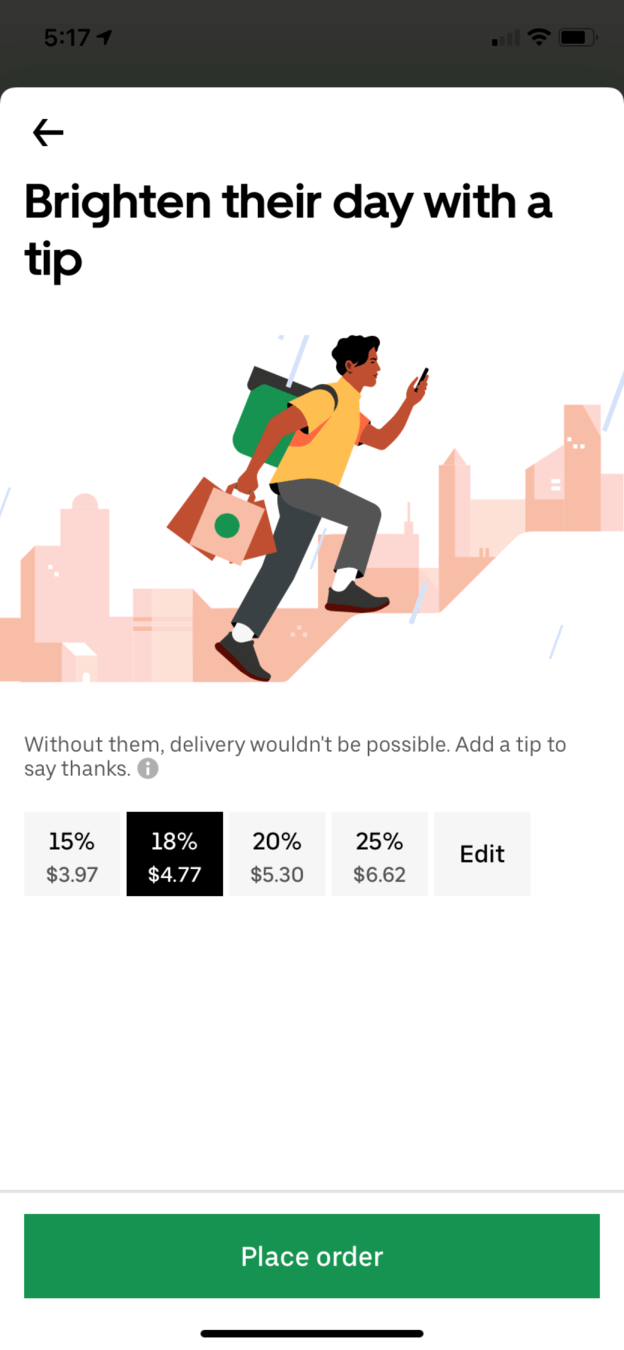 Tip preselected
07
Problem 4
Because nothing is preselected, the screen starts in an invalid state.
The 'Why Donate?' explanation sits at the bottom of the page, after the buttons, and no amount is chosen when the page opens. The user must make one more decision before they can pay.
TakeawayEvery required input adds a decision. Only ask for it when you truly need it.
Amazon's one click defaultReduce the number of decisions in a journey. When input is required to continue, the screen is invalid by default. Amazon's checkout follows this idea, and Uber Eats preselects a tip so ordering takes one tap.
Original No guidanceRedesign 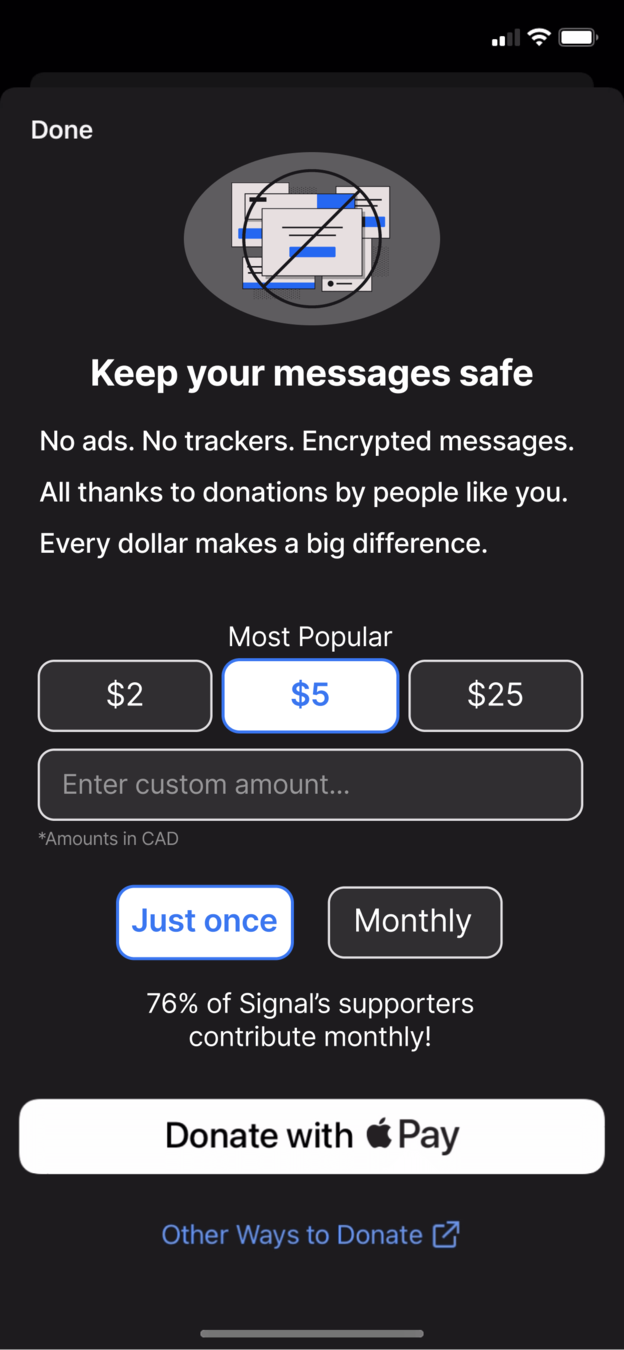 Popular default
08
Repair 2
Show the reason first, preselect the popular amount and offer monthly.
The redesign opens with 'Keep your messages safe' and a short line on what donations pay for. It offers three amounts with $5 marked 'Most Popular' and selected, plus a choice between 'Just once' and 'Monthly'.
What changed
- Headline states the benefit before the amounts
- Six options become three, with $5 preselected
- 'Just once' or 'Monthly' adds a recurring option
- A social proof line: '76% of Signal's supporters contribute monthly!'
TakeawayWhen someone is about to pay, remind them what they get and make the easy path the default.
Social proof tips the decisionPeople want to feel they are not alone when they give. A short note about what other supporters do reassures them and makes the recurring choice feel normal.
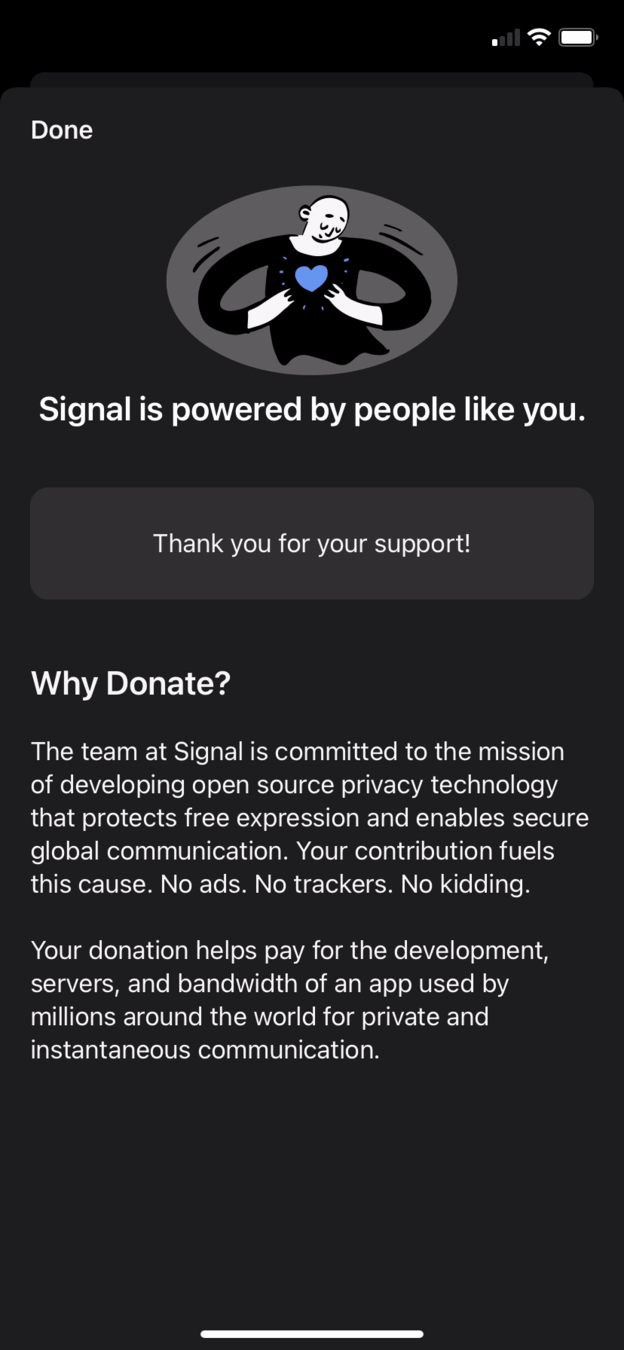 Barely a thank you
09
Problem 5
After paying, the user sees the same page with a grey 'Thank you' bar.
The donation succeeds, but the screen barely changes: the amount buttons are swapped for a plain 'Thank you for your support!' box. For a service that depends on donations, the moment of giving feels underwhelming.
TakeawayThe last screen of a flow is the one people remember.
Peak end rulePeople judge an experience largely by its peak and how it ends. If you want someone to repeat a behavior, make the end of the experience memorable. Growth.Design covers this in its Psychology of Design guide.
Original Generic boxRedesign 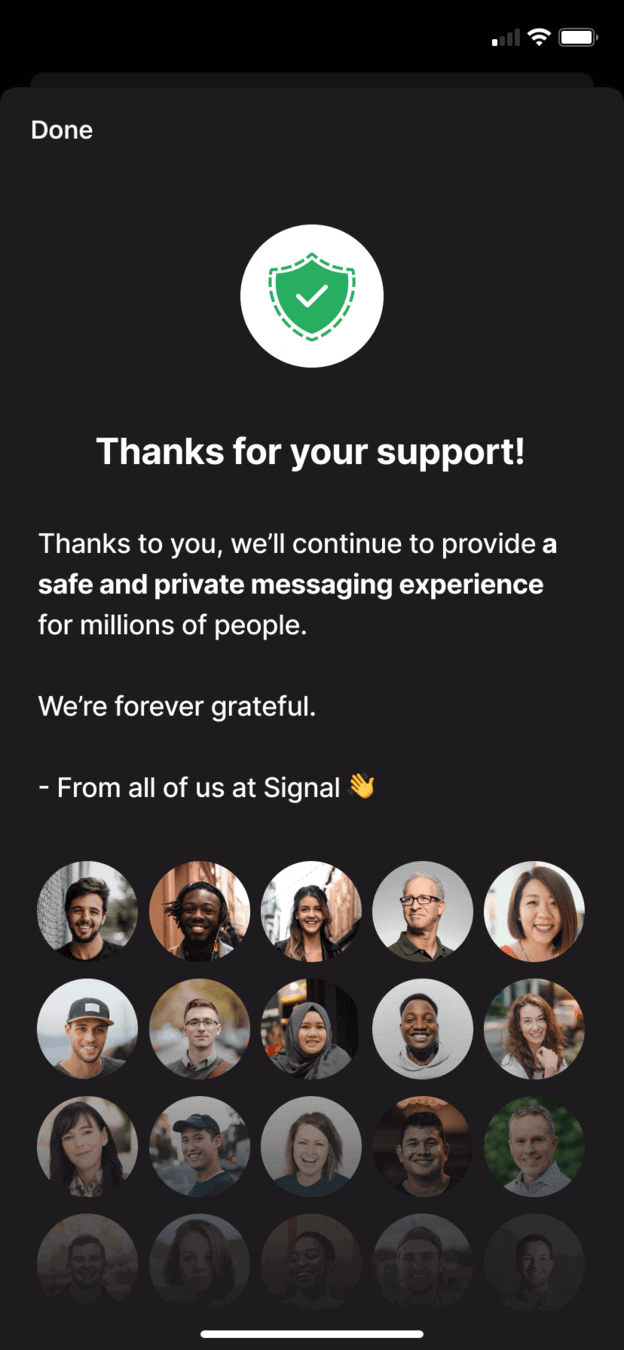 Real people
10
Repair 3
Replace the grey bar with a real thank you from the team.
The redesigned ending gives the thank you its own screen, explains that the donation keeps messaging safe and private for millions, and signs off with the faces of the people at Signal.
What changed
- A dedicated confirmation screen with a clear headline
- Copy names the impact of the donation
- Photos of the team make the thanks personal
TakeawayA human, specific thank you turns a transaction into a reason to give again.
Every takeaway, in one place
- The setupThe first ask shapes whether people consider giving at all.
- Problem 1Answer 'why should I care?' early in the flow, before you ask for anything.
- Problem 2Content that looks like an ad, or sits where ads usually go, is filtered out.
- Repair 1Put the ask where people look, and phrase it around what they get.
- Problem 3A page with many equal options and no default slows people down.
- What worksSimple device based personalization can cut a whole step out of a flow.
- Problem 4Every required input adds a decision. Only ask for it when you truly need it.
- Repair 2When someone is about to pay, remind them what they get and make the easy path the default.
- Problem 5The last screen of a flow is the one people remember.
- Repair 3A human, specific thank you turns a transaction into a reason to give again.
Source: Growth.Design: Signal: How To Ethically Boost Your Revenues
Make your ask as clear as your product.
Donation, upgrade and tipping flows often lose people through vague wording, too many choices and a flat ending. Zyxware can review your revenue flow screen by screen, test clearer asks and defaults, and design an ending that makes people glad they paid.