How Loom Turns Video Viewers Into New Users
 +20 XP
Case study
How Loom Turns Video Viewers Into New Users
Someone who has never used Loom opens an email with a Loom video inside, watches it, reacts and replies, and signs up almost without noticing. This story walks through each psychological nudge on that path, one busy screen that nearly derails it, and how a calmer layout would help.
+20 XP when you reach the endWhat you will learn
- Use defaults and small cues to get a first action started
- Ask for a sign-up right after people act on their own
- Remove competing calls to action from a first experience
Scroll to follow the story. The screen changes with you.
Based on the learnings from Growth.Design: The Psychology Behind Loom's Explosive Growth, presented in our own format.
Step 1 of 11
- Animated preview
01
The setup
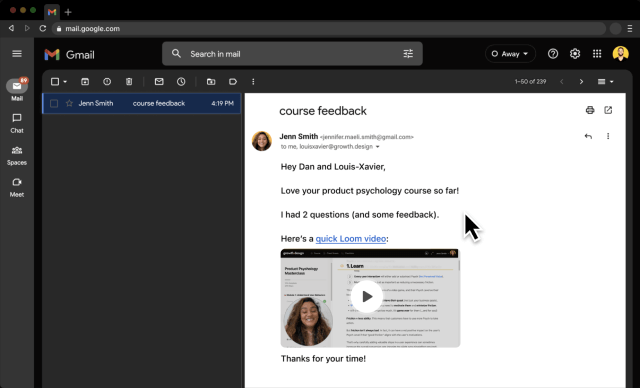
A new viewer meets Loom inside an ordinary email.
A customer sends feedback with a link to a short Loom video. The email shows an animated preview of the video with the sender's face, so it looks inviting before anyone has heard of the product.
TakeawayFor products that spread by sharing, the first touch often happens in someone else's inbox.
 Whose Libraries?
02
First impression
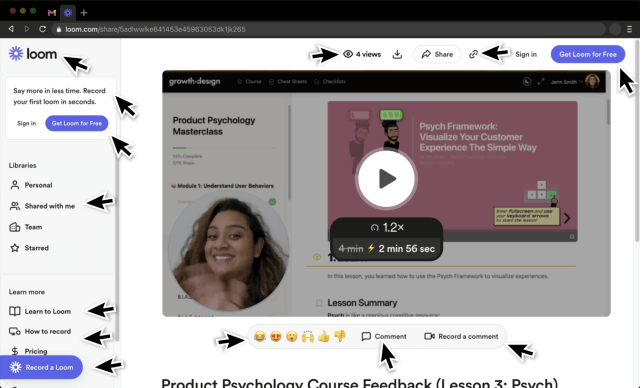
The video page greets a first-time viewer with a crowd of options.
Around the video sit a sidebar of Libraries, Team and Starred folders, several sign-up buttons, share and download icons and a comment bar. A viewer without an account wonders whose Libraries these are and whether they are in someone else's account.
TakeawayNavigation built for account holders confuses people who only came to watch.
 1.2x by default
03
Nudge 1
The video plays at 1.2x by default, and says how much time that saves.
Over the thumbnail, a small badge shows the 1.2x speed and crosses out 4 min in favor of 2 min 56 sec. The viewer's face and this shorter length make pressing play feel cheap.
TakeawayA good default plus a clear time estimate lowers the cost of starting.
Status quo bias and anchoringPeople tend to keep default settings. Showing the original 4 minutes anchors the saving, while 1.2x is quick enough to save time without making the speaker sound unnatural.
- Who reacted here?
04
Nudge 2
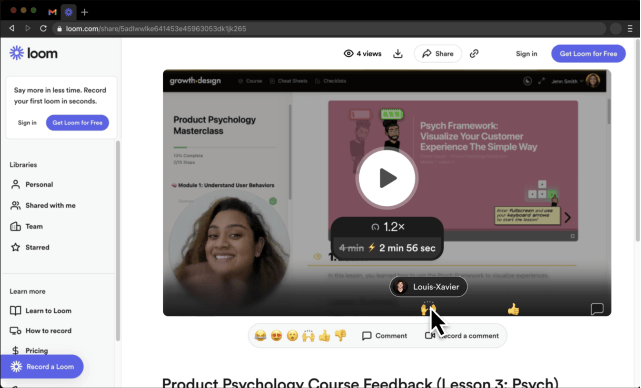
Reactions pinned to the timeline make the viewer curious.
Emoji reactions from other viewers sit at points along the progress bar. Hovering one reveals who left it, here a cofounder, and the viewer wants to see what moment they reacted to.
TakeawayA small gap in information gives people a reason to keep going.
Curiosity gapPeople dislike missing information. Not knowing what someone else reacted to creates an itch that pressing play will scratch.
 Sign up to react
05
Nudge 3
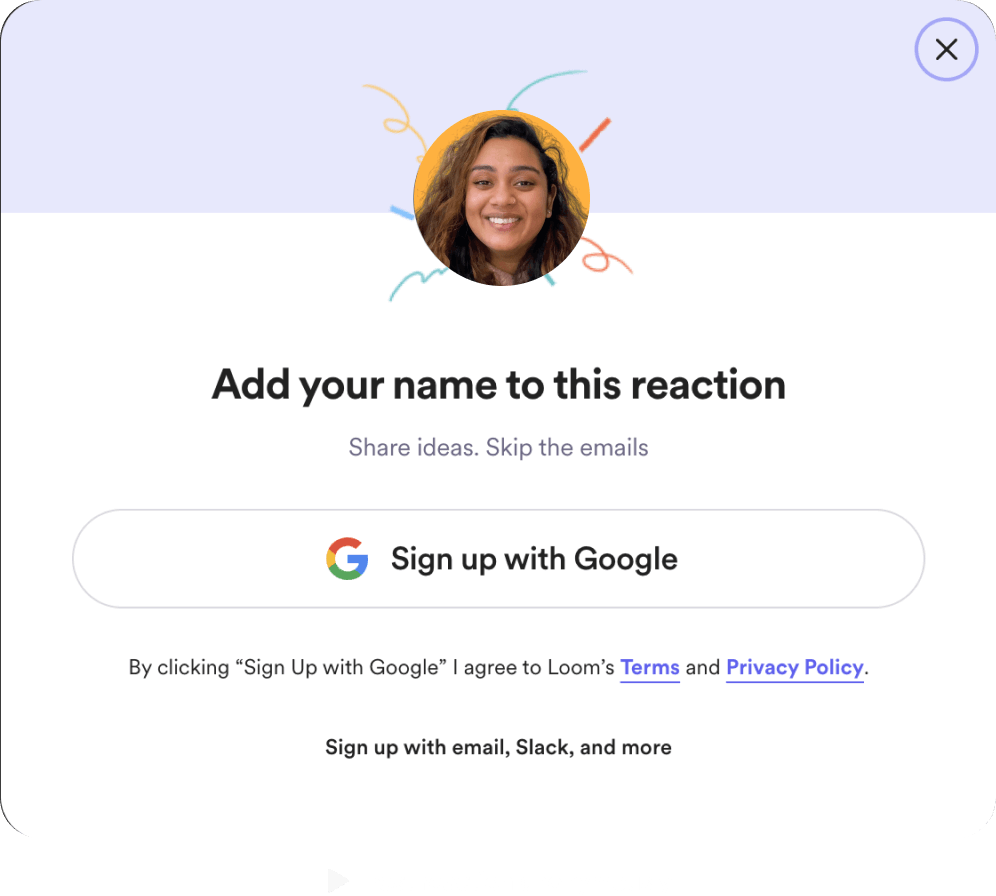
Sign-up is offered right after the viewer reacts on their own.
Halfway through, the viewer gives the speaker a high five. Loom immediately asks them to add their name to that reaction with a Google sign-up, while still allowing an anonymous post.
TakeawayAsk for a commitment straight after people take a related action by choice.
Self-initiated triggersAccording to Robert Cialdini, people are more likely to act on prompts they set up themselves, because they want to stay consistent with what they just did.
 Reply already typed
06
Nudge 4
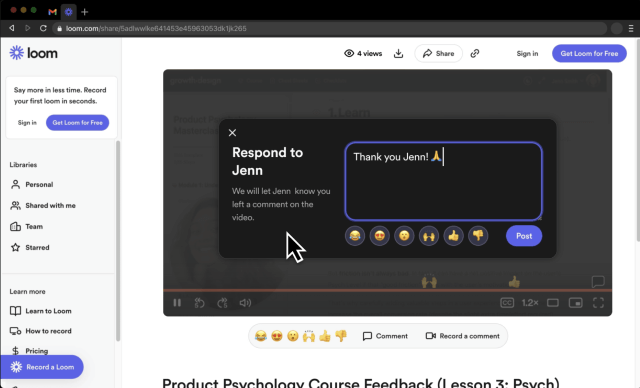
When the video ends, a thank-you reply is already written.
The end screen opens a 'Respond to Jenn' box with 'Thank you Jenn!' already typed, plus quick emoji buttons. The viewer only has to press Post to thank the sender.
TakeawayPre-filled input removes the blank page that stops people from replying.
 Sign up to reply
07
Nudge 5
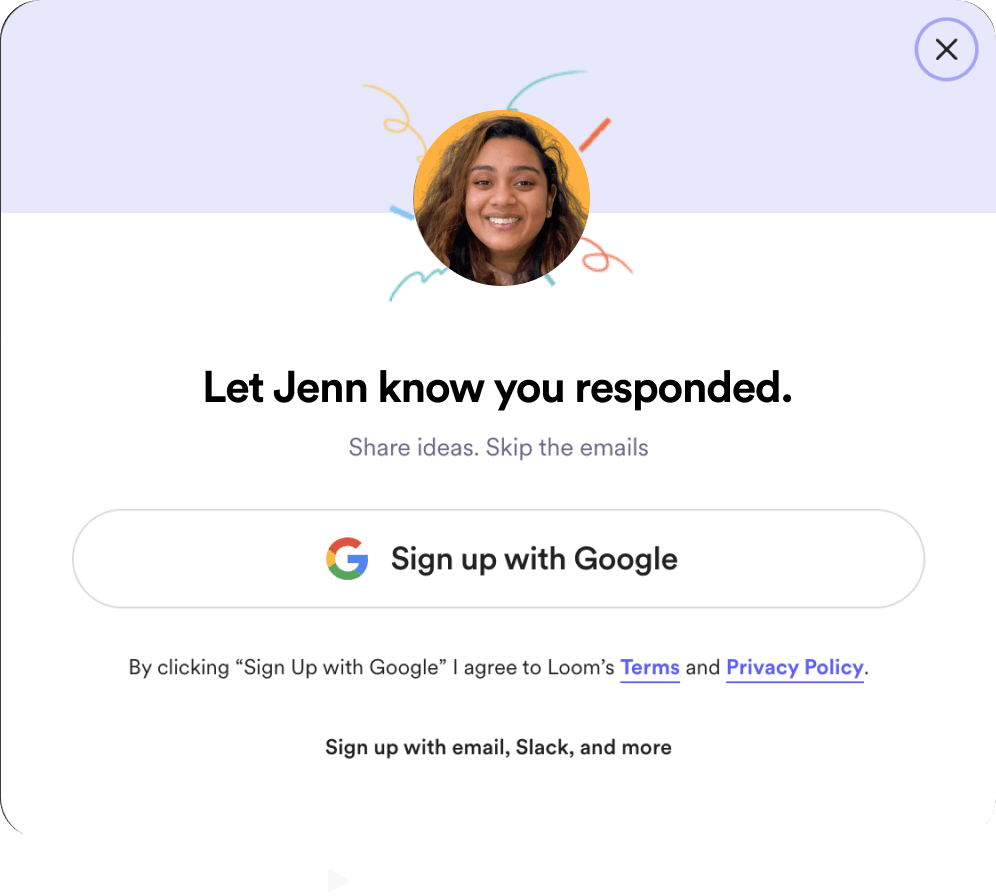
Posting the thanks leads straight into a sign-up that feels earned.
After pressing Post, the viewer sees 'Let Jenn know you responded' with a Google sign-up button. They received something useful, they want the sender to know they are grateful, and signing up is the way to show it.
TakeawayLink sign-up to a social reason the person already has.
Reciprocity and social normsPeople feel they should return a favor. Growth.Design cites Loom's product team: this end-of-video prompt alone raised comments on all Loom videos by 13 percent.
Earlier ending 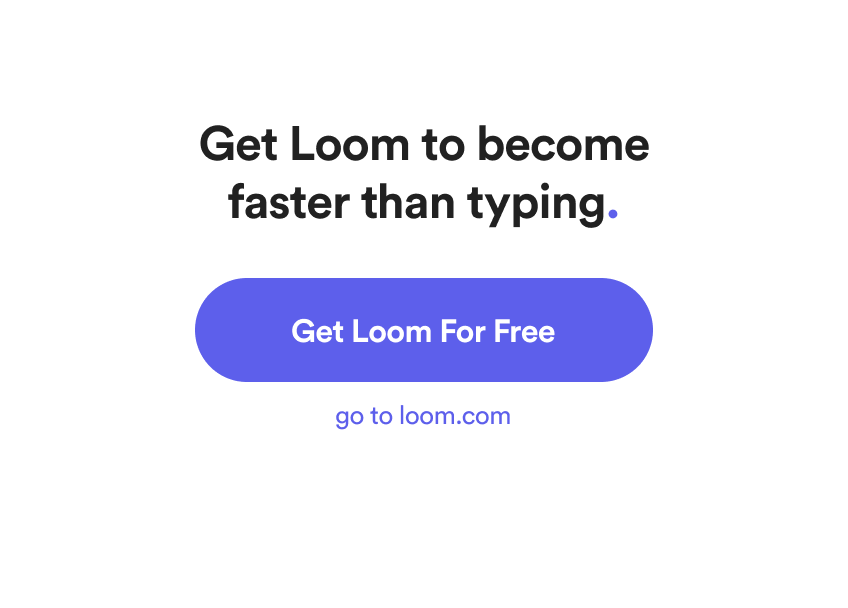 Generic ask
Current ending Reason to act08
What came before
The earlier end screen asked for a sign-up with no reason attached.
Before the respond flow, videos ended with 'Get Loom to become faster than typing' and a Get Loom For Free button. It ignored what the viewer wanted at that moment, which was to answer the sender.
What changed
- Context: the ask is tied to replying, not to the product
- Friction: a pre-filled reply replaces a cold start
- Redundancy: the same button no longer repeats three times on the page
TakeawayA generic call to action loses to one that matches the user's goal in context.
- Repeated button
09
The weak spot
Most of the page around the video gets ignored.
The sidebar sign-up button, the header sign-up button and the end-screen button all ask for the same thing. Years of watching video sites have trained people to look only at the player, so these repeated asks fade into the background.
TakeawayRepeating a call to action does not make it seen. It adds load and gets filtered.
Cognitive load and banner blindnessEvery interaction costs mental effort, so people filter out what seems unrelated or repeated. Areas where ads or extra content usually appear get skipped.
- Noise around video
10
The repair
Give first-time viewers one task: watch the video.
Growth.Design suggests a layout that drops this sidebar and dims everything except the player. Once the video is playing, the reactions and comment bar appear underneath, when they make sense.
What changed
- The sidebar of folders is hidden for viewers without an account
- The page is dimmed so the player stands out
- Reactions and comments appear once the video starts
TakeawayShow only the core task first, and reveal the rest as people get going.
Progressive disclosure and behavior leversNew users are less overwhelmed when complex features come later. A clean viewing page also helps sharing: people share more when they feel comfortable with how their face and video look.
- The moment to ask
11
The result
A curious viewer became a user by saying thank you.
The email preview, the default speed and the timeline reactions got the video playing. The busy page nearly lost the viewer, but the pre-filled reply made signing up the natural next step. Growth.Design grades the experience A minus.
TakeawayGrowth loops work best when each prompt rides on something the person already wants to do.
Every takeaway, in one place
- The setupFor products that spread by sharing, the first touch often happens in someone else's inbox.
- First impressionNavigation built for account holders confuses people who only came to watch.
- Nudge 1A good default plus a clear time estimate lowers the cost of starting.
- Nudge 2A small gap in information gives people a reason to keep going.
- Nudge 3Ask for a commitment straight after people take a related action by choice.
- Nudge 4Pre-filled input removes the blank page that stops people from replying.
- Nudge 5Link sign-up to a social reason the person already has.
- What came beforeA generic call to action loses to one that matches the user's goal in context.
- The weak spotRepeating a call to action does not make it seen. It adds load and gets filtered.
- The repairShow only the core task first, and reveal the rest as people get going.
- The resultGrowth loops work best when each prompt rides on something the person already wants to do.
Source: Growth.Design: The Psychology Behind Loom's Explosive Growth
Make every shared link a first step into your product.
When people meet your product through something a colleague sent, the first screen decides whether they stay a viewer or become a user. Zyxware can map that path, remove the noise around the main task, and place sign-up prompts where they follow what people already want to do.