How to Send Lifecycle Emails Without Overwhelming People
 +20 XP
Case study
How to Send Lifecycle Emails Without Overwhelming People
On a Sunday afternoon, one learner receives four emails from Duolingo in four hours, each from a different part of the company. This story shows why that backfires and how a single CRM segment, plus a short team checklist, keeps notifications helpful instead of pushy.
+20 XP when you reach the endWhat you will learn
- See how overlapping campaigns lower opens and raise unsubscribes
- Build an 'anti-stalker' segment that pauses repeat sends
- Align teams so each person gets one clear call to action
Scroll to follow the story. The screen changes with you.
Based on the learnings from Growth.Design: How To Notify Users Without Being Spammy, presented in our own format.
Step 1 of 7
- Four in a row
01
The setup
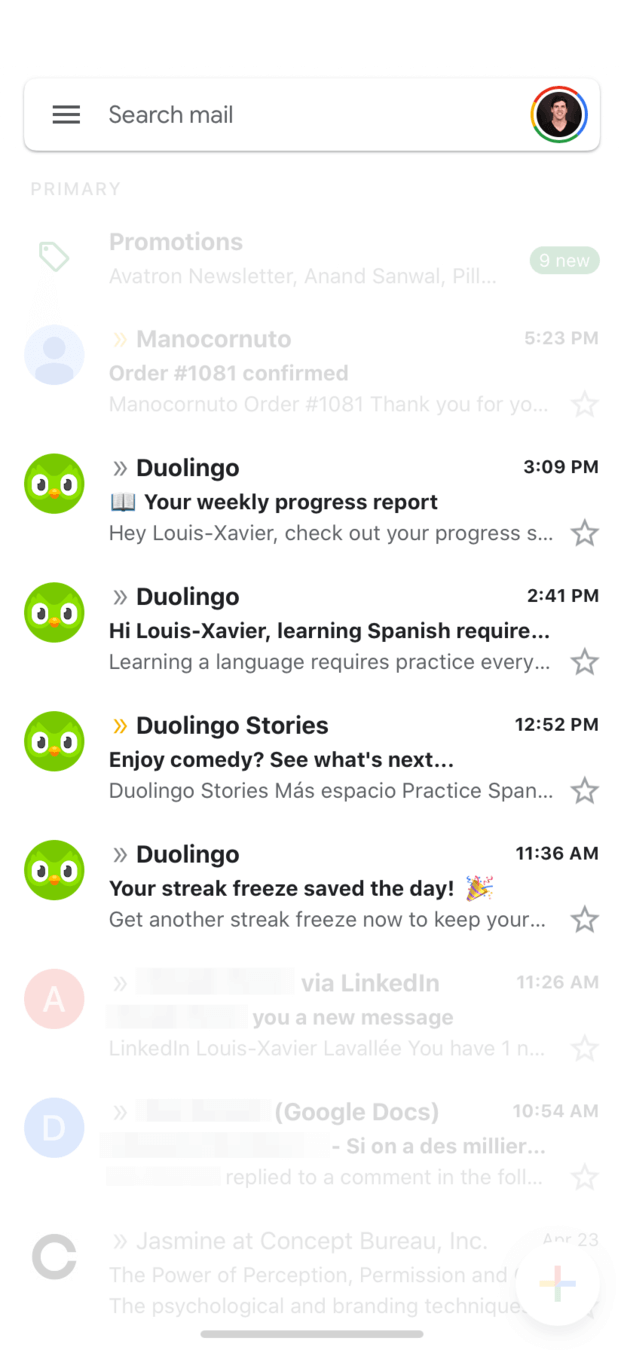
Four emails from the same app arrive in four hours.
While relaxing on a Sunday, a learner checks their inbox. Duolingo has sent a weekly progress report at 3:09 PM, a Spanish practice reminder at 2:41 PM, a Duolingo Stories promotion at 12:52 PM and a streak freeze notice at 11:36 AM.
TakeawayEach email may make sense alone. Together, they feel like pressure.
- Useful, but buried
02
The problem
Too many messages make people want to push back.
By the fourth email, the reaction is not to open any of them but to look for the unsubscribe link. The streak freeze message, which could be genuinely useful, gets lost with the rest.
TakeawayThe more you push, the more people resist, even when the content is good.
ReactanceWhen people feel forced to do something, they tend to do the opposite, especially when their freedom of choice feels threatened.
- A different team
03
The cause
No one would visit a neighbor four times in an afternoon.
Calling at lunch, knocking on the door later, then showing up again in the garden would feel strange in real life. Online it happens because the progress report, the learning reminders and the Stories promotion are likely owned by different teams that do not see each other's sends.
TakeawayUsers see one brand, not your org chart.
Users do not care about silosThis situation often comes from departments that do not coordinate well. Internal miscommunication should never shape the user experience.
- Four different asks
04
The impact
Open rates drop and no call to action stands out.
If someone engages with one of these emails, they may never open the others. And each email asks for something different: check your progress, practice, try Stories, buy a streak freeze. With four competing actions, people are unsure which one matters.
TakeawayOne clear next step beats four competing ones.
A clear path lifts engagementSteve Krug's advice applies here: people do not want to overthink. Make it easy for them to choose what to do next, and they will engage with your content.
- Next: unsubscribe
05
The cost
People clean up their inbox by switching you off.
To receive less, people unsubscribe or turn off notifications entirely. That removes the channel for the messages that do help them keep learning, like the streak reminder.
TakeawayEvery extra send risks the whole channel, not just that one email.
 Last email received
06
The solution
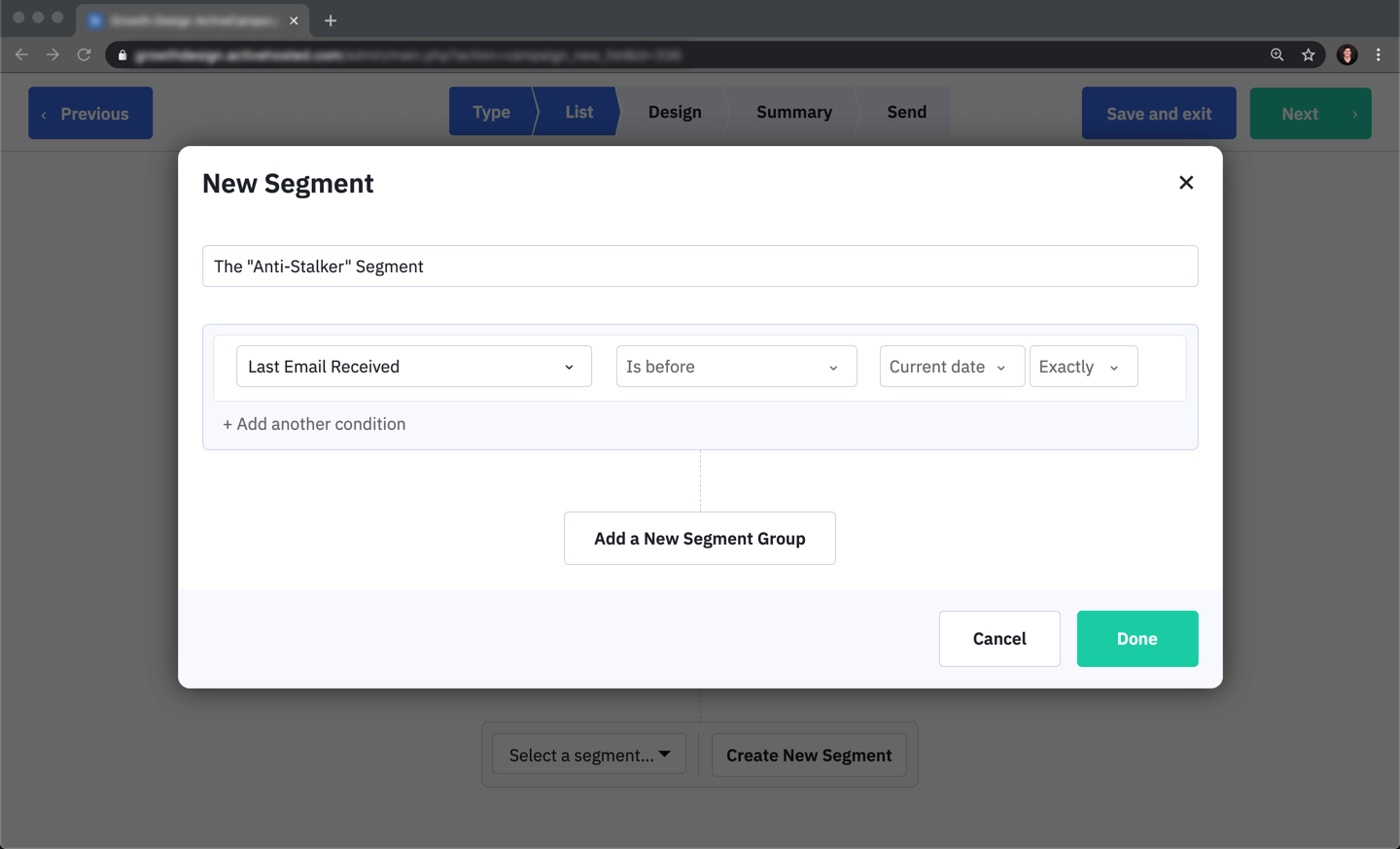
Create an 'anti-stalker' segment in your CRM.
In the email tool, a new segment uses the condition 'Last Email Received' 'Is before' 'Current date'. Anyone who already received an email today drops out of the next campaign automatically, whichever team sends it.
What changed
- Name a dynamic segment, for example 'Anti-Stalker'
- Condition: last email received is before today
- Apply the segment to every campaign and automation
TakeawayA shared frequency rule protects users even when teams forget to coordinate.
- Save and apply
07
Making it stick
Turn the rule into a routine every team follows.
The segment is the start. Teams also need to agree on overlaps, write the process down and make sure nobody is left out: people held back today should still get the campaign tomorrow.
What changed
- Create the segment or filter in your CRM, however your tool supports it
- Sync with other departments to minimize overlaps
- Add the process to your team wiki for new campaigns
- Schedule the held-back audience for the next day, and sync email with push so calls to action are not duplicated
TakeawayRespectful notifications are a team habit, not a one-time setting.
Every takeaway, in one place
- The setupEach email may make sense alone. Together, they feel like pressure.
- The problemThe more you push, the more people resist, even when the content is good.
- The causeUsers see one brand, not your org chart.
- The impactOne clear next step beats four competing ones.
- The costEvery extra send risks the whole channel, not just that one email.
- The solutionA shared frequency rule protects users even when teams forget to coordinate.
- Making it stickRespectful notifications are a team habit, not a one-time setting.
Source: Growth.Design: How To Notify Users Without Being Spammy
Coordinate every message your customers receive.
When product, marketing and content teams each run their own campaigns, customers feel the overlap first. Zyxware can map every automated email and push notification you send, find where they collide, and set up the rules and shared calendar that keep each person's inbox calm.