Letterboxd: Finding Focus Through Jobs to Be Done
 +20 XP
Case study
Letterboxd: Finding Focus Through Jobs to Be Done
A new user downloads Letterboxd to track films and share them with friends, then gets lost in a carousel, a vague pop-up, a quiz with no end and a home screen that hides their films. You will learn how a clear focus on customers' jobs to be done turns that confusion into a product that feels obvious.
+20 XP when you reach the endWhat you will learn
- Give people a reason before asking for input
- Add stopping cues and visible feedback to onboarding
- Build the home screen around the core jobs
Scroll to follow the story. The screen changes with you.
Based on the learnings from Growth.Design: Letterboxd: How to nail product market fit with clear Jobs-To-Be-Done, presented in our own format.
Step 1 of 11
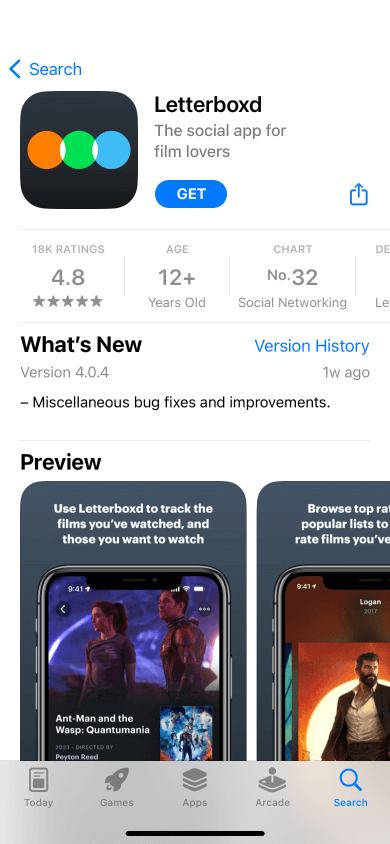
- A clear tagline
01
The setup
Friends keep posting the films they have watched, so our user downloads Letterboxd.
The App Store listing calls it 'The social app for film lovers', with a 4.8 rating. Our user already keeps a basic watch list and hopes to track films and find a few rare gems.
TakeawayPeople arrive with a specific job in mind, often shaped by what they saw others do.
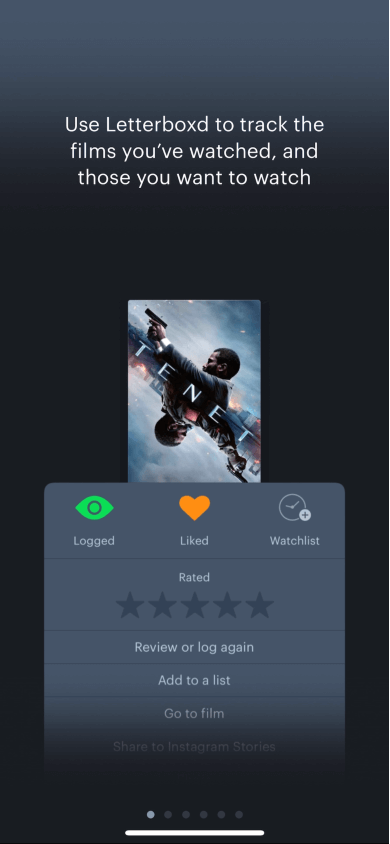 Six slides to skip
02
Problem 1
Onboarding starts with a six-slide carousel of text.
The first slide says the app tracks films you have watched and want to watch, which is exactly the job. But the dots show six slides, and most people swipe through without reading, then sign up.
TakeawayCarousels explain features that people would understand faster by using them.
Show, do not tellDo not rely on instructions out of context to explain your product. Let people discover what it can do and guide them toward their key moment.
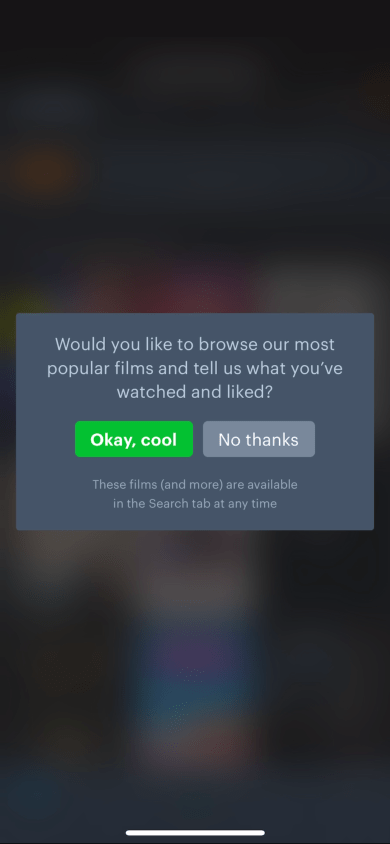 Small, passive buttons
03
Problem 2
Right after signup, a small pop-up asks what films you have watched and liked.
The request matters, since it drives recommendations. But the buttons are small, the copy is passive with 'Okay, cool' and 'No thanks', and there is no reason given for sharing your taste.
TakeawayIf you need something from people, tell them what they get in return.
Voice and toneCopy can move people to act. Just like in a shop or restaurant, the way people are welcomed sets the tone for the rest of the experience.
Original No reason givenSuggested 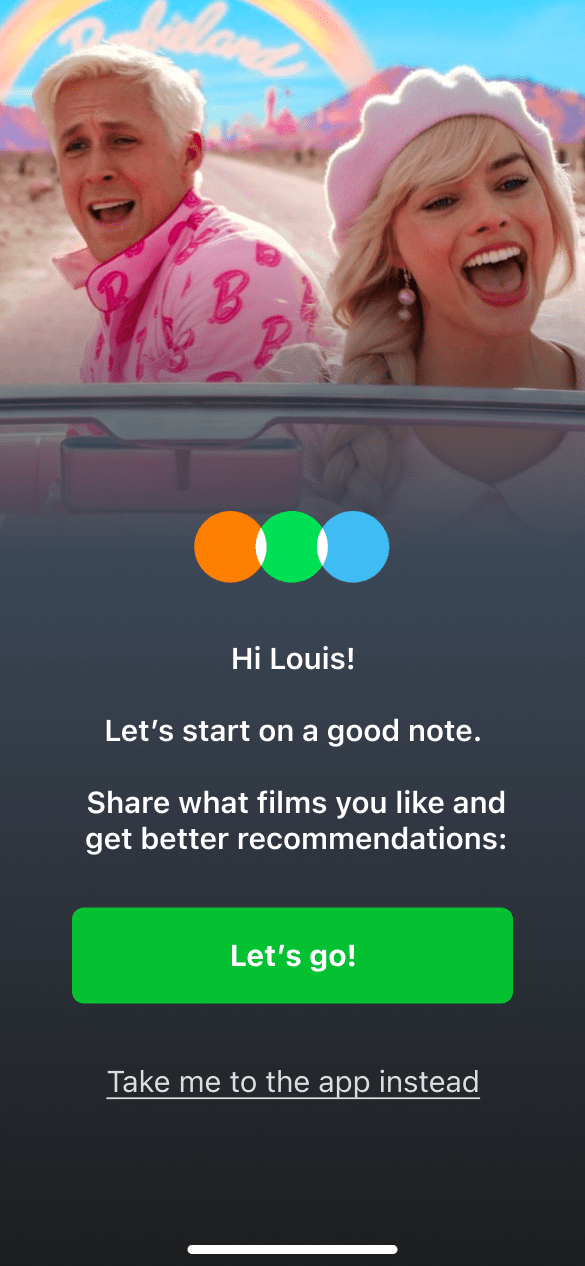 Clear benefit
04
Repair
Greet people by name and explain why sharing their taste helps them.
Growth.Design's suggested screen uses a vivid film still, says hello by name, and asks people to share what they like to get better recommendations. One large 'Let's go!' button leads, with a quiet link to skip.
What changed
- Personal greeting with the user's name
- The benefit, better recommendations, is stated
- One large primary button and a quiet skip link
TakeawayA friendly welcome plus a clear reason gives people something to say yes to.
 Four choices
05
Problem 3
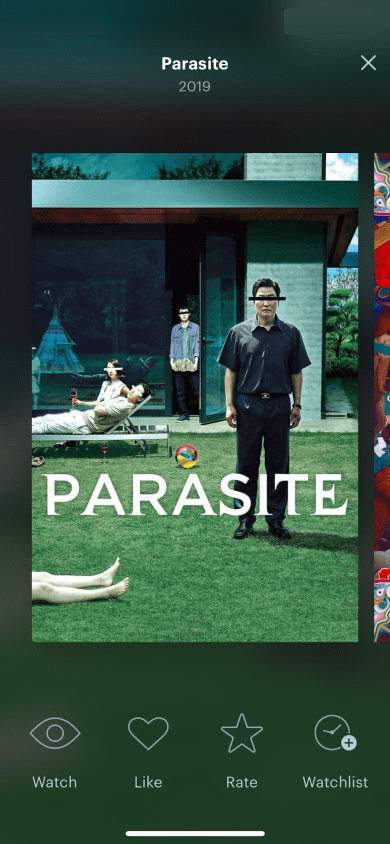
Each film offers Watch, Like, Rate and Watchlist, with no guidance.
Our user sees Parasite and four icons. Should they rate it, like it, or add it to the watchlist? Does the eye mean they want to watch it or already did? A simple job, sharing your taste, becomes four decisions per film.
TakeawayWhen the goal is simple, the interaction should be too.
Hick's lawThe more choices people see, the longer it takes to decide. Four detailed options for each film turn a quick preference check into a chore, and decision fatigue sets in.
- Close and lose it?
06
Problem 4
The films keep coming, with no sign of when it will end.
After Parasite comes Barbie, then Spider-Man, then more. There is no counter and no finish line, and closing the screen might lose everything logged so far. Our user is still not sure why they are doing this.
TakeawayPeople need to know how long a task is and when they are done.
Provide stopping cuesA stopping cue tells people an activity is complete. Growth.Design cites Adam Alter: without a cue or clear exit point, digital experiences cause fatigue and pushback.
Original Four iconsSuggested 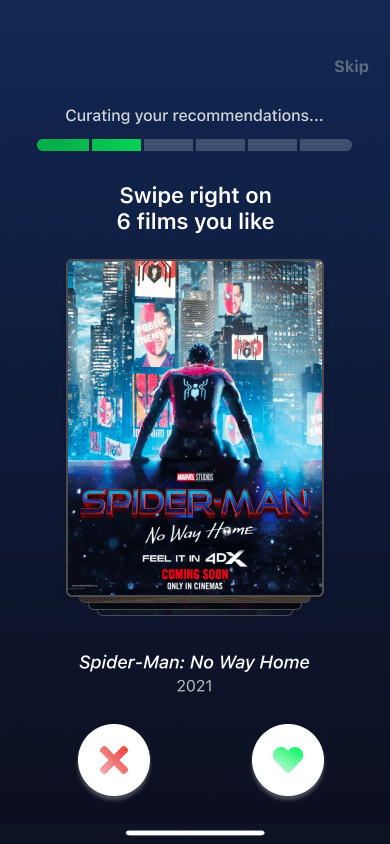 Clear goal
07
Repair
Ask for six swipes, with a progress bar and a clear purpose.
The suggested version states the reward up front, 'Curating your recommendations', and a goal: swipe right on six films you like. A progress bar shows how far along you are, a Skip link offers a way out, and the four icons become a familiar left or right swipe.
What changed
- A stated goal of six films
- A progress bar and a Skip link
- Swipe left or right replaces four icons
TakeawayA clear goal, visible progress and a familiar gesture make input feel easy.
 What diary?
08
Problem 5
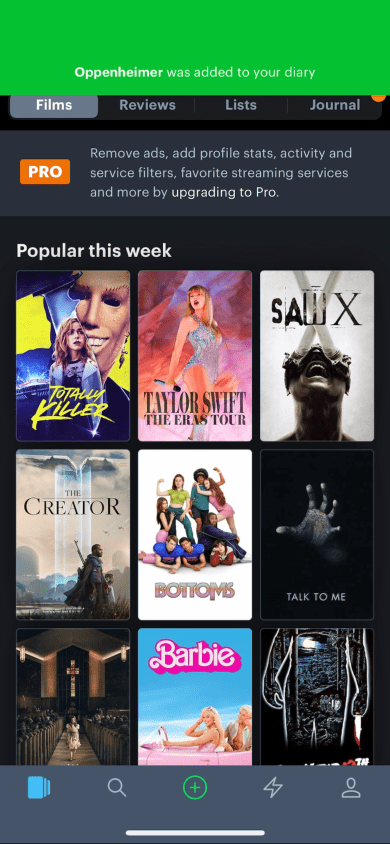
The home screen shows no sign of the films just logged.
The home page shows popular films and an upgrade to Pro, not the films our user just rated. Adding a film works, and a green banner says Oppenheimer was added to 'your diary'. But no diary appears anywhere in the navigation.
TakeawayEvery action should produce a result people can find.
Feedback loopsCommunicate the result of every action to avoid confusion. Every cause needs an effect, and that effect must be visible to the user.
 Not your films
09
Problem 6
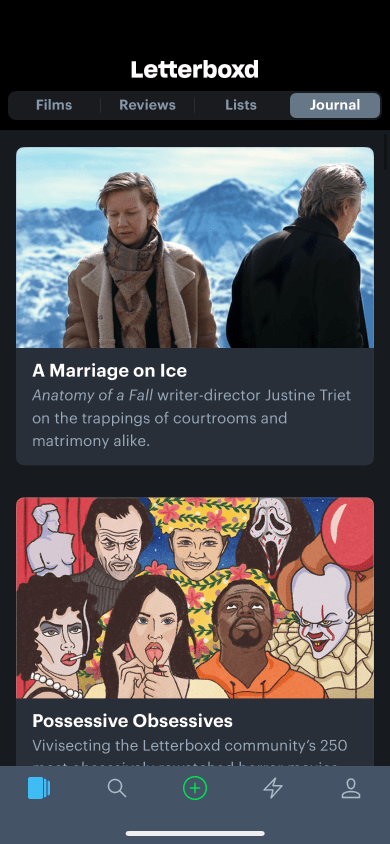
A red dot on 'Journal' leads to editorial articles, not your films.
Looking for the diary, our user taps Journal and finds long-form features. Diary, Journal and Watchlist all sound like places for their films, and none of them are. Is this a tracker, a recommendation engine or a social app?
TakeawayLabel things with words people already understand, and use each word for one thing.
Familiar namesKeep labels simple and clear. Relying on familiar terms is a strong starting point for any app.
Original Pro upsellSuggested 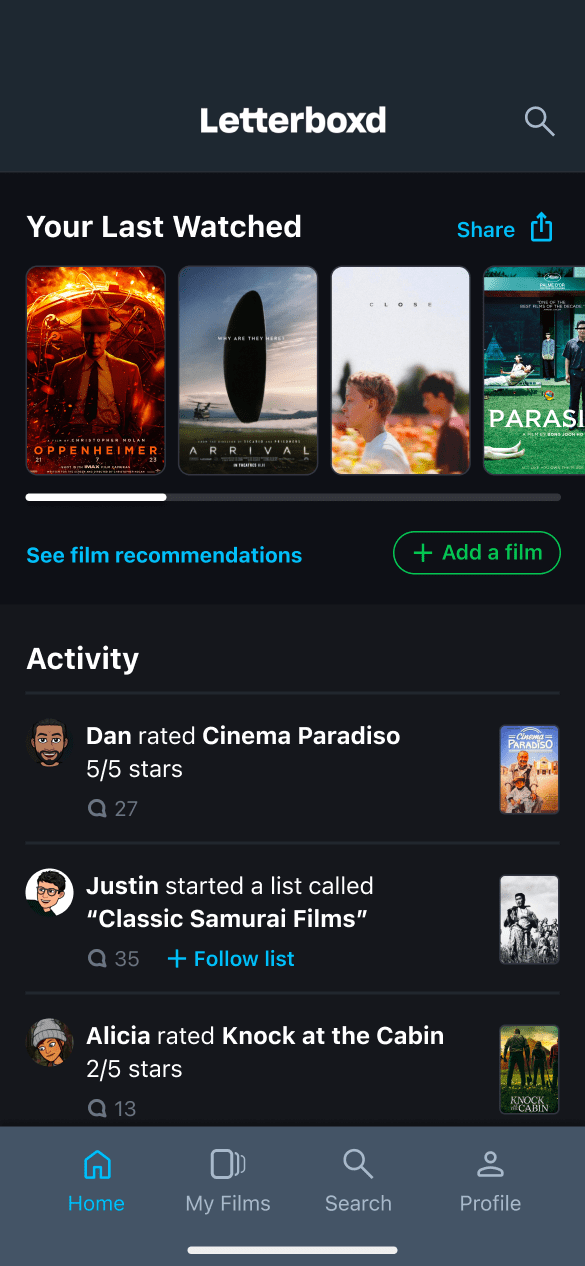 Your films first
10
Repair
Rebuild the home screen around two jobs: tracking and discussing films.
The suggested home starts with 'Your Last Watched', with buttons to add a film and see recommendations. Below it, an Activity feed shows what friends rated and listed, so people can join the conversation. A Share button lets them show off their history, which is why they came.
What changed
- Your last watched films lead the page
- A friends' activity feed for discussion
- Share and add actions sit next to the films
TakeawayFocus a screen on outcomes customers want, not on every feature you have.
Jobs to be doneKnowing what customers hope to accomplish in a given situation helps you focus on outcomes rather than features. Growth.Design cites the Nielsen Norman Group and Harvard Business Review on the framework.
Onboarding Momentum dropsFocused home Clear purpose11
The result
An exciting promise, lost in onboarding, recoverable with focus.
The tagline raised interest, then the carousel, the reasonless pop-up, the endless quiz and the missing films pulled it steadily down. Each fix is small, and together they point to one idea: with a clear focus on customers' jobs, Letterboxd could be a great social app for film lovers.
What changed
- Give a reason before asking for input
- Add stopping cues and progress
- Show results where people expect them
- Design the home screen for the core jobs
TakeawayProduct market fit gets clearer when every screen serves a job customers already have.
Every takeaway, in one place
- The setupPeople arrive with a specific job in mind, often shaped by what they saw others do.
- Problem 1Carousels explain features that people would understand faster by using them.
- Problem 2If you need something from people, tell them what they get in return.
- RepairA friendly welcome plus a clear reason gives people something to say yes to.
- Problem 3When the goal is simple, the interaction should be too.
- Problem 4People need to know how long a task is and when they are done.
- RepairA clear goal, visible progress and a familiar gesture make input feel easy.
- Problem 5Every action should produce a result people can find.
- Problem 6Label things with words people already understand, and use each word for one thing.
- RepairFocus a screen on outcomes customers want, not on every feature you have.
- The resultProduct market fit gets clearer when every screen serves a job customers already have.
Source: Growth.Design: Letterboxd: How to nail product market fit with clear Jobs-To-Be-Done
Build your product around the jobs people hire it for.
When a product tries to be many things at once, new users cannot tell what it is for. Zyxware can interview your customers, define the jobs they need done, and redesign onboarding and key screens so those jobs are easy to find and finish.