Landing Page Psychology: From Cluttered to Clear
 +20 XP
Case study
Landing Page Psychology: From Cluttered to Clear
A landing page for an online UX course tries to do everything at once, with competing buttons, buried facts and no clear hierarchy. You will learn to spot the psychological and visual problems, then see how one focused redesign fixes them.
+20 XP when you reach the endWhat you will learn
- Cut competing calls to action down to one
- Use proximity, typography and contrast to guide the eye
- Start with a small, relevant step to lift engagement
Scroll to follow the story. The screen changes with you.
Based on the learnings from Growth.Design: The psychology behind highly effective landing pages, presented in our own format.
Step 1 of 9
- Where to look?
01
The setup
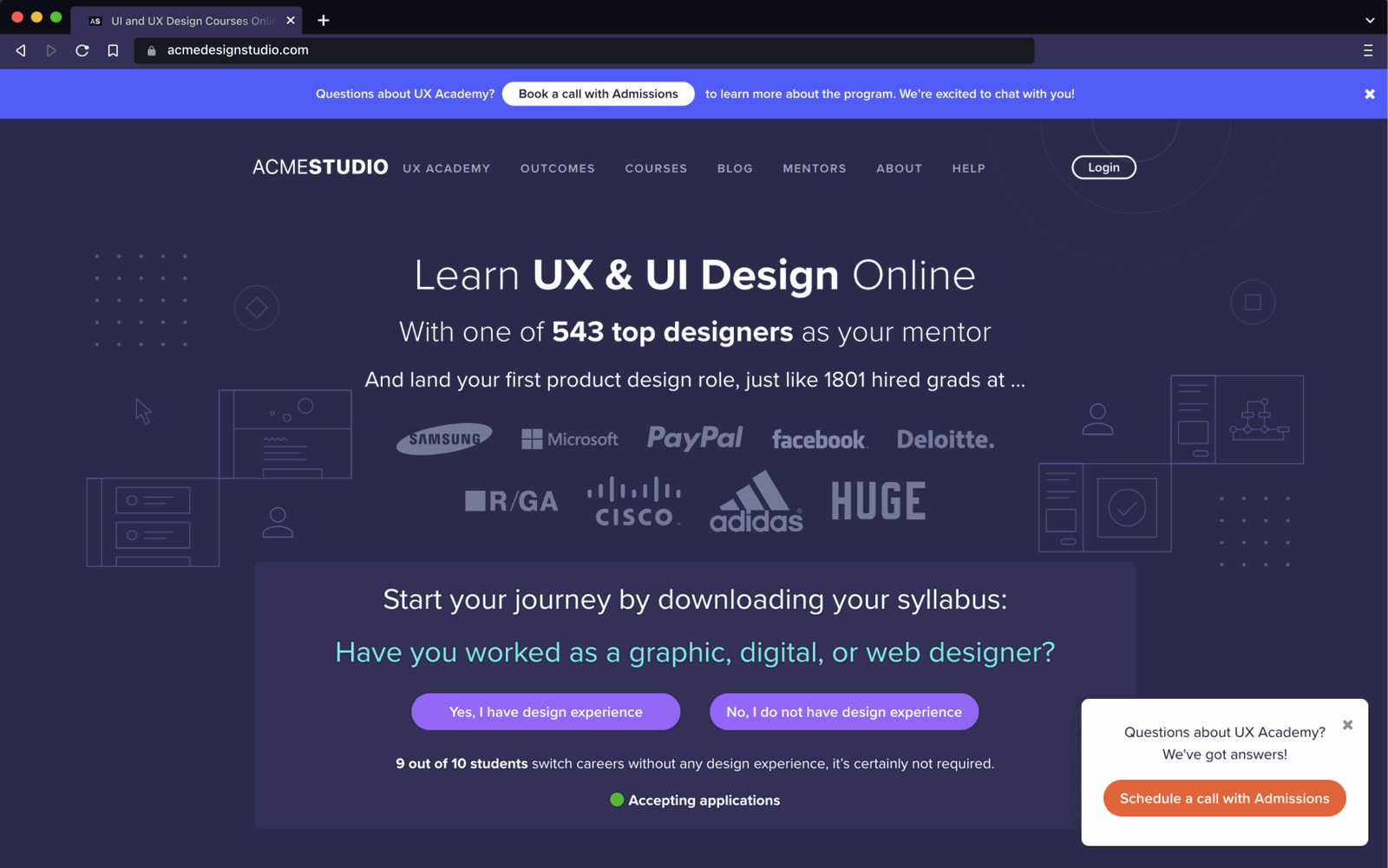
A friend shares the landing page for an online UX and UI design course.
The visitor is curious but has no design background. The page has a top banner, a navigation bar, a headline, a wall of company logos, a question with two buttons, a status line and a pop-up. There is a lot going on before they have read a word.
TakeawayIf a page looks busy at first glance, most visitors will not stay to find out why.
 Book a call
02
Problem 1
Five different things ask to be clicked, and two of them are the same.
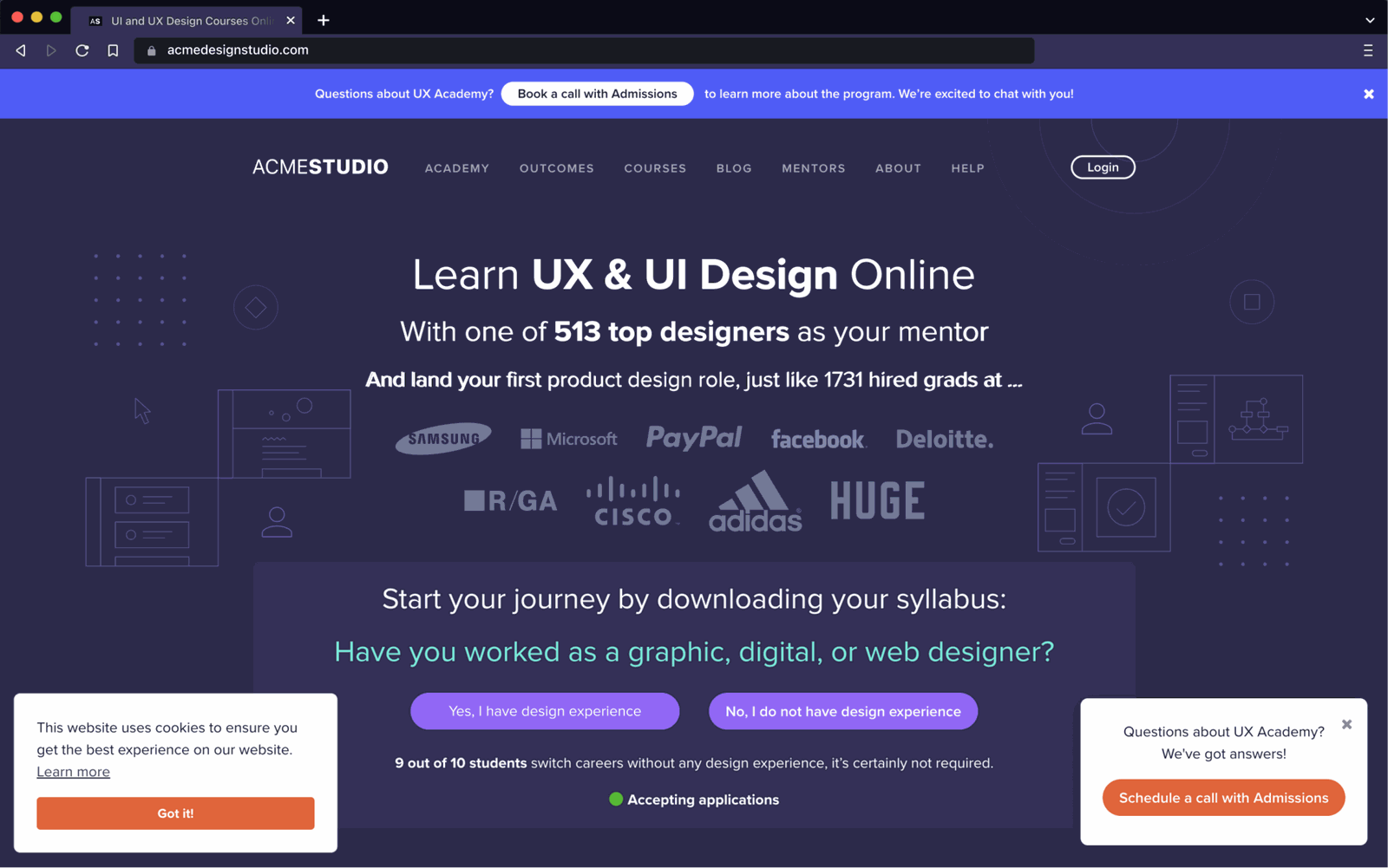
A cookie notice, two answer buttons, 'Book a call with Admissions' in the top banner and 'Schedule a call with Admissions' in the pop-up all compete. The call to book a call appears twice, which is a sign the page has not decided what it wants the visitor to do.
TakeawayWhen everything is a call to action, nothing is.
Wrongful delegationAs the product expert, it is your job to make decisions easier. If you are unsure what people need, do not hand them the work of sorting it out. Do more research and testing instead.
- Buried key fact
03
Problem 2
The page raises questions it never answers.
It suggests downloading the syllabus, but there is no download link. It says 'Accepting applications', but there is no way to apply, only to book a call. And the most persuasive fact, that 9 out of 10 students switch careers without design experience, is hidden in small print.
TakeawayPut the facts that remove doubt where people will read them, and make every promise clickable.
- One dense block
04
UI problem 1
Everything sits close together, so it is hard to tell what belongs with what.
The headline, mentor count, graduate stat, logos, syllabus prompt and question are stacked with similar spacing. People read items that are close together as related, so the eye cannot separate the pitch from the proof from the action.
TakeawayUse space to group related items and separate unrelated ones.
- Mixed weights
05
UI problem 2
Many font sizes, weights and colors, with no clear order.
Bold and light text mix within lines, the question is in teal, and three lines of similar size compete under the headline. Without a typographic hierarchy, the reader has to work out what matters most.
TakeawayLimit type styles so size and weight signal importance.
The aesthetics of readingTo get people to act, keep cognitive load low. Growth.Design cites a 2003 MIT study showing that good typography helps people perform better on cognitive tasks.
- Loudest element
06
UI problem 3
The brightest parts of the page are the least important.
The bright blue top bar, the white pop-up and the orange buttons draw the eye first. The core message and the question sit in a muted panel. Contrast is spent on distractions.
TakeawayGive the highest contrast to the one thing you want people to do.
The squint testEvery screen should make its purpose clear. Growth.Design cites Luke Wroblewski: half close your eyes to blur the page and see what stands out. Here you see a blurry center and a few bright edges.
Before Two competing buttonsAfter  One easy answer
07
Repair
The redesign asks one simple question, with a clear Yes or No.
The banner, pop-up and cookie notice are gone. The page leads with 'Become an expert UX & UI Designer', then offers one step: 'Question 1 of 5', asking whether the visitor has worked as a designer. It is a question about them, so it is easy and relevant to answer.
What changed
- Banner, pop-up and cookie notice removed
- One question replaces several calls to action
- A step counter shows the quiz is short
TakeawayStart with a small step that is about the visitor, and they are more likely to take it.
Spark effectPeople are more likely to act when the effort is small. If the action also relates to their own goals, engagement improves further.
- Doubt removed early
08
Repair
Cleaner type and spacing make the page read in a clear order.
One bold headline, one supporting line, one highlighted question box, and the proof at the bottom. The buried fact becomes 'No previous experience needed' right under the headline, and a hand-drawn arrow leads the eye to the question.
What changed
- One headline style and one body style
- The key fact moves up under the headline
- Logos move below the action as proof
TakeawayA clear order of headline, reassurance, action and proof guides people without effort.
Original Many choicesRedesign One next step09
The result
Same offer, one clear path to a better fit.
The course, the mentors and the graduate results are unchanged. The redesign simply removes competing actions, answers the visitor's main worry up front, and turns the page into a short quiz that helps people find the right course for them.
What changed
- Fewer calls to action
- Grouping by proximity
- Consistent typography
- Contrast spent on the main action
TakeawayEffective landing pages make one decision easy, not every decision possible.
Every takeaway, in one place
- The setupIf a page looks busy at first glance, most visitors will not stay to find out why.
- Problem 1When everything is a call to action, nothing is.
- Problem 2Put the facts that remove doubt where people will read them, and make every promise clickable.
- UI problem 1Use space to group related items and separate unrelated ones.
- UI problem 2Limit type styles so size and weight signal importance.
- UI problem 3Give the highest contrast to the one thing you want people to do.
- RepairStart with a small step that is about the visitor, and they are more likely to take it.
- RepairA clear order of headline, reassurance, action and proof guides people without effort.
- The resultEffective landing pages make one decision easy, not every decision possible.
Source: Growth.Design: The psychology behind highly effective landing pages
Turn landing page visitors into applicants.
Most landing pages lose people to clutter, not to a weak offer. Zyxware can audit your key pages for competing actions, hidden proof and weak hierarchy, then redesign and test a clearer path to the one action that matters.