Hopper: When to Ask for Location and Notifications
 +20 XP
Case study
Hopper: When to Ask for Location and Notifications
A traveler opens Hopper for a quick look at flight prices and meets two system permission prompts along the way. One arrives too early and one arrives at exactly the right moment, and you will learn what separates them, plus how to lighten the screens in between.
+20 XP when you reach the endWhat you will learn
- Tie each permission request to a clear, immediate benefit
- Let people trigger early requests themselves
- Cut color, options and calls to action that slow decisions
Scroll to follow the story. The screen changes with you.
Based on the learnings from Growth.Design: How Hopper Perfectly Nails Permission Requests UX, presented in our own format.
Step 1 of 10
- Travel mood
01
The setup
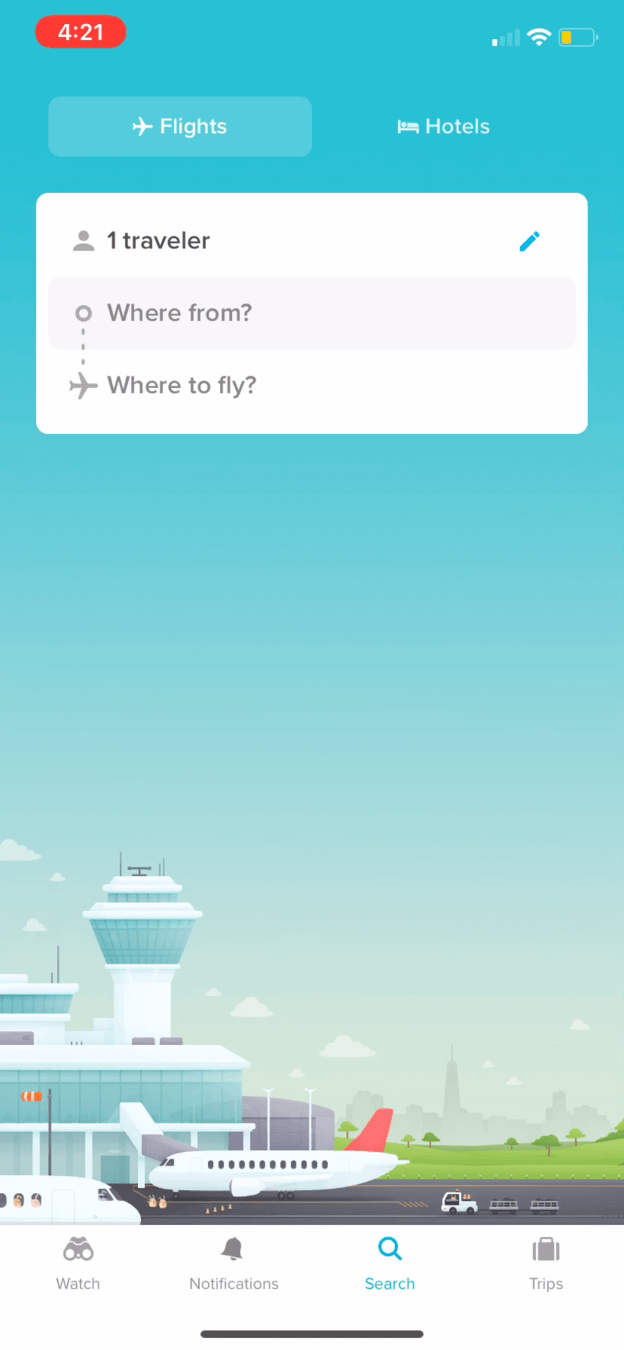
Hopper opens with a friendly airport scene and just two questions.
The traveler only wants a quick look at ticket prices, so their motivation is low. The home screen asks 'Where from?' and 'Where to fly?' over a bright illustration of an airport and a plane about to take off. It feels calm and makes the trip feel close.
TakeawayVisuals can set a mood that makes the next step feel inviting.
PrimingSubtle visual cues shape how people respond. The cheerful airport scene lets people start dreaming about their trip, which makes a positive experience more likely.
- Easy first step
02
Tactic
Only two fields and one clear action on the first screen.
Growth.Design compares this with Kayak, whose search asks for trip type and dates up front and shows several competing actions on the home screen. Hopper starts with origin and destination and leaves the rest for later.
TakeawayStart with the easiest questions and reveal the harder ones as people go.
Progressive disclosureMoving people from simple actions to more complex ones lowers the chance they feel overwhelmed. Here, 'Where from?' and 'Where to?' are the simple start.
 Easy to refuse
03
Permission 1
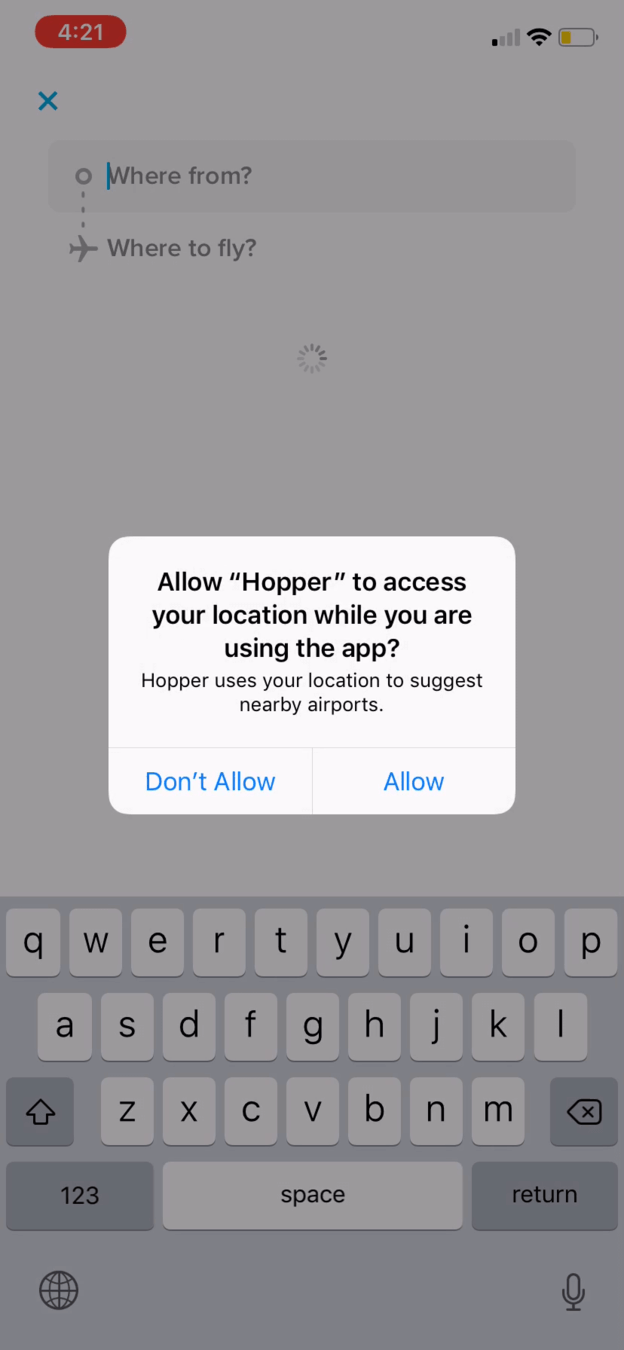
Tapping 'Where from?' immediately triggers a location request.
The request makes sense in context, since Hopper wants to suggest nearby airports. But the traveler opened the app seconds ago and has no reason to trust it yet, so 'Don't Allow' is the easy answer.
TakeawayContext is not enough on its own. People also need enough trust to say yes.
Original Prompt on first tapSuggested 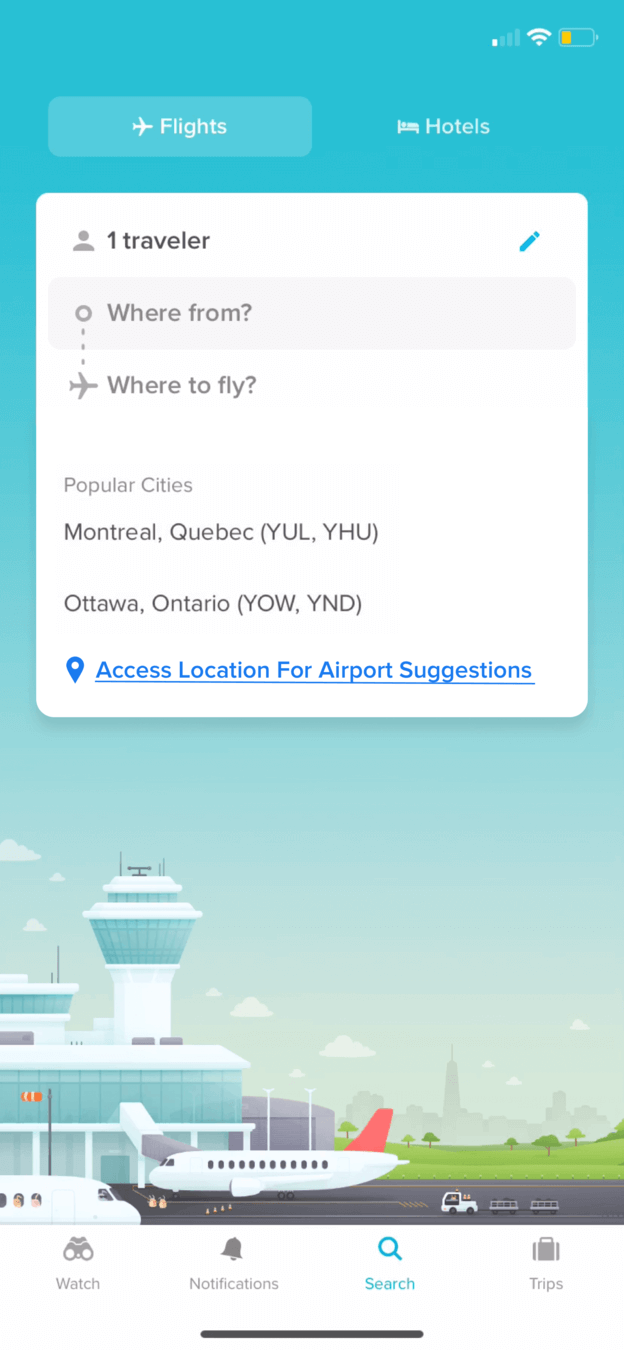 User-driven link
04
Repair
Offer location as an optional link under the popular cities.
In Growth.Design's suggested version, the list of popular cities appears first, with a link that reads 'Access Location For Airport Suggestions'. Only people who want nearby airports tap it, and they see the system prompt because they asked for it.
What changed
- The system prompt no longer fires on the first tap
- Popular cities show without location
- A clear link explains what location is for
TakeawayWhen you need access early, let the person decide when to trigger the request.
User-driven promptWhen a request is triggered by the user's own intent, it feels natural on their side, which leads to better acceptance.
 Four price bands
05
Friction
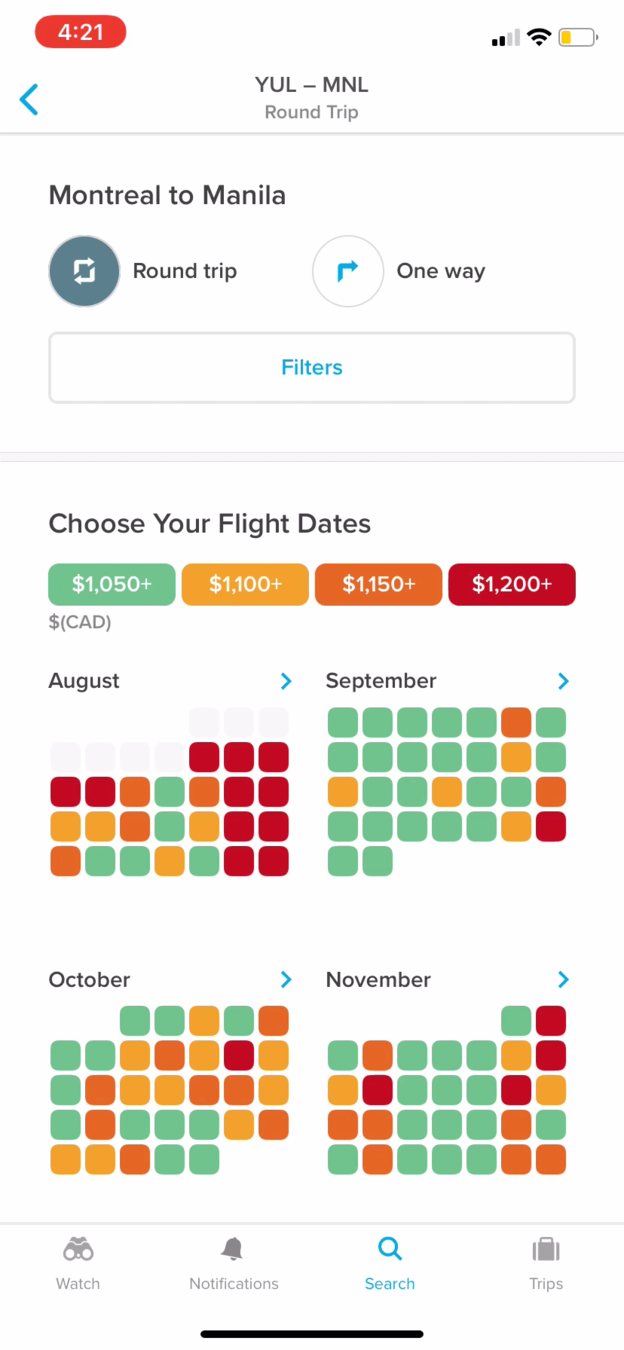
The date calendar is a wall of red, orange and green.
Four saturated price colors cover every day, and the gap between color bands is only about 50 dollars on a trip over 1,000. A full-width Filters button also takes prime space. On the plus side, the flow still guides the traveler through one decision at a time.
TakeawayEvery color on screen should mean something worth the attention it takes.
Original Everything shoutsSuggested 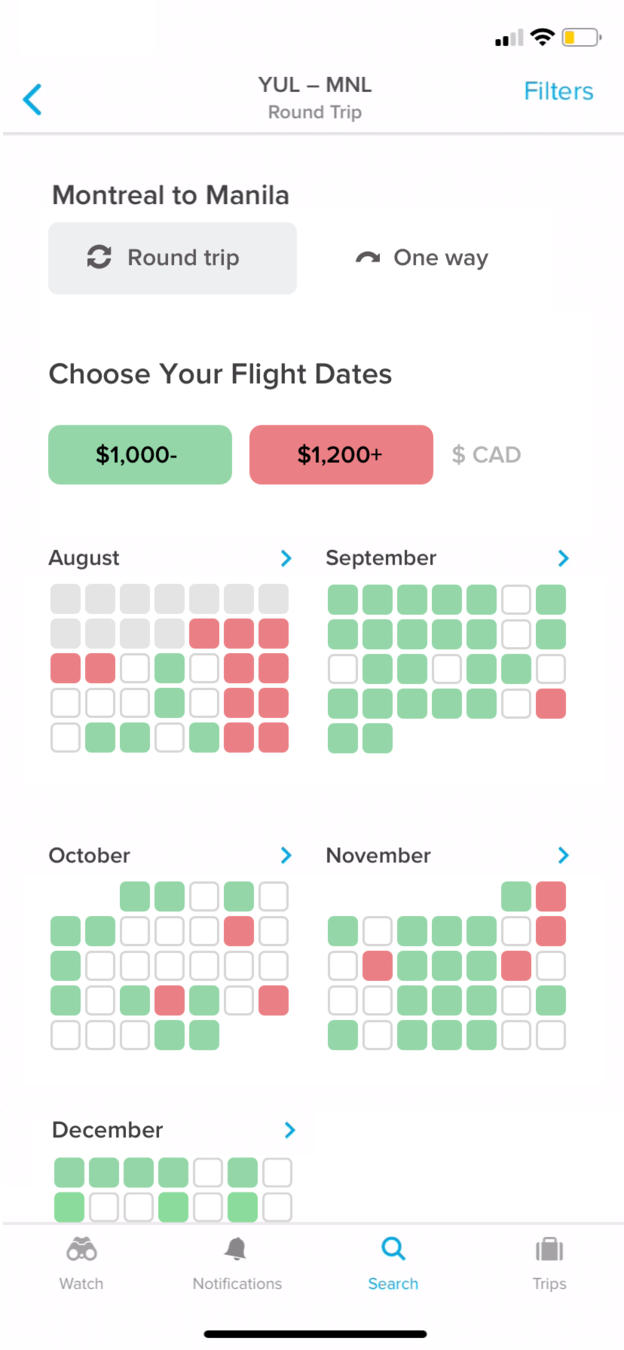 Two clear bands
06
Repair
Show cheap and expensive days, and let the rest fade back.
The suggested calendar uses two soft colors, under 1,000 and over 1,200, and leaves middle prices neutral. Filters moves to the header. The good dates now stand out at a glance.
What changed
- Four price colors become two
- Middle prices stay neutral
- Filters moves out of the main area
TakeawayReduce the number of signals so the important one is easy to read.
Minimize cognitive loadGrowth.Design cites the Nielsen Norman Group: extra load comes from how information is presented, and the more there is, the heavier it gets.
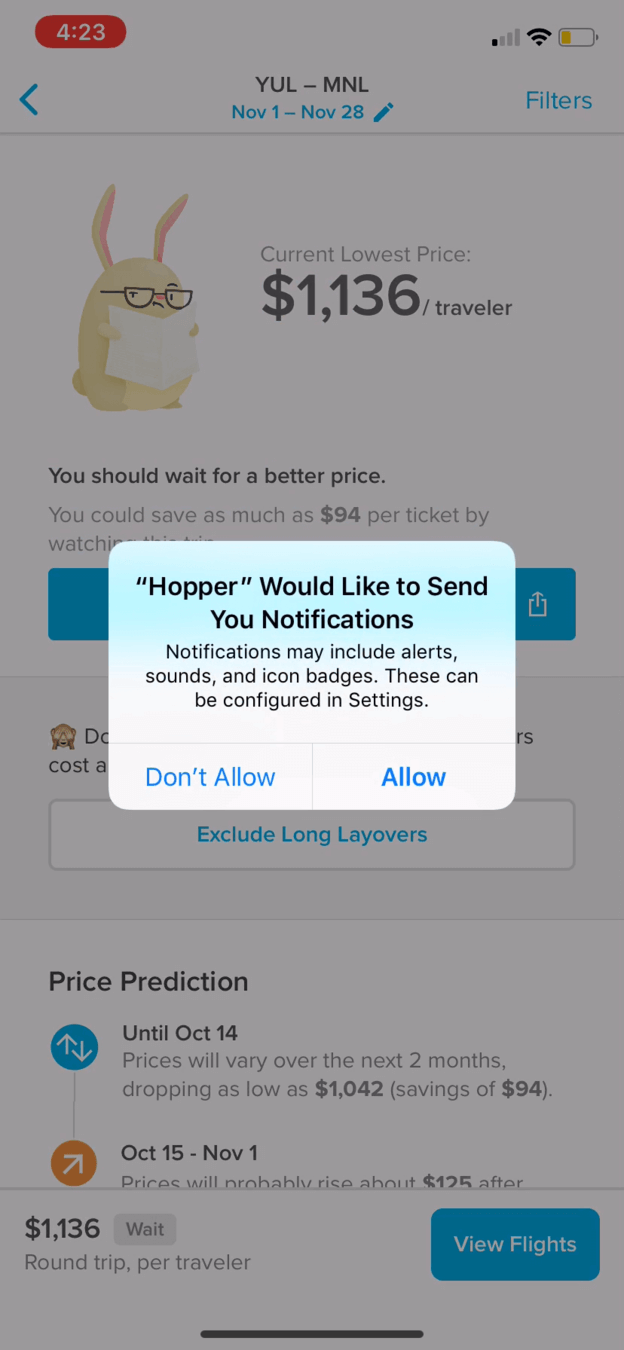 An easy yes
07
Permission 2
Hopper says 'wait for a better price', then asks to notify you.
The price screen recommends waiting rather than buying now, which puts the traveler's interest ahead of a quick sale. When they tap 'Watch This Trip', the notification prompt appears. Now the benefit is obvious: Hopper will tell them when to buy.
TakeawayAsk for permission right after the person has chosen the thing it makes possible.
Original 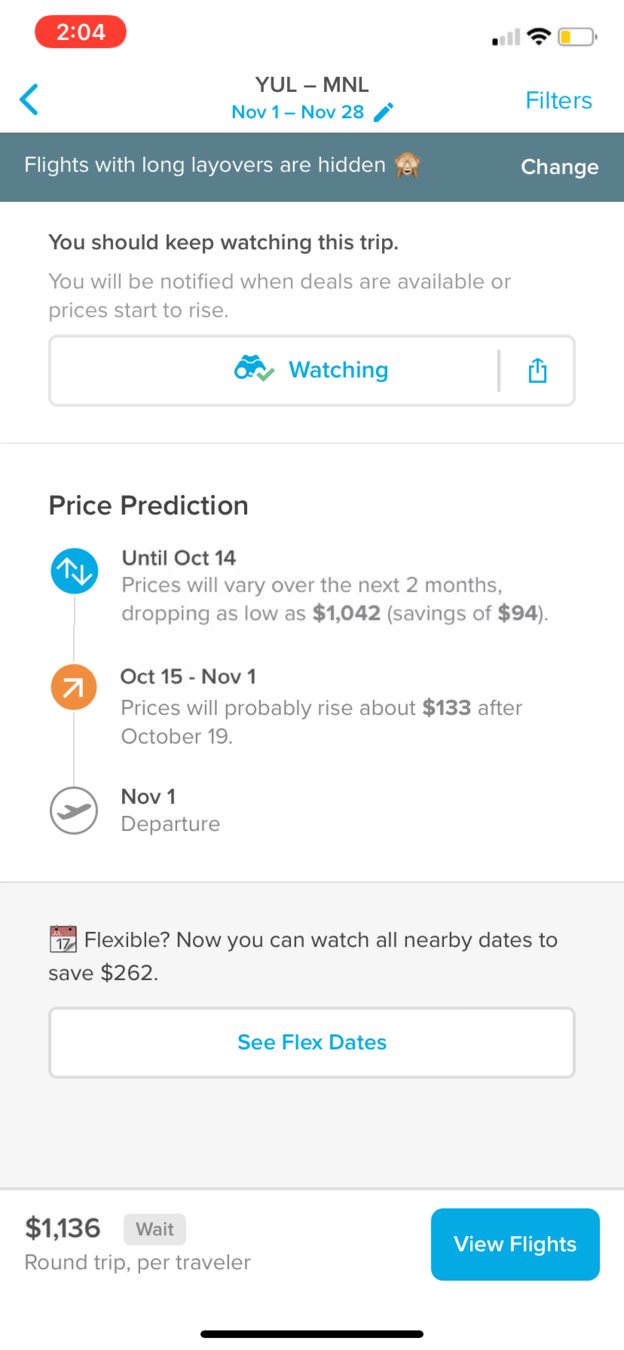 Buried feature
Suggested 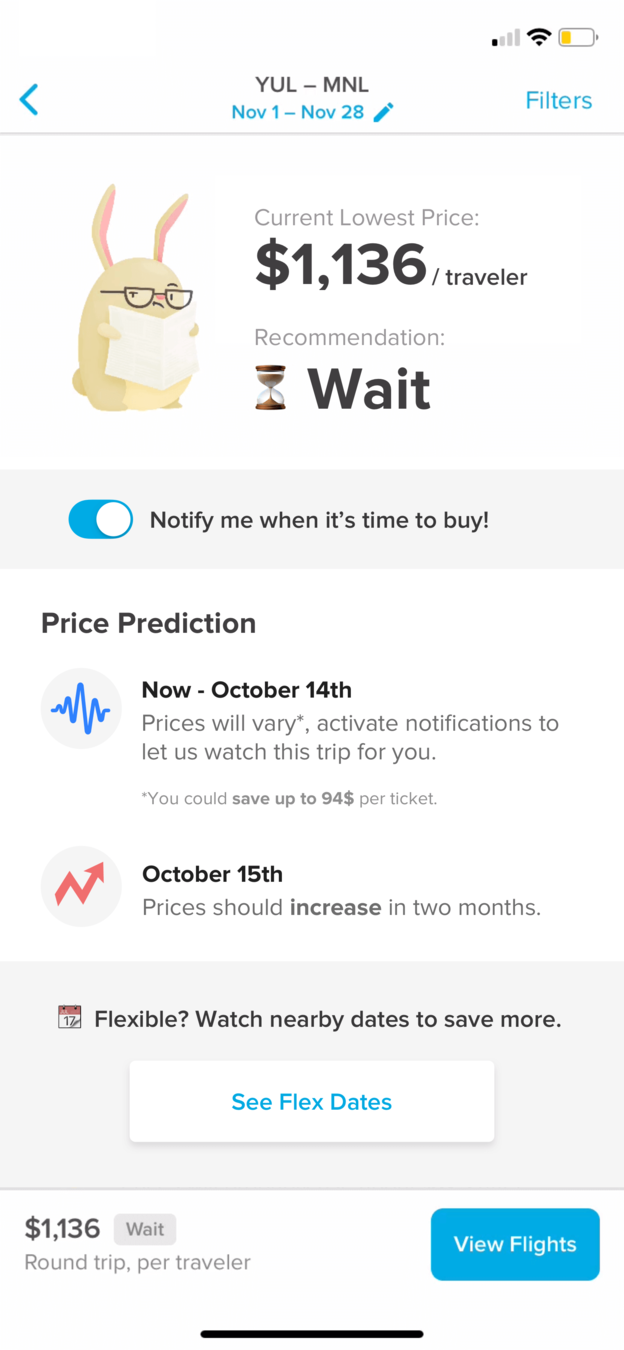 Clear advice
08
Repair
Put the recommendation first and give the page one clear action.
After allowing notifications, the watching page is long and takes effort to decode, and one of Hopper's best features, flexible dates, sits near the bottom. The suggested page leads with 'Wait', adds a notification toggle and gives flexible dates a clear block.
What changed
- 'Wait' becomes the headline
- A toggle confirms alerts are on
- Flexible dates get their own clear block
TakeawayTell people what to do next in one line, then support it.
Recommend one actionA clear call to action and a clean interface help a lot when someone is deciding what to do. Too much input leads to information overload and weaker decisions.
 The destination
09
The surprise
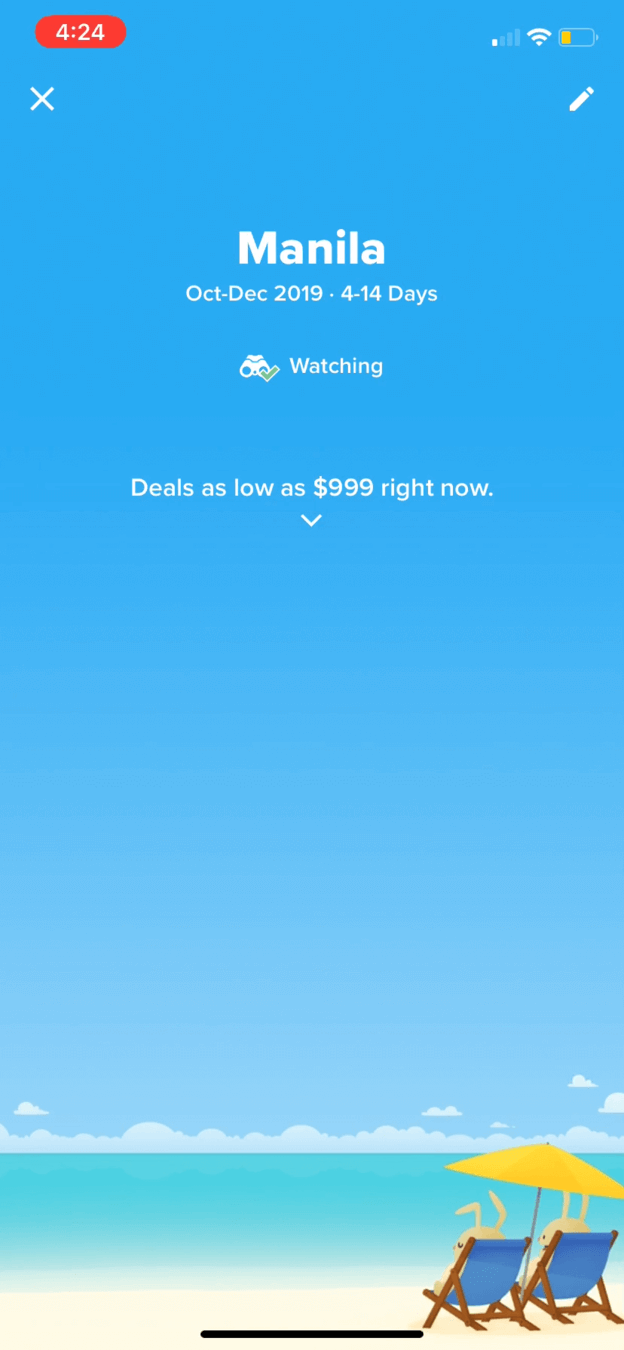
Flexible dates open onto a full-screen beach for Manila.
Tapping 'See Flex Dates' shows the destination name, a date range and deals as low as 999 dollars over a sunny beach. Like a travel agency window full of palm trees, it reminds people why they are planning at all.
TakeawayPair a tedious task with the reward it leads to.
Temptation bundlingGrowth.Design cites James Clear: we are more likely to do hard things when they are tied to something we enjoy. Booking a trip is a chore, and the imagery makes it tempting.
Notifications Right momentReward Worth the wait10
The result
One of the smoothest notification requests, with a few easy repairs.
Priming lifts the traveler at the start, the early location prompt and busy calendar drag them down, and the wait recommendation plus a well-timed notification request win them back. Growth.Design gives Hopper's notification experience an A.
What changed
- Let people trigger location themselves
- Use fewer price colors
- Lead with one recommendation
- Growth.Design also suggests matching the home illustration to the destination city
TakeawayPermission requests work when they arrive as the answer to something the person already wants.
Every takeaway, in one place
- The setupVisuals can set a mood that makes the next step feel inviting.
- TacticStart with the easiest questions and reveal the harder ones as people go.
- Permission 1Context is not enough on its own. People also need enough trust to say yes.
- RepairWhen you need access early, let the person decide when to trigger the request.
- FrictionEvery color on screen should mean something worth the attention it takes.
- RepairReduce the number of signals so the important one is easy to read.
- Permission 2Ask for permission right after the person has chosen the thing it makes possible.
- RepairTell people what to do next in one line, then support it.
- The surprisePair a tedious task with the reward it leads to.
- The resultPermission requests work when they arrive as the answer to something the person already wants.
Source: Growth.Design: How Hopper Perfectly Nails Permission Requests UX
Ask for access when people already want to say yes.
A declined permission is hard to win back. Zyxware can review when and how your product asks for location, notifications or data, and redesign those moments so the request arrives with a clear reason and at the point of need.