Onboarding Built Around the Job a User Wants Done
 +20 XP
Case study
Onboarding Built Around the Job a User Wants Done
A stressed person downloads Headspace hoping to simply relax, and moves through a calming splash screen, a sign up form, a goals question, a paywall and a wall of courses. You will see where the flow understands what they came for, where it loses them, and how framing each step around their job keeps them engaged.
+20 XP when you reach the endWhat you will learn
- Frame onboarding questions around the outcome people want
- Use loading moments and effort to add perceived value
- Give value before asking for payment or permissions
Scroll to follow the story. The screen changes with you.
Based on the learnings from Growth.Design: How To Properly Apply Jobs-To-Be-Done To User Onboarding, presented in our own format.

Step 1 of 11
- Value while loading
01
The setup
A stressed person opens Headspace, and the splash screen starts helping right away.
With a lot going on in the world and a walk that did not help, they decide to try meditation. The loading screen becomes a short guided breath: 'Breathe in', 'Breathe out'. They feel calmer before they have even signed up.
TakeawayTurn waiting time into a small taste of the product's value.
Loading time is an opportunitySpinners add uncertainty and give almost no feedback. Growth.Design cites UX Collective (2017): why not use loading time to add value and help people transition from wherever they were before?
 Four fields
02
Step 1
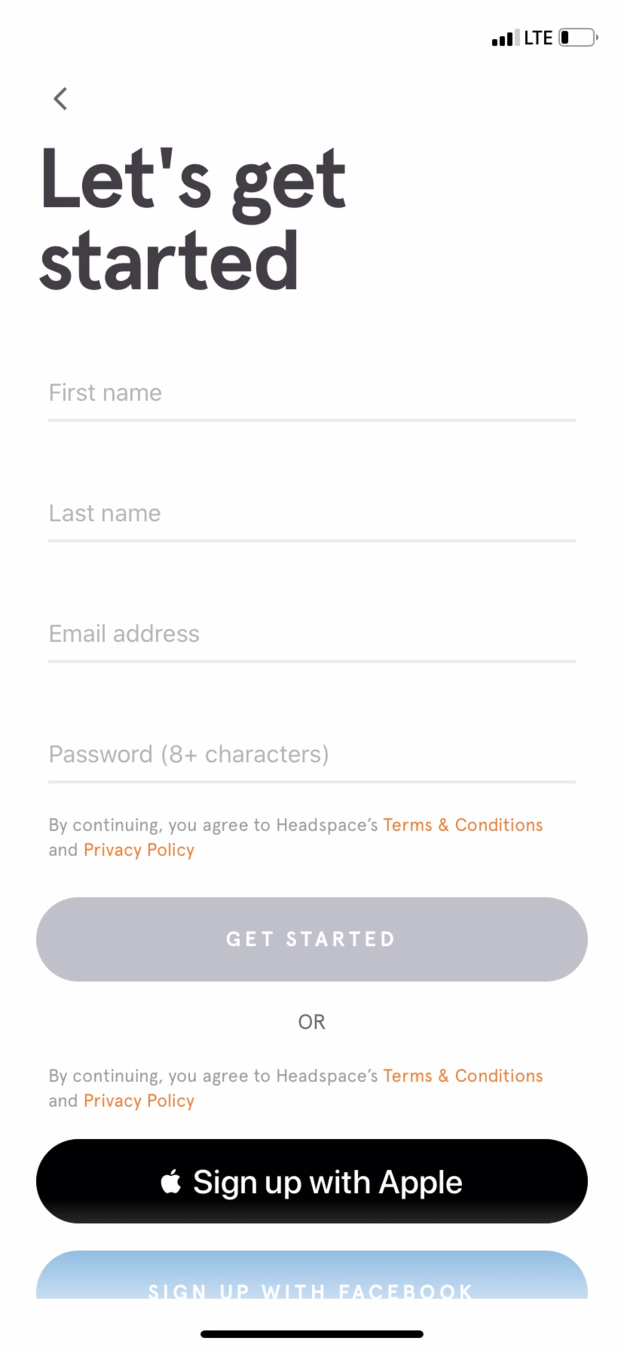
Straight after, a full sign up form asks for name, email and password.
'Let's get started' asks for four fields before anything else, with no way to skip. Because the breathing exercise raised their motivation, the user is willing to fill it in and moves on.
TakeawayA demanding step works only when motivation is already high.
 Framed as a problem
03
Step 2
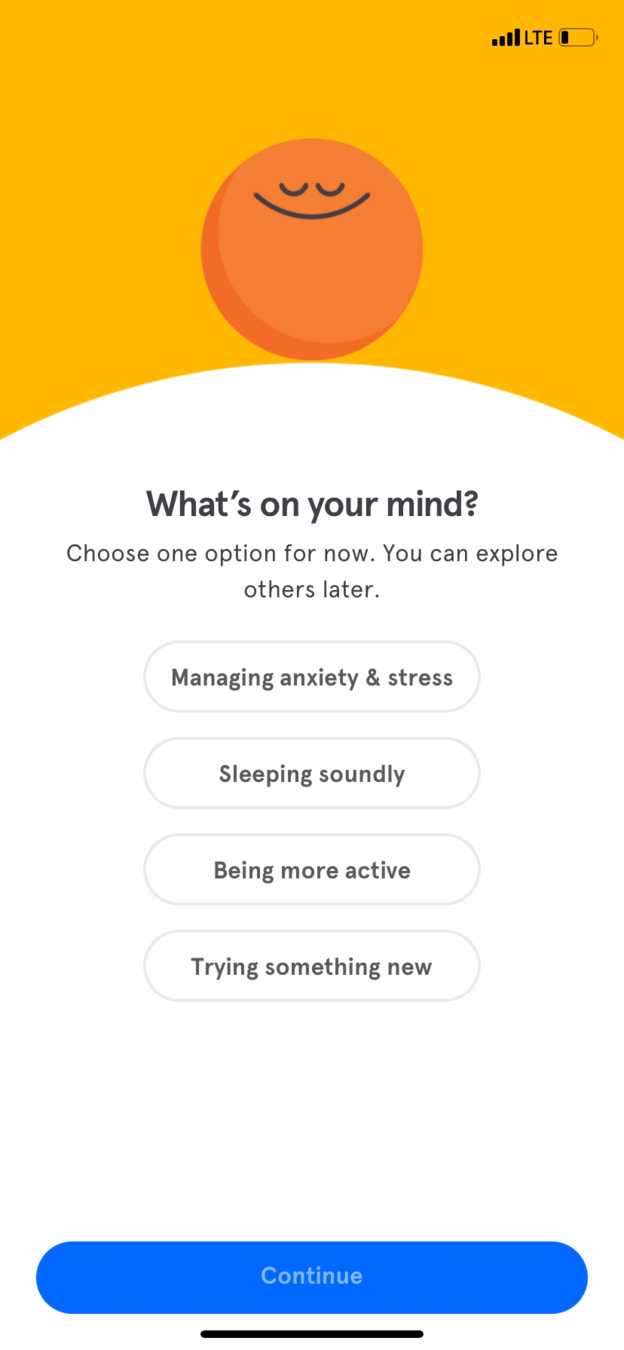
'What's on your mind?' offers choices that are not quite what they want.
The options are managing anxiety and stress, sleeping soundly, being more active and trying something new. The user mostly wants to relax. 'Managing anxiety' also frames their situation negatively, as a problem to fix.
TakeawayPersonalizing is good; framing the options around a person's weaknesses is not.
Current A weaknessRedesign 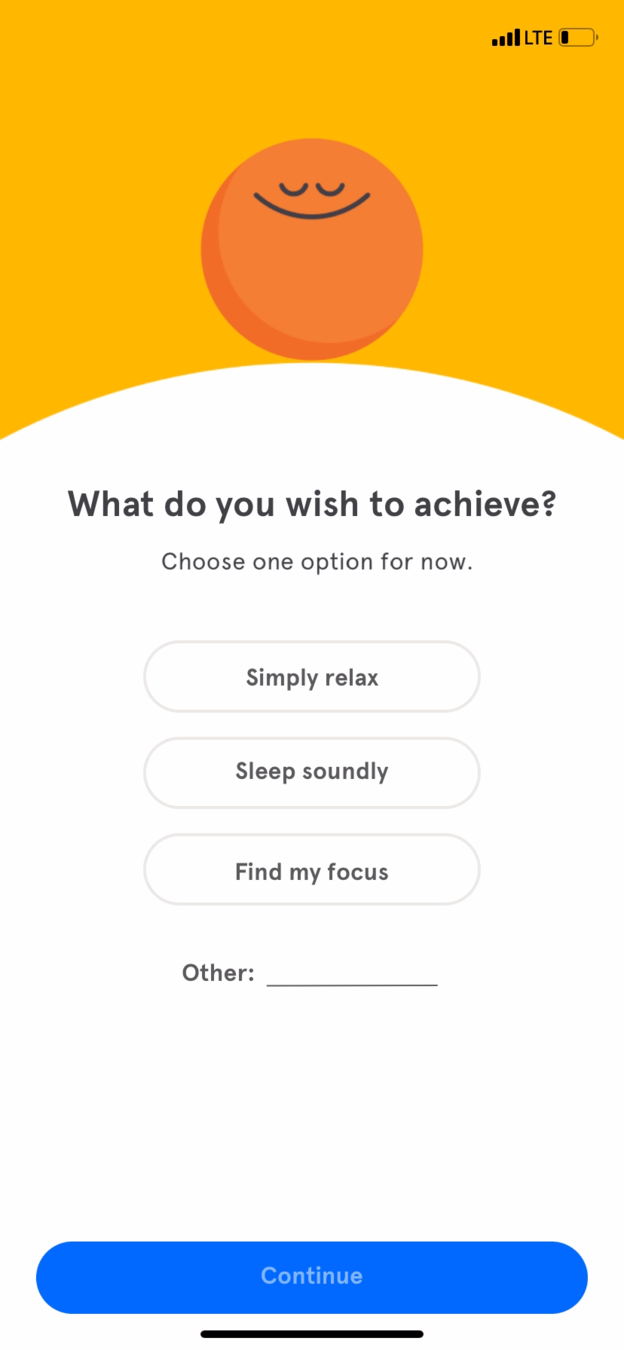 An outcome
04
The repair
Ask what they wish to achieve, and offer outcomes like 'Simply relax'.
Growth.Design's version asks 'What do you wish to achieve?' with positive outcomes: simply relax, sleep soundly, find my focus, and an 'Other' field so people can describe their own reason in their own words.
What changed
- Show positive benefits, not shortcomings
- Options named after outcomes the user wants
- An 'Other' field to research the real job
TakeawayDescribe the better situation people want to reach, not the one they are in.
Framing customers' jobsA job to be done is when someone wants to move from an existing situation to a preferred one. Growth.Design cites Alan Klement and Clayton Christensen: setting the right frame of reference helps people understand your product.
 Sounds like work
05
Step 3
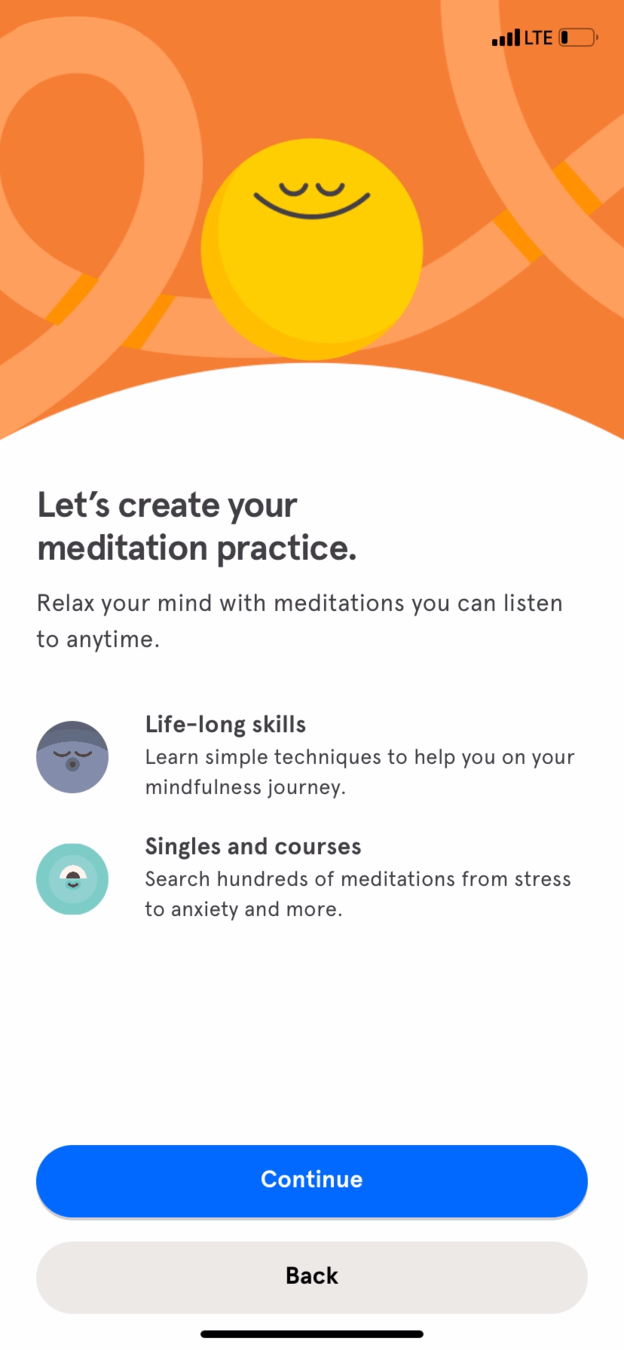
Instead of a quick session, the next screen offers life-long skills and courses.
'Let's create your meditation practice' offers 'Life-long skills' and 'Singles and courses'. For someone who just wants to relax, it sounds like signing up for a new challenge, and it is a lot of text to digest.
TakeawayMatch the size of the next step to the size of the user's goal.
Current Extra decisionRedesign 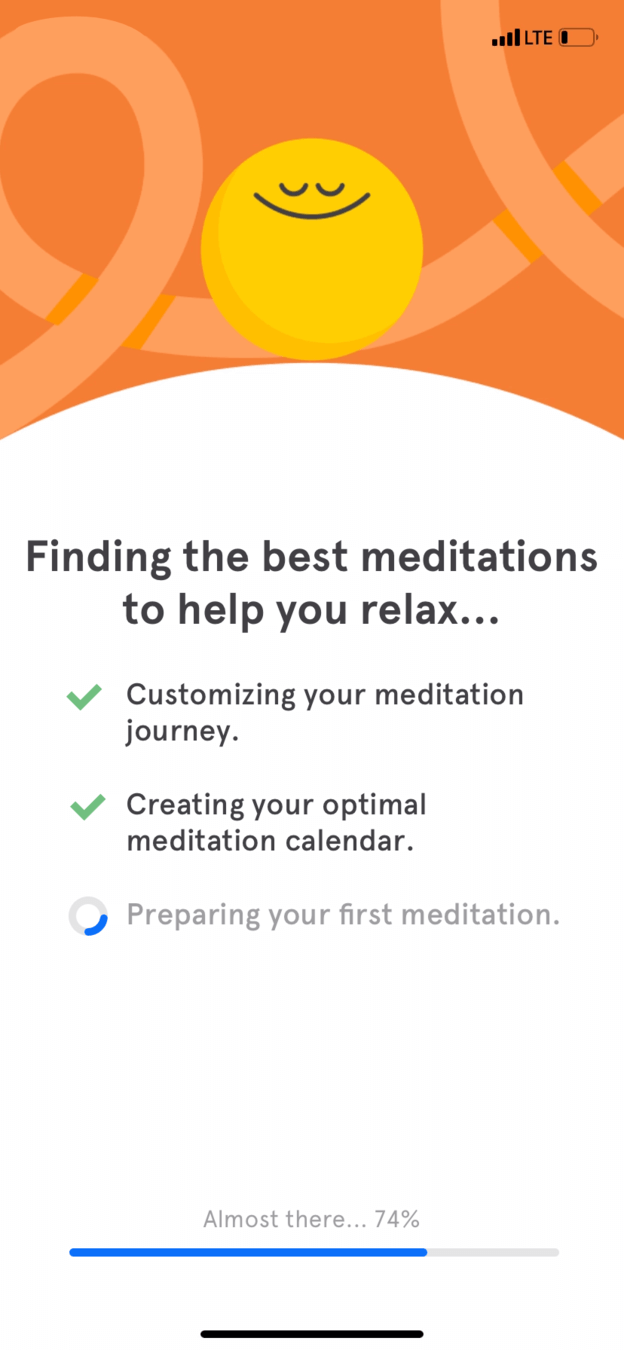 Work shown
06
The repair
Replace the extra step with a short animated transition that builds anticipation.
Growth.Design's redesign removes the choice and shows 'Finding the best meditations to help you relax', ticking off customizing the journey, creating a calendar and preparing the first meditation, with a progress bar. The copy speaks to the user's stated job.
What changed
- A smooth transition instead of an extra step
- Priming: excitement about the first meditation
- Copy personalized to 'help you relax'
TakeawayShowing the work done on someone's behalf raises the value of what comes next.
Labor illusionPeople trust and value results more when they arrive after a carefully crafted delay. Showing effort to customize the experience raises the perceived value of what follows.
 Generic benefits
07
Step 4
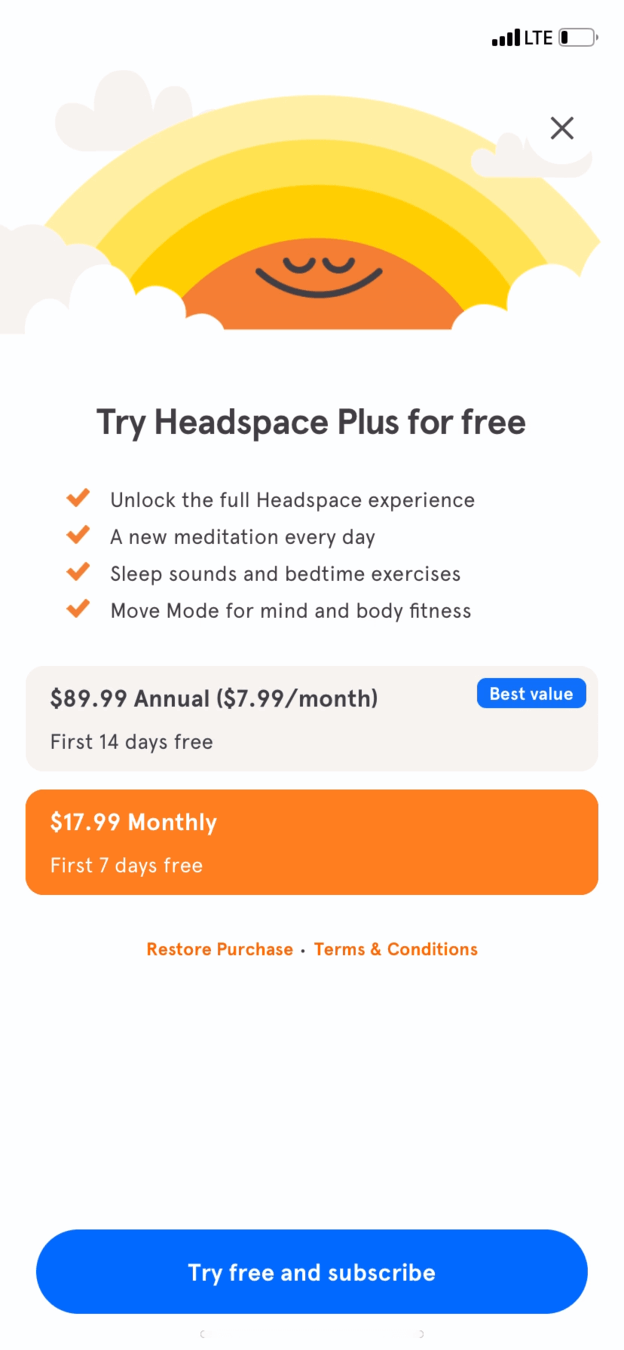
Before seeing the app, the user hits a paywall that ignores their goal.
'Try Headspace Plus for free' lists general benefits and two plans, $89.99 a year or $17.99 a month. Nothing mentions relaxing or sleeping, even though the app now knows the user's job. They feel committed enough to pick the monthly option, but the small close button went unnoticed.
TakeawayA paywall that knows the user's goal should sell that goal.
Endowment effectPeople value something more when they feel it is theirs. Knowing what users want, their job to be done, lets you craft an offer that feels personal to anyone. Growth.Design notes a paywall this early may lift short term conversions but hurt long term customer value.
 Why now?
08
Step 5
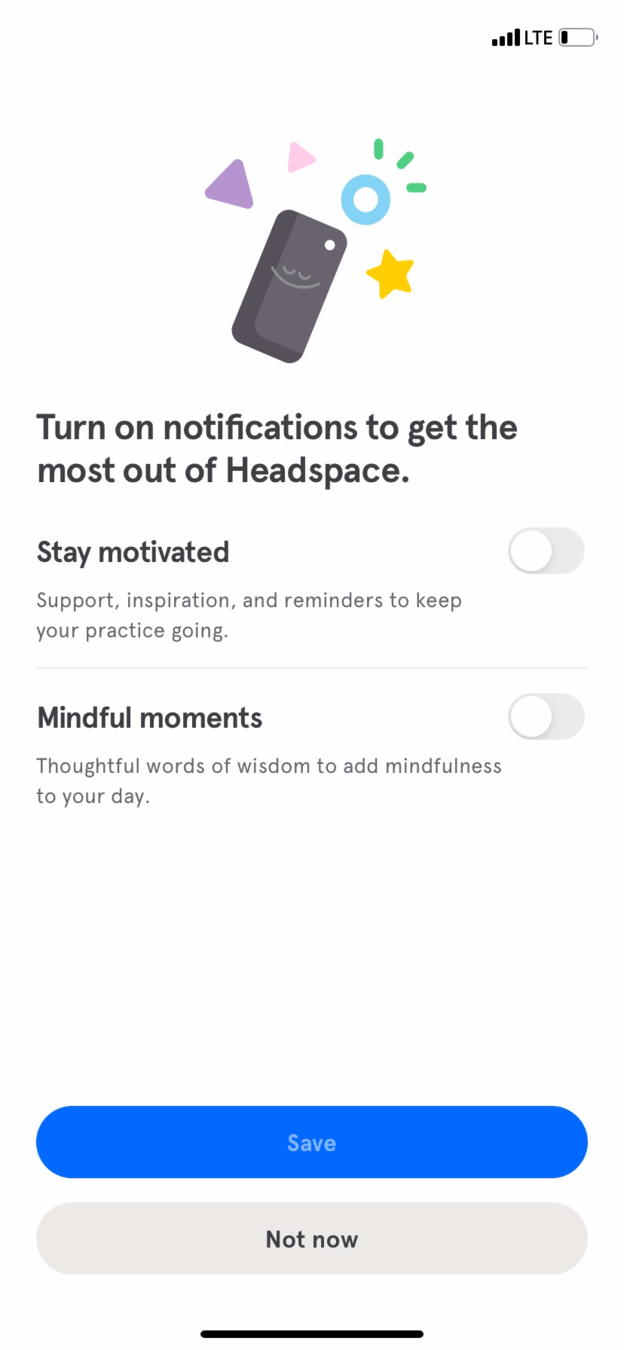
Then a notification request arrives, before any meditation and without a clear reason.
'Turn on notifications to get the most out of Headspace' offers two toggles, 'Stay motivated' and 'Mindful moments'. The user has not yet received anything, and the benefit is vague.
TakeawayAsk for permissions after people have experienced value, not before.
ReciprocityPeople feel they should return a favor after receiving one. Asking a stranger for six favors in a row would feel odd, and apps are no different. Asking right after the first meditation would be a solid improvement.
Featured 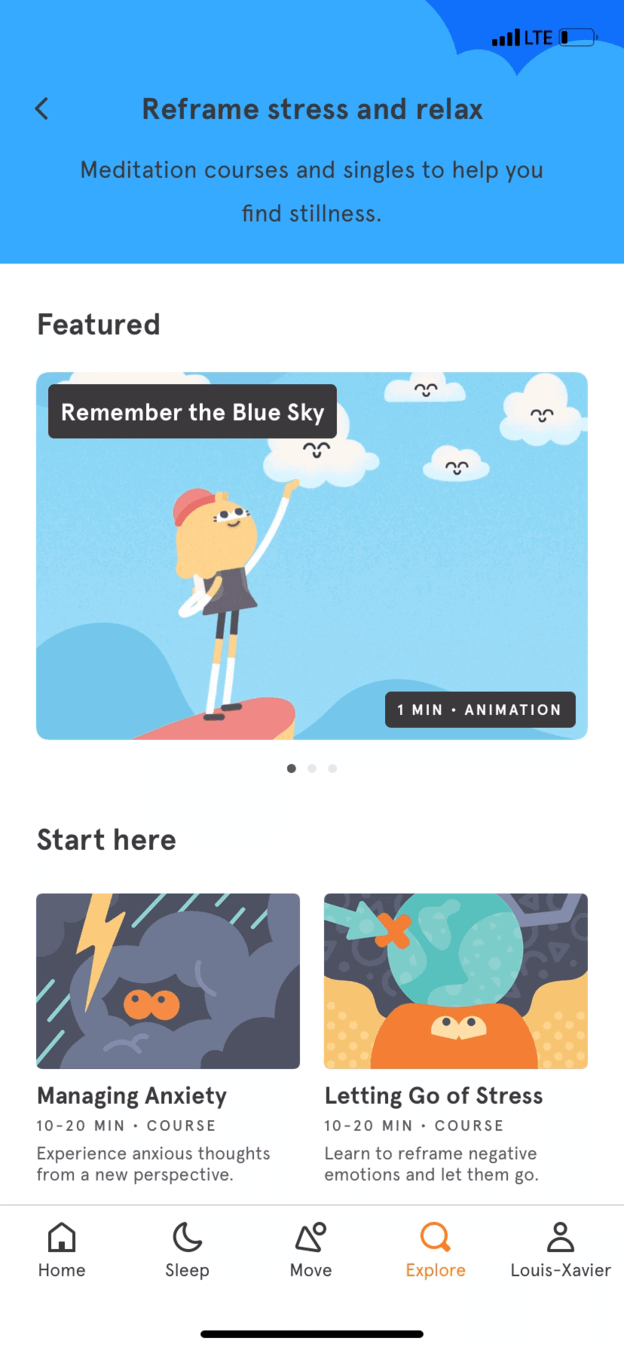 Unclear pick
Scrolling down 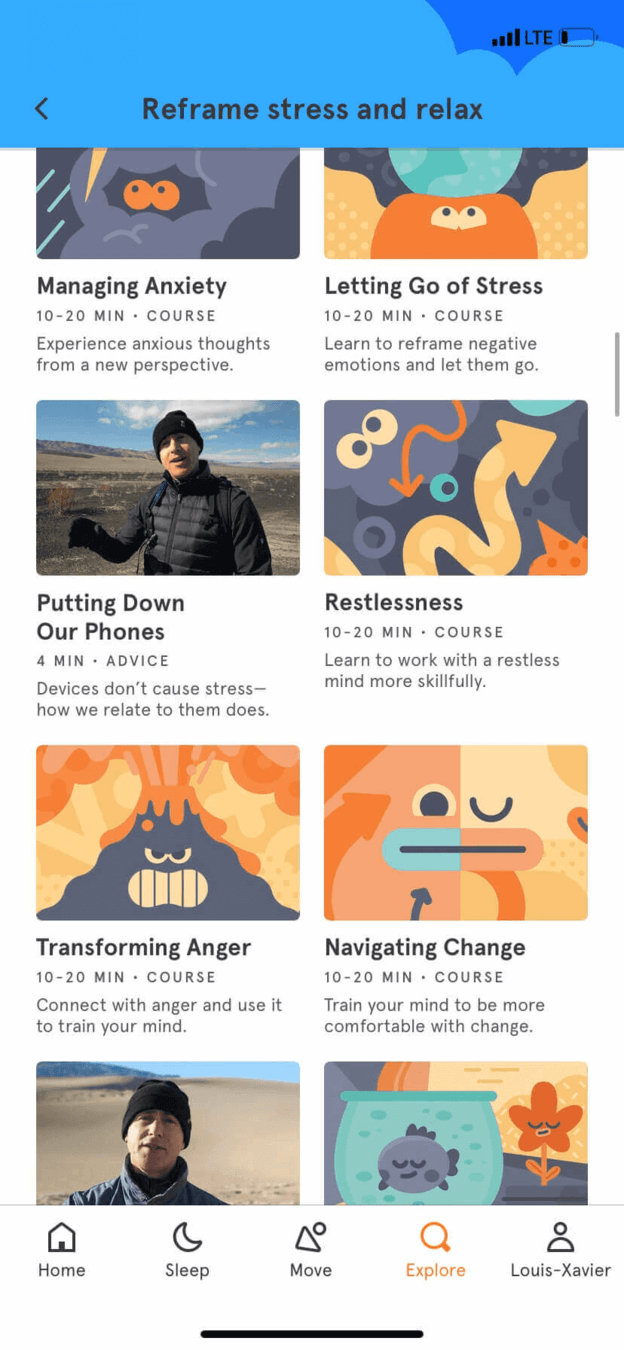 More courses
09
Step 6
Inside the app, the user finds a list of courses instead of one relaxing session.
'Reframe stress and relax' features 'Remember the Blue Sky', which does not obviously connect to their goal, followed by 10 to 20 minute courses on anxiety, anger and change. None of the titles match the simple wish to relax, and they leave.
TakeawayThe first screen inside the product should deliver the job the user described.
Needs 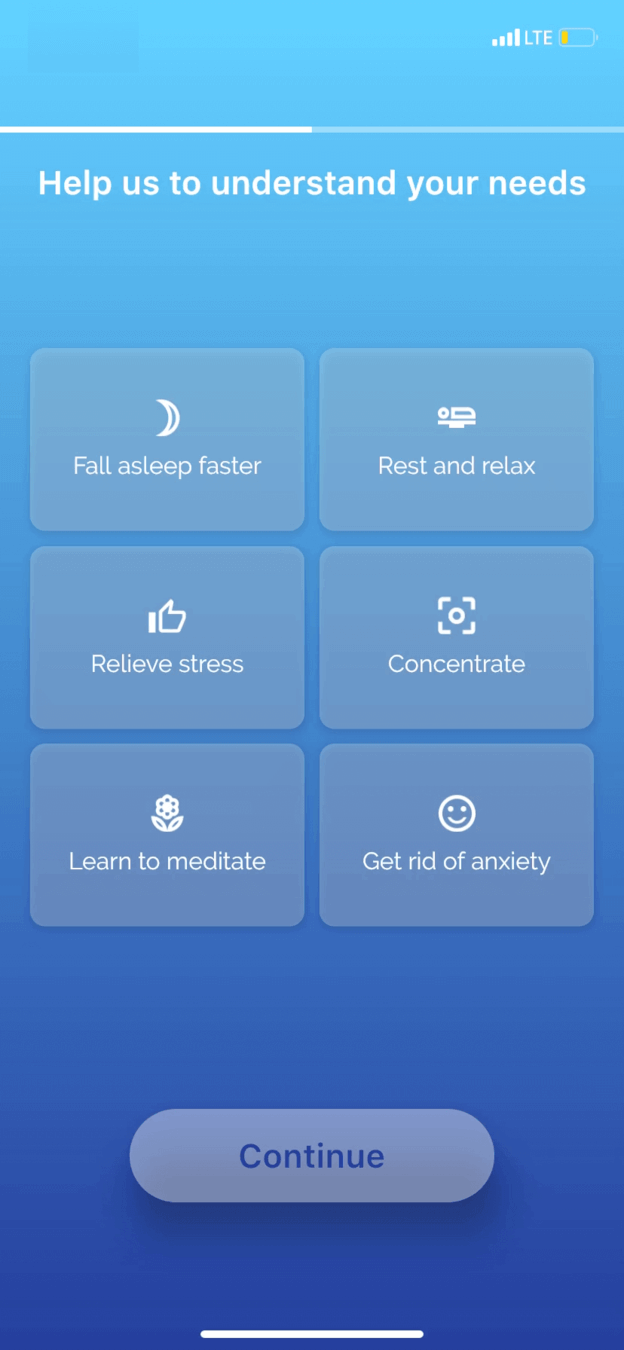 Framed as benefits
Paywall 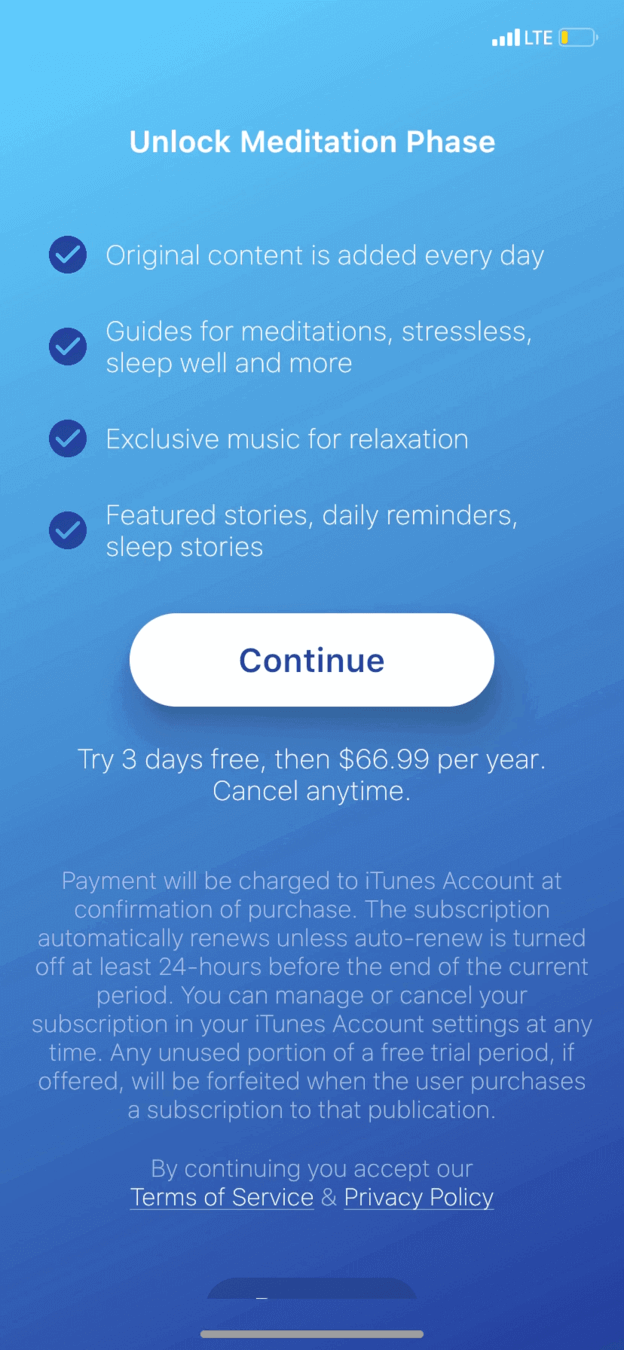 Too early
10
The comparison
A different meditation app frames its options as benefits, then asks for money too soon.
Searching the app store, the user tries a relaxation app. Its 'Help us to understand your needs' screen offers fall asleep faster, rest and relax, and relieve stress, which is well framed. But it goes straight to 'Unlock Meditation Phase' and a trial, and this time the user closes it.
TakeawayGood framing cannot rescue a request made before the product has shown its worth.
Consider user psychologyAsking for information or money without giving value can work when a person is highly motivated. According to BJ Fogg's behavior model, when motivation and ability are low it rarely does. Crafting each interaction around giving value first helps even in a poor context.
Strong start Value firstThe job Their job11
The result
A strong start faded because the flow kept asking and never delivered the job.
The breathing splash provided value and carried the user through sign up. Asking about goals was the right idea and needed only better framing. After that, a paywall, a permission request and an unrelated course list turned onboarding into a series of asks, and Growth.Design rates the experience a C.
What changed
- Frame questions around desired outcomes
- Use transitions to show personalization at work
- Tie the paywall to the user's stated goal
- Ask for notifications after the first session
TakeawayUnderstanding the customer's job is only useful if every later step serves it.
Every takeaway, in one place
- The setupTurn waiting time into a small taste of the product's value.
- Step 1A demanding step works only when motivation is already high.
- Step 2Personalizing is good; framing the options around a person's weaknesses is not.
- The repairDescribe the better situation people want to reach, not the one they are in.
- Step 3Match the size of the next step to the size of the user's goal.
- The repairShowing the work done on someone's behalf raises the value of what comes next.
- Step 4A paywall that knows the user's goal should sell that goal.
- Step 5Ask for permissions after people have experienced value, not before.
- Step 6The first screen inside the product should deliver the job the user described.
- The comparisonGood framing cannot rescue a request made before the product has shown its worth.
- The resultUnderstanding the customer's job is only useful if every later step serves it.
Source: Growth.Design: How To Properly Apply Jobs-To-Be-Done To User Onboarding
Design onboarding around what users came to do.
People install an app with a specific outcome in mind, and onboarding either moves them toward it or gets in the way. Zyxware can research your users' jobs to be done, rework questions, paywalls and permission prompts around them, and measure how far new users get in their first session.