How Duolingo Wins Back a Lapsed Learner
 +20 XP
Case study
How Duolingo Wins Back a Lapsed Learner
A traveler who stopped using Duolingo gets a reminder email at the airport, completes two lessons before takeoff, then drifts away again once work gets busy. Following that journey shows which of Duolingo's eight retention tactics rebuild the habit and which moments put it at risk.
+20 XP when you reach the endWhat you will learn
- Match a reminder to the reason people use the product
- Use rewards, streaks and small commitments to rebuild a habit
- Give people a clear place to stop, and respect their attention
Scroll to follow the story. The screen changes with you.
Based on the learnings from Growth.Design: Duolingo's User Retention: 8 Tactics Tested On 300 Million Users, presented in our own format.
Step 1 of 12
- We miss you
01
Tactic 1: lifecycle email
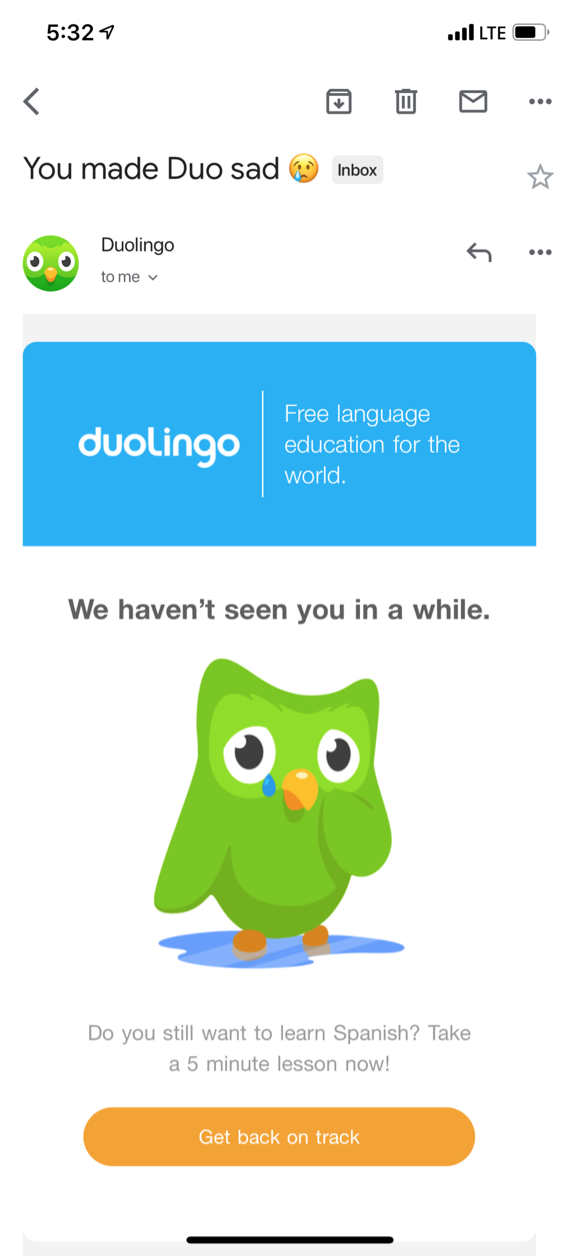
A reminder email arrives just as a lapsed learner is about to fly to Argentina.
The traveler has not opened Duolingo in weeks. While waiting for a delayed flight, an email with a sad Duo and the line 'We haven't seen you in a while' lands in their inbox. With a trip to a Spanish speaking country ahead, the timing could not be better.
TakeawayA reminder works best when it lines up with a reason the person already has.
Internal and external triggersA trigger is a prompt to act. External triggers are emails, notifications and ads; internal ones are places, feelings and situations. According to Nir Eyal in 'Hooked', people act more readily when the two line up. Growth.Design cites Duolingo's blog: 15 to 30 percent of its students learn to make international travel more enjoyable.
- Easy to miss
02
A missed opportunity
The one action that matters is the smallest thing in the email.
The large blue banner and the owl take most of the space. The call to action, 'Get back on track', is small, and the line above it is light gray on white. Someone scanning the email sees Duo and the banner, not what to do next.
TakeawayMake the next step the most visible element, not the decoration around it.
 One tap to start
03
Tactic 2: reduce friction
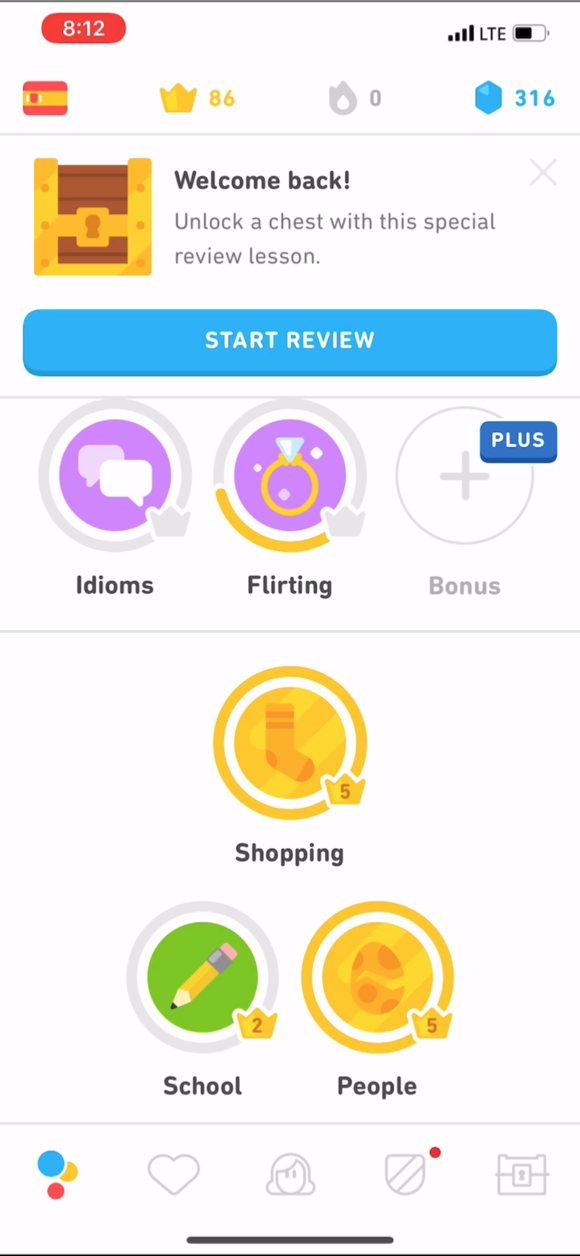
The home screen is crowded, but one button makes starting easy.
Back in the app, the lesson tree is full of colorful circles competing for attention. At the top, a 'Start review' button lets the returning user begin with a single tap instead of choosing a topic. A dimmed overlay over the rest of the screen would have kept the focus on that button even more.
TakeawayWhen people return after a break, pick the first step for them.
Hick's LawThe time it takes to decide grows with the number and complexity of choices. If you highlight one option, make sure the others do not compete with it.
 Subtle shaming
04
An ethical note
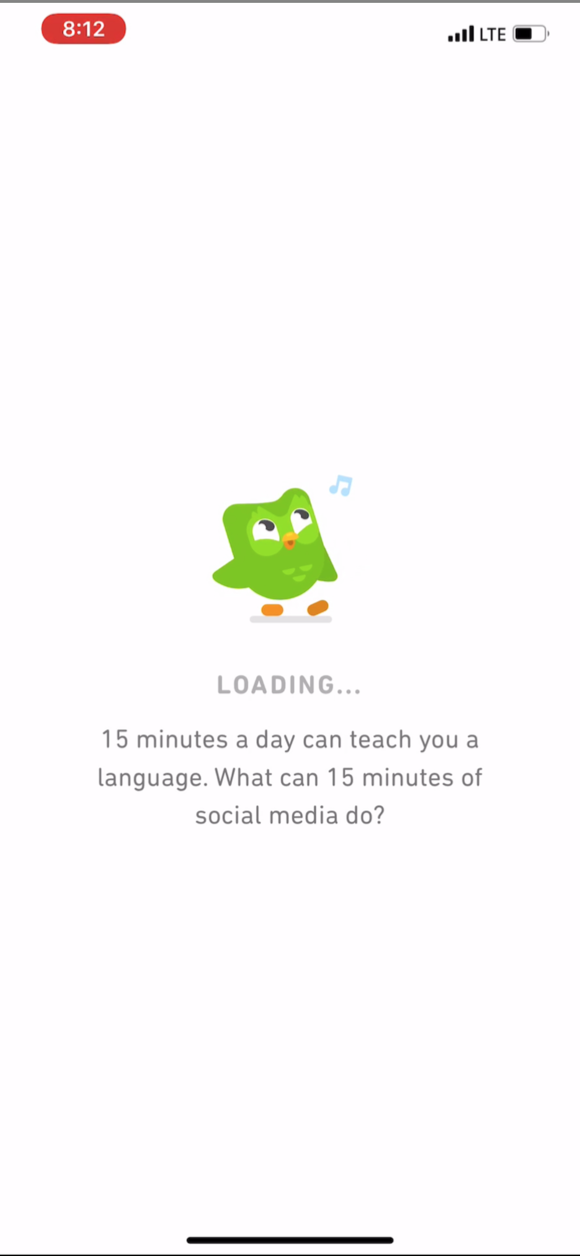
The loading screen reinforces the habit, then takes a small jab at the user.
Using the loading moment to talk about learning is a smart idea. The message compares 15 minutes of Duolingo with 15 minutes of social media, which quietly implies the user is wasting time. For someone who barely uses social media, it simply feels like being judged.
TakeawayEncourage the behavior you want without making people feel bad about themselves.
User shamingMaking people feel bad to change their behavior rarely works. Nielsen Norman Group (2017) describes specific forms such as manipulinks and confirmshaming. It is usually better to avoid this kind of microcopy altogether, since it slides toward dark patterns.
 Hard to get wrong
05
Tactic 3: lower difficulty
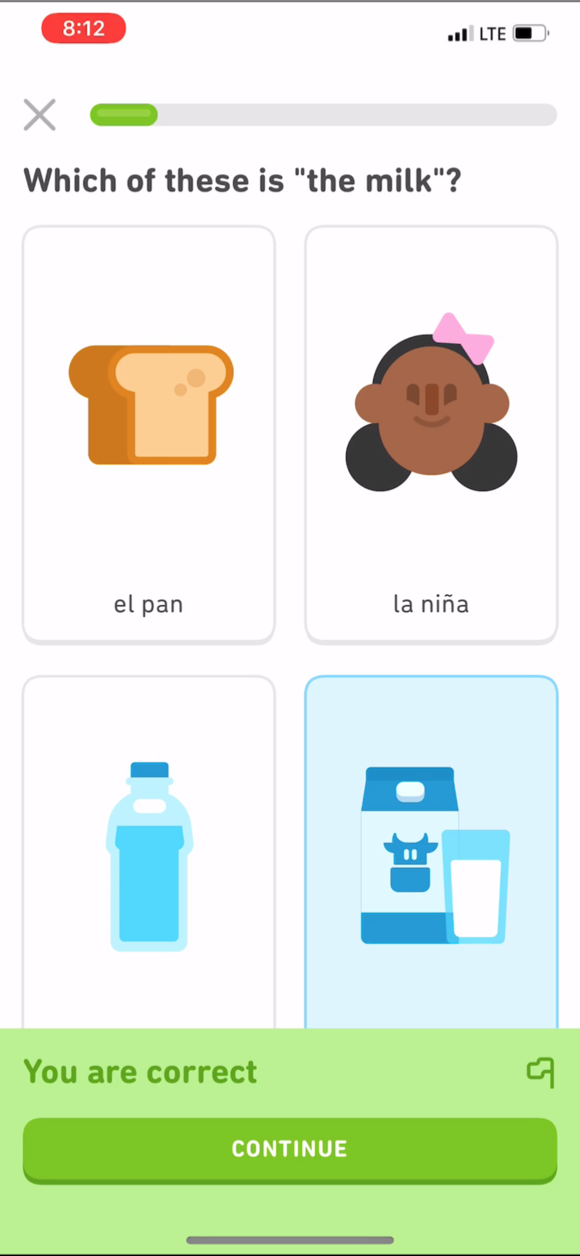
The first review lesson is noticeably easier than the user remembers.
The opening question asks which picture shows 'the milk', with four clear illustrations. The whole lesson flows quickly, and the learner finishes feeling capable instead of rusty.
TakeawayA quick early success is what convinces a returning user to keep going.
Design a happy pathOffer a simplified experience with lower difficulty, even if it means bending your usual flow. It helps raise activation when onboarding new users and improves retention when people come back after a long pause.
- Chest reward
06
Tactics 4 and 5: reward and streak
A welcome back chest and a new streak give the learner reasons to continue.
The 'Welcome back!' card offers a chest for finishing a review, and completing it pays out 100 gems in about two minutes. The lesson also starts a new daily streak, shown as a progress ring that is not yet full.
TakeawayA small reward plus a visibly unfinished goal pulls people into the next session.
Zeigarnik effectPeople remember unfinished tasks better than finished ones. Progress bars and rings are a well known way to use this to guide behavior.
First prompt 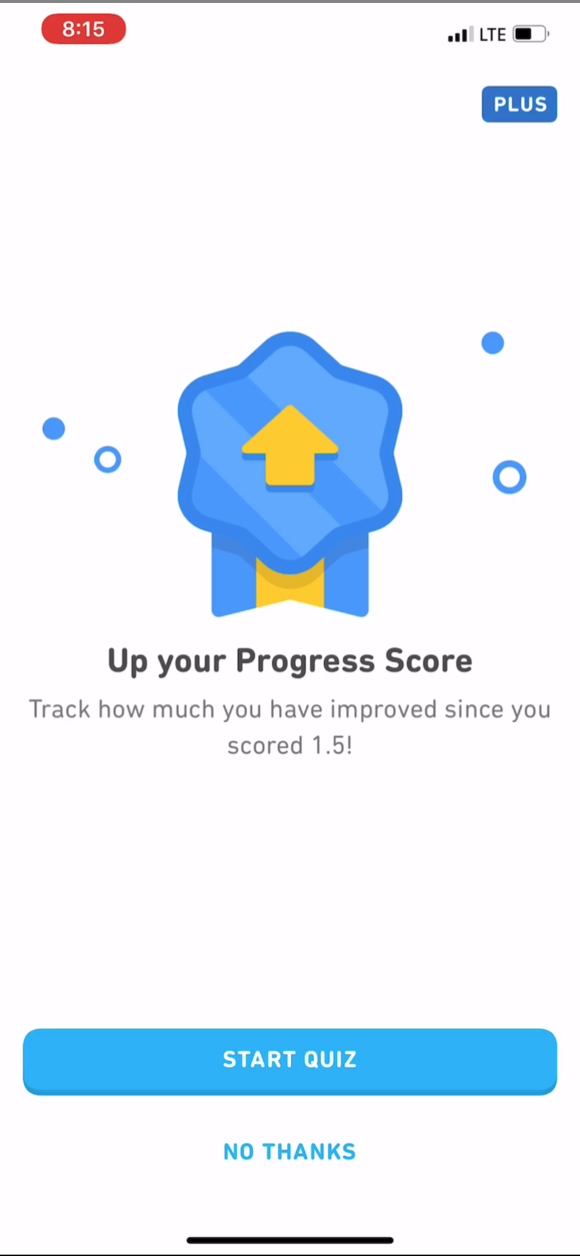 Sounds like a test
Second prompt 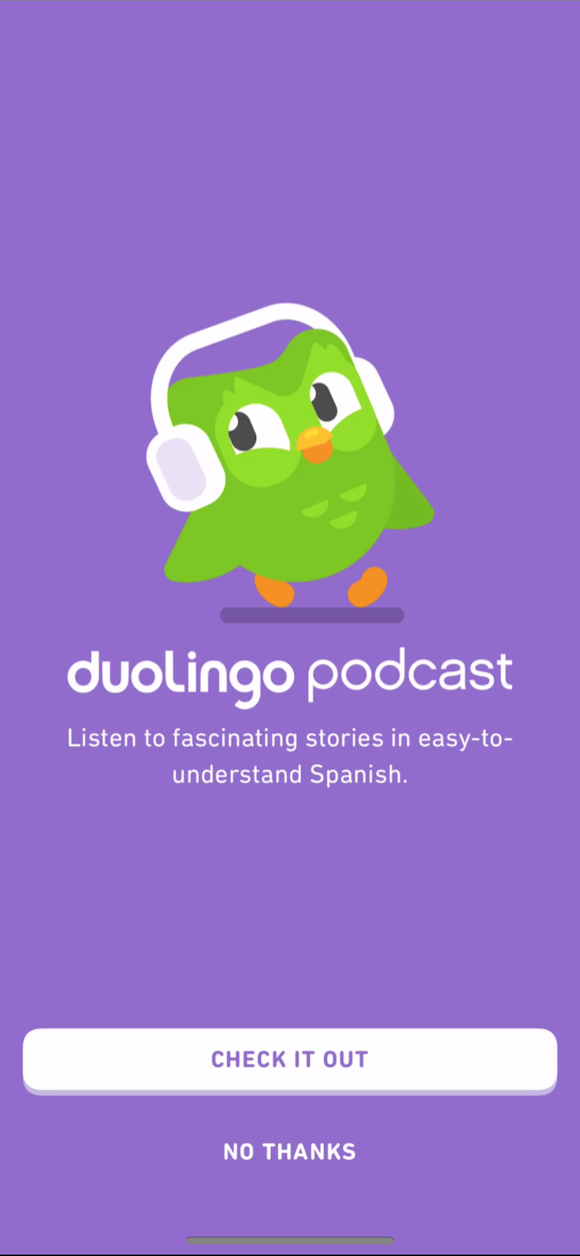 Too big a leap
07
Where it slips
Just as momentum builds, two unrelated offers get in the way.
After the reward, the app suggests a 'Progress Score' quiz the user never heard of, then promotes the Duolingo podcast. Going from relearning one word to listening to a full podcast in Spanish is a big jump, and both screens delay the lesson the learner actually wanted.
TakeawayDo not spend a fragile returning user's attention on promotions.
Segment before you suggestGrowth.Design suggests holding back the podcast for two groups: people resurrecting after a pause, and beginners. Citing Duolingo's blog, it notes that resurrected users are 20 percent less likely than new users to be retained.
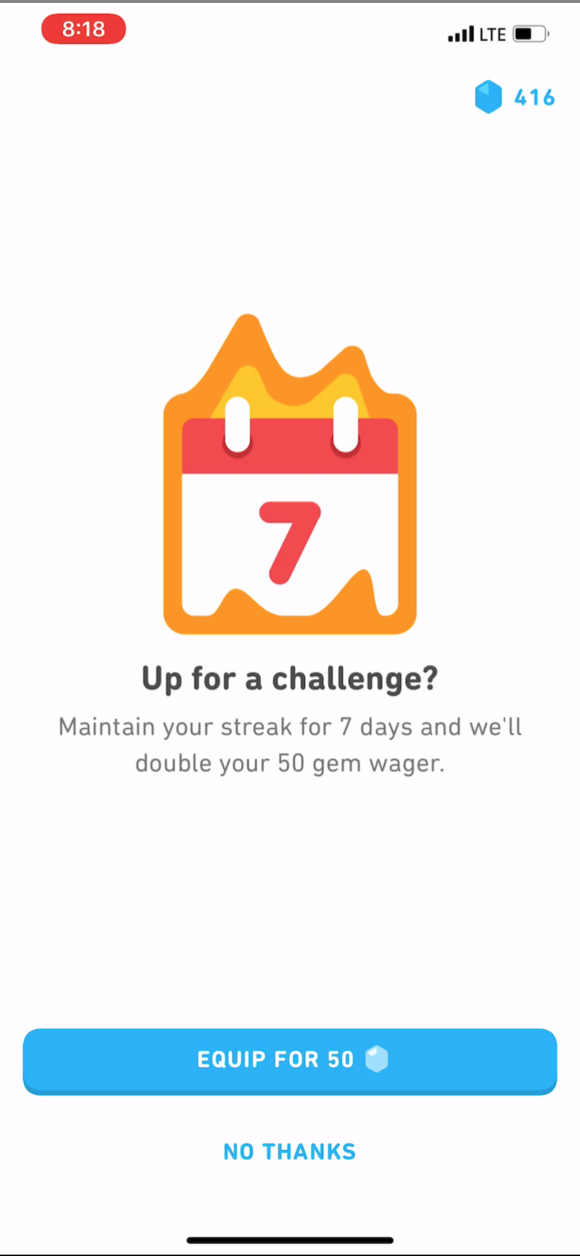 Small commitment
08
Tactic 6: sunk cost
Right after a win, the app asks for a small investment: bet 50 gems on a 7 day streak.
The learner just earned gems and finished a lesson, so wagering 50 of them on keeping a streak for a week feels easy. With weeks in a Spanish speaking country ahead, it seems like a safe bet.
TakeawayAsk for a commitment right after a reward, when people feel most able to make one.
Investment and the sunk cost effectAn investment loads the next trigger, and people value what they have put effort into. Growth.Design cites Duolingo's blog: this 'Investment Wager' step increased Day 7 retention by 14 percent. Duolingo's former Head of Growth, Gina Gotthilf, has also said streaks bring people back, but losing one is a big reason people quit.
Current 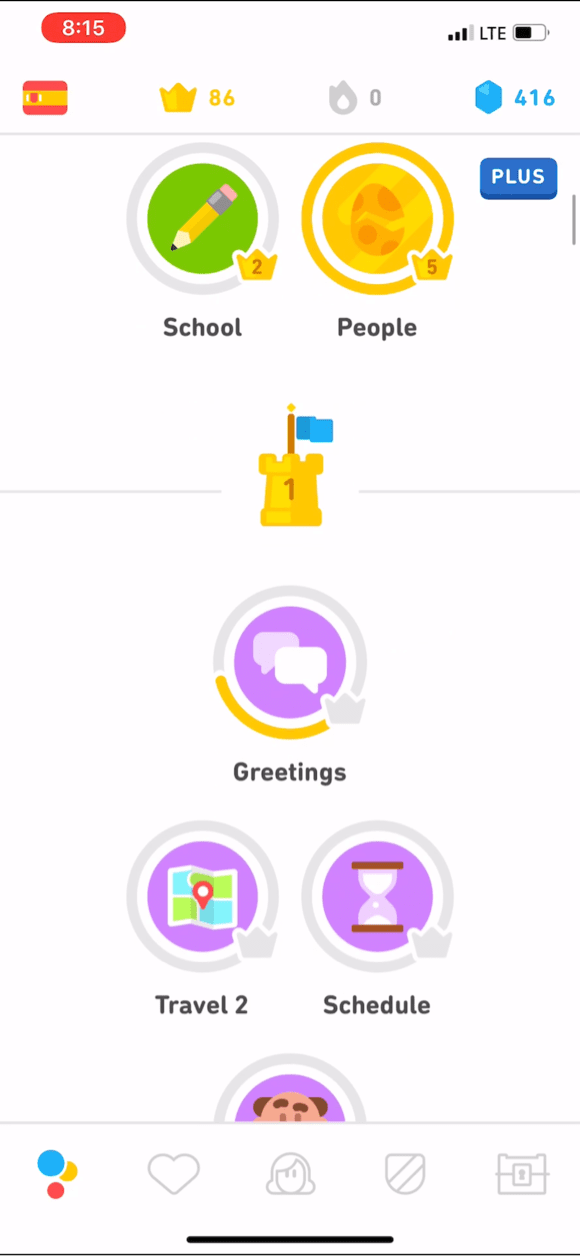 No clear end
Suggested redesign  A clean finish
09
Improvement idea
After the daily goal, the app drops the learner back into an endless list of lessons.
The review shortcut is gone and the tree is full of unfinished lessons, so closing the app feels like abandoning something, even though the goal is done. Growth.Design's experimental redesign ends the session with 'Good job! See you tomorrow' and a summary of what was achieved.
What changed
- A closing message nudges the learner to return tomorrow
- Checkmarks recap the goal, lessons and new words
- 'Keep exploring' stays as a low key option for power users
TakeawayLet people leave with a sense of completion, or they will link your product with unfinished work.
Provide exit pointsGrowth.Design frames this as an experiment to run, with the objective of increasing Day 30 retention by 5 percent. It is a hypothesis to test, not a measured result.
 Easy to ignore
10
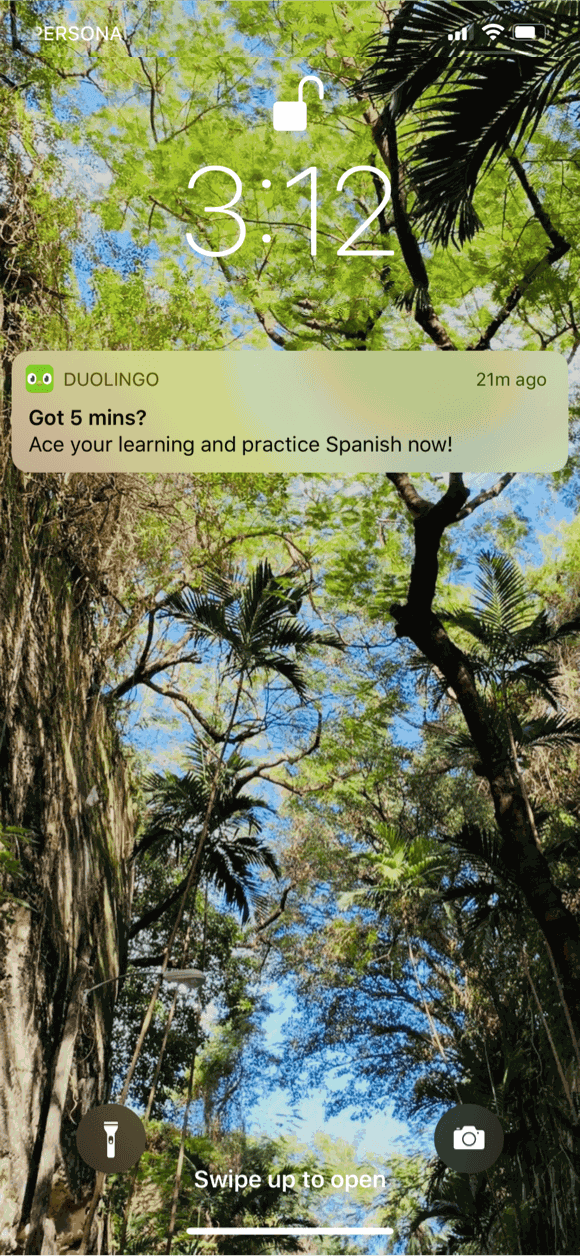
Tactic 7: phone notifications
Back at work, the reminders keep coming, and the habit still fades.
A week into the trip, meetings take over. Notifications like 'Got 5 mins?' and 'Don't give up!' arrive on the lock screen, but the learner is always in a rush and swipes them away. No amount of reminders brings them back while life is this busy.
TakeawayNotifications support a habit; they cannot create one when the timing is wrong.
 Respectful pause
11
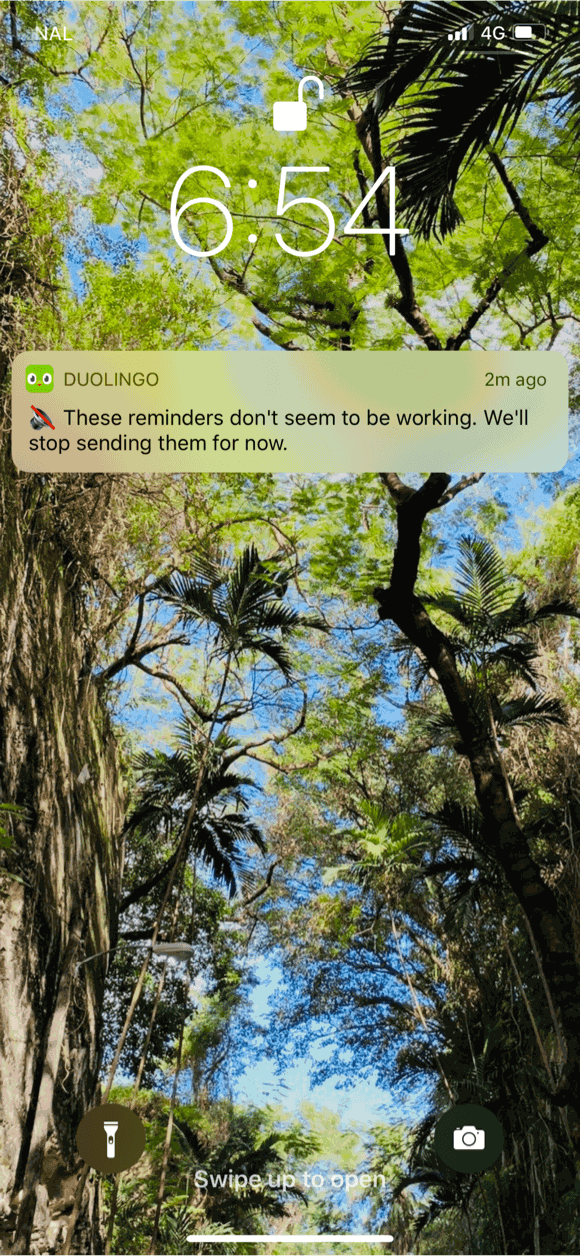
Tactic 8: auto-filtering
Duolingo notices it is being ignored and stops sending reminders.
On one of the last days of the trip, a single message appears: these reminders do not seem to be working, so they will stop for now. Being given that space oddly makes the learner want to go back and prove they are still committed.
TakeawayPulling back when a message is not working protects the relationship for later.
Respecting attentionFiltering your own notifications has three benefits: people are less annoyed, fewer of them turn notifications off for good, and you keep a chance to bring them back at a better moment.
What worked CommitmentEarning trust Restraint12
The result
Eight tactics, one journey: most of them helped, and the gaps were about attention.
The timed email, the review shortcut, the easy lesson, the welcome back reward, the streak and the wager all lifted motivation. The unrelated prompts, the missing exit and the ignored notifications pulled it down. Growth.Design still rates the overall experience an A.
What changed
- Lifecycle emails, reduced friction and lower difficulty
- Welcome back reward, streaks and the sunk cost wager
- Phone notifications and notification auto-filtering
TakeawayRetention comes from a sequence of well judged moments, not a single feature.
Every takeaway, in one place
- Tactic 1: lifecycle emailA reminder works best when it lines up with a reason the person already has.
- A missed opportunityMake the next step the most visible element, not the decoration around it.
- Tactic 2: reduce frictionWhen people return after a break, pick the first step for them.
- An ethical noteEncourage the behavior you want without making people feel bad about themselves.
- Tactic 3: lower difficultyA quick early success is what convinces a returning user to keep going.
- Tactics 4 and 5: reward and streakA small reward plus a visibly unfinished goal pulls people into the next session.
- Where it slipsDo not spend a fragile returning user's attention on promotions.
- Tactic 6: sunk costAsk for a commitment right after a reward, when people feel most able to make one.
- Improvement ideaLet people leave with a sense of completion, or they will link your product with unfinished work.
- Tactic 7: phone notificationsNotifications support a habit; they cannot create one when the timing is wrong.
- Tactic 8: auto-filteringPulling back when a message is not working protects the relationship for later.
- The resultRetention comes from a sequence of well judged moments, not a single feature.
Source: Growth.Design: Duolingo's User Retention: 8 Tactics Tested On 300 Million Users
Turn a returning user into a regular one.
Retention is decided in small moments: the reminder, the first screen back, the point where someone can stop. Zyxware can map your returning user journey, find where people drop off again, and design the prompts, rewards and exits that bring them back without wearing them out.