Five Small Fixes for a Newsletter Signup and Upgrade Flow
 +20 XP
Case study
Five Small Fixes for a Newsletter Signup and Upgrade Flow
A reader subscribes to a creator's newsletter on beehiiv, then wanders through generic recommendations and lands on a premium offer they cannot place. We look at five small mistakes in that flow and a redesign that keeps the creator's voice at the center.
+20 XP when you reach the endWhat you will learn
- Write recommendations in the creator's own voice
- Limit choices so the main offer is not forgotten
- Frame and preview a paid tier so its value is obvious
Scroll to follow the story. The screen changes with you.
Based on the learnings from Growth.Design: Beehiiv subscription: 5 small UX mistakes that make a BIG difference, presented in our own format.
Step 1 of 11
- Why they came
01
The setup
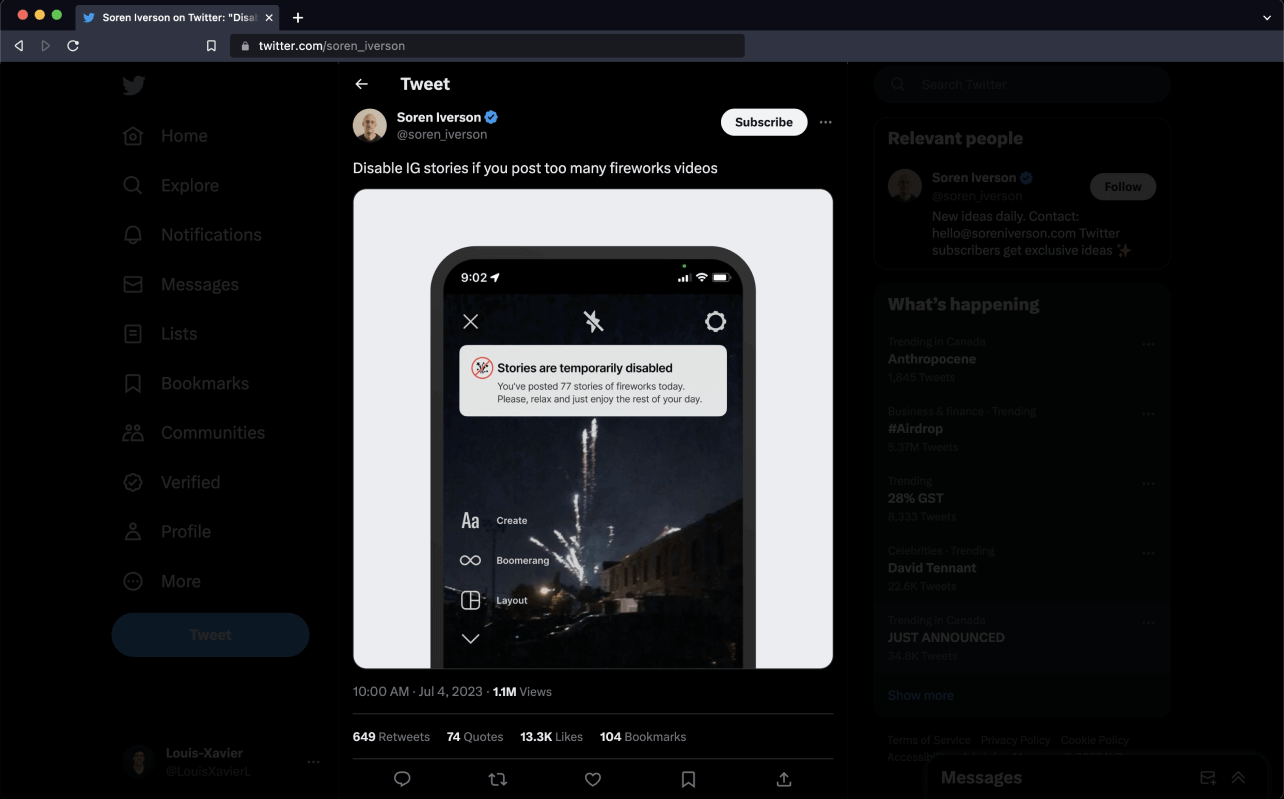
A funny post on Twitter leads a reader to a creator named Soren.
Soren shared a screenshot of Instagram gently telling him stories were disabled after he posted 77 fireworks clips. The reader enjoys his take and goes looking for his newsletter.
TakeawayPeople subscribe to a person first. The flow should keep that person visible.
 One click
02
Step 1
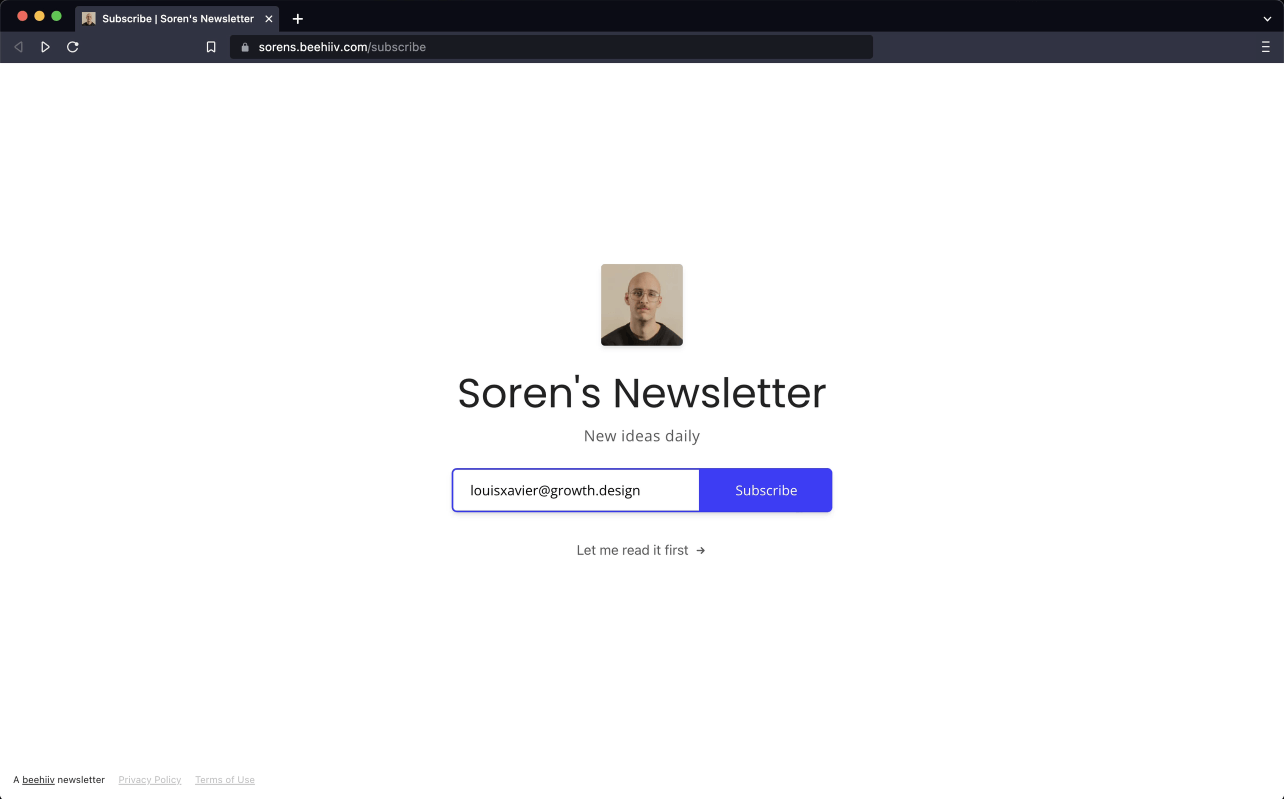
Subscribing takes one email address and one click.
Soren's beehiiv page is simple: his photo, the name 'Soren's Newsletter', an email field and a 'Subscribe' button. So far the experience is quick and pleasant.
TakeawayA clean first step builds goodwill that the next steps can either keep or spend.
 Who is recommending?
03
Mistake 1
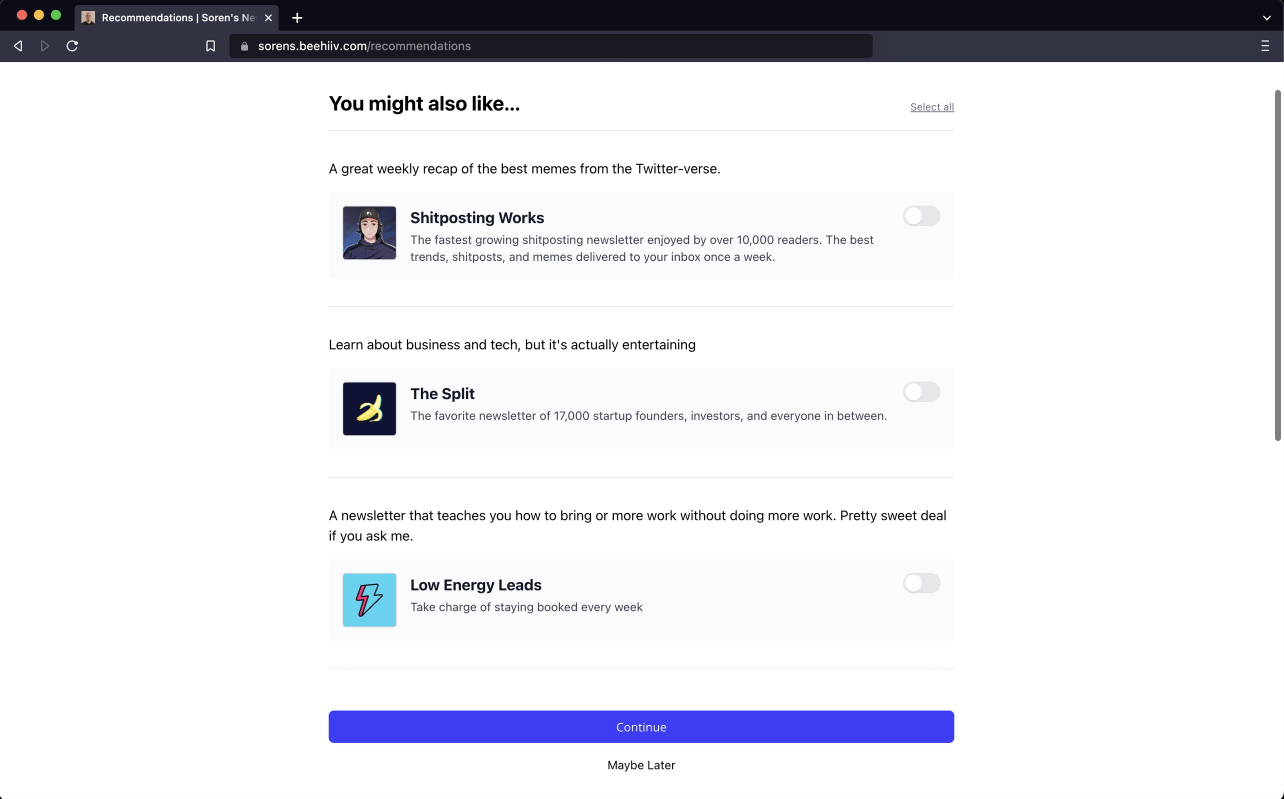
The next page recommends other newsletters in a voice that is not Soren's.
Under 'You might also like...' each option has a short generic description and a toggle. It reads like a platform algorithm talking, and Soren, the reason the reader is here, has vanished from the page.
TakeawayRecommendations feel trustworthy when they come from the person people just chose.
 More and more
04
Mistake 2
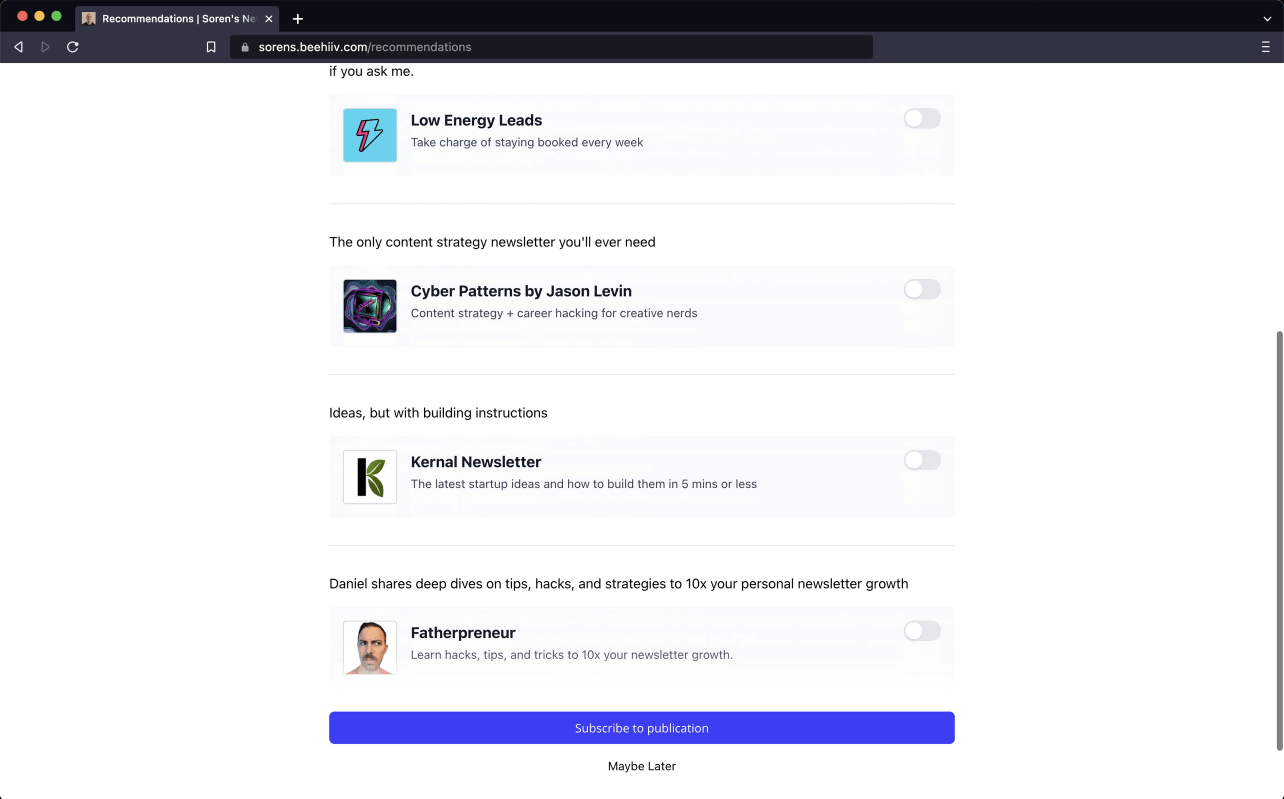
Scrolling reveals four more newsletters, seven in total.
Cyber Patterns, Kernal Newsletter, Fatherpreneur and more appear below the first three. The reader picks one and taps 'Subscribe to publication', but by now they have almost forgotten Soren's own newsletter.
TakeawayEvery extra option dilutes attention from the one that matters most.
Hick's lawThe more choices people face, the longer they take to decide and the more likely they are to lose track of their original goal. Growth.Design's redesign caps the list at three.
 Premium for what?
05
Mistake 3
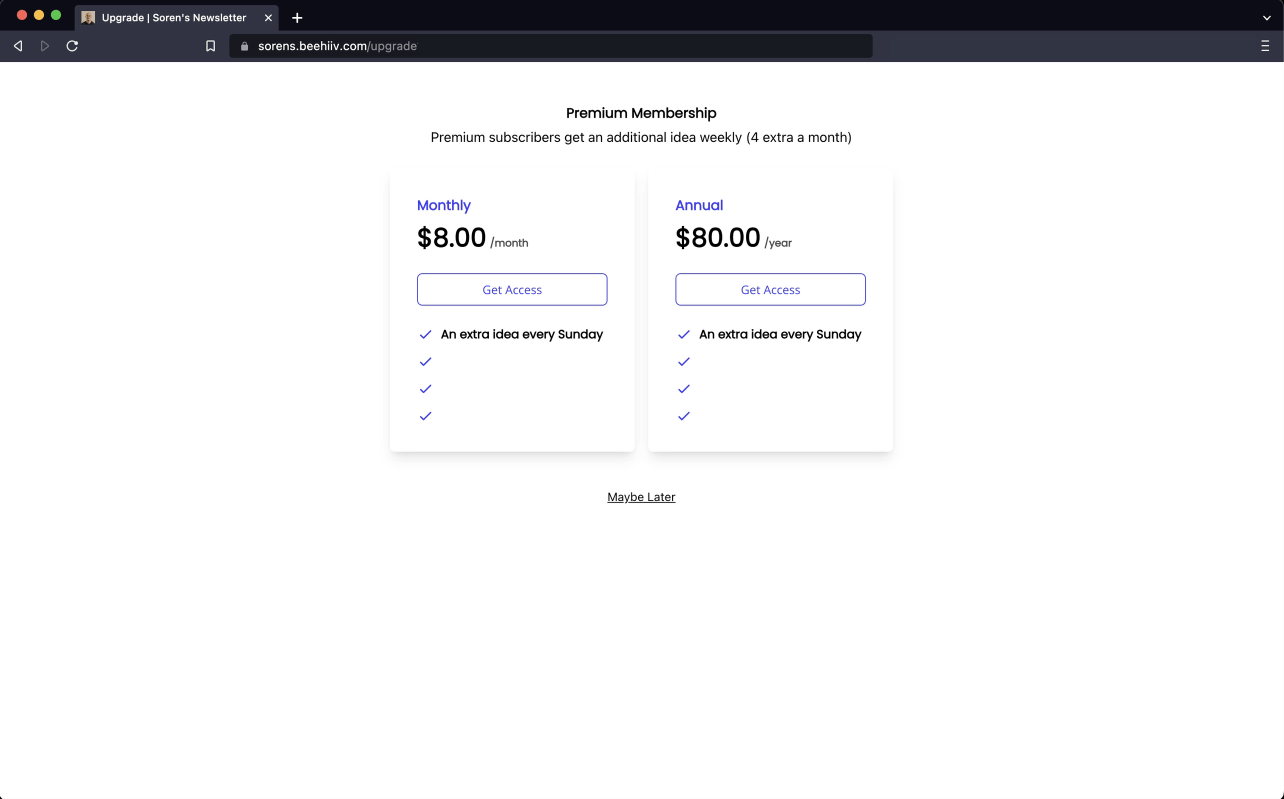
A 'Premium Membership' page appears with no clue whose it is.
The page offers $8 a month or $80 a year for 'An extra idea every Sunday'. Coming straight from the recommendations, the reader wonders if they must now pay for the newsletters they just selected.
TakeawayNever make people remember where they are. Show them.
 Finally, a name
06
The realization
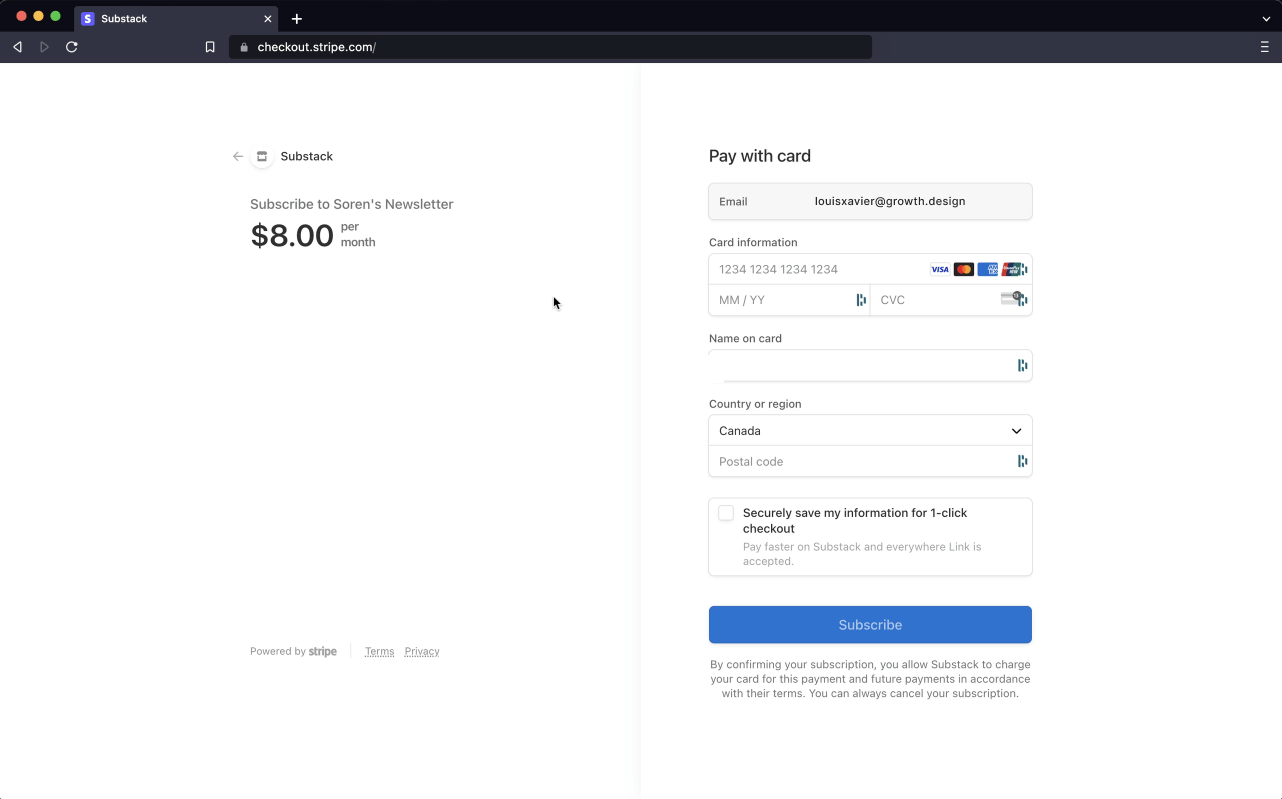
Only the checkout page says it is Soren's newsletter.
After tapping 'Get Access', the Stripe checkout shows 'Subscribe to Soren's Newsletter, $8.00 per month' in small text. The context the reader needed arrives one step too late, after they have already been confused.
TakeawayContext that appears after the decision does not help the decision.
Recognition over recallIt is easier to recognize something on screen than to recall it from memory. After seven other newsletters, recalling that this was still Soren's flow was nearly impossible. A simple reminder would have solved it.
- Blank checkmarks
07
Mistake 4
The pricing table lists one benefit next to a column of empty checkmarks.
Each plan shows 'An extra idea every Sunday', followed by three checkmarks with nothing beside them. A table built for several features, holding only one, makes the offer look thin.
TakeawayThe layout sets expectations. An empty table signals an empty offer.
Step 2 Detour firstStep 3 Main offer last08
Mistake 5
Other newsletters come before Soren's own offer.
The reader is sent to browse other creators first and only then sees Soren's premium tier. Wrapping up with Soren's offer after a detour adds to the confusion and weakens the pitch.
TakeawayPut the main offer where interest is highest, then add extras.
Reorder for better journeysReordering or shortening a flow is a simple way to remove pitfalls. If people love something that sits at the end of a journey, try moving it to the beginning.
Current Anonymous listRedesign 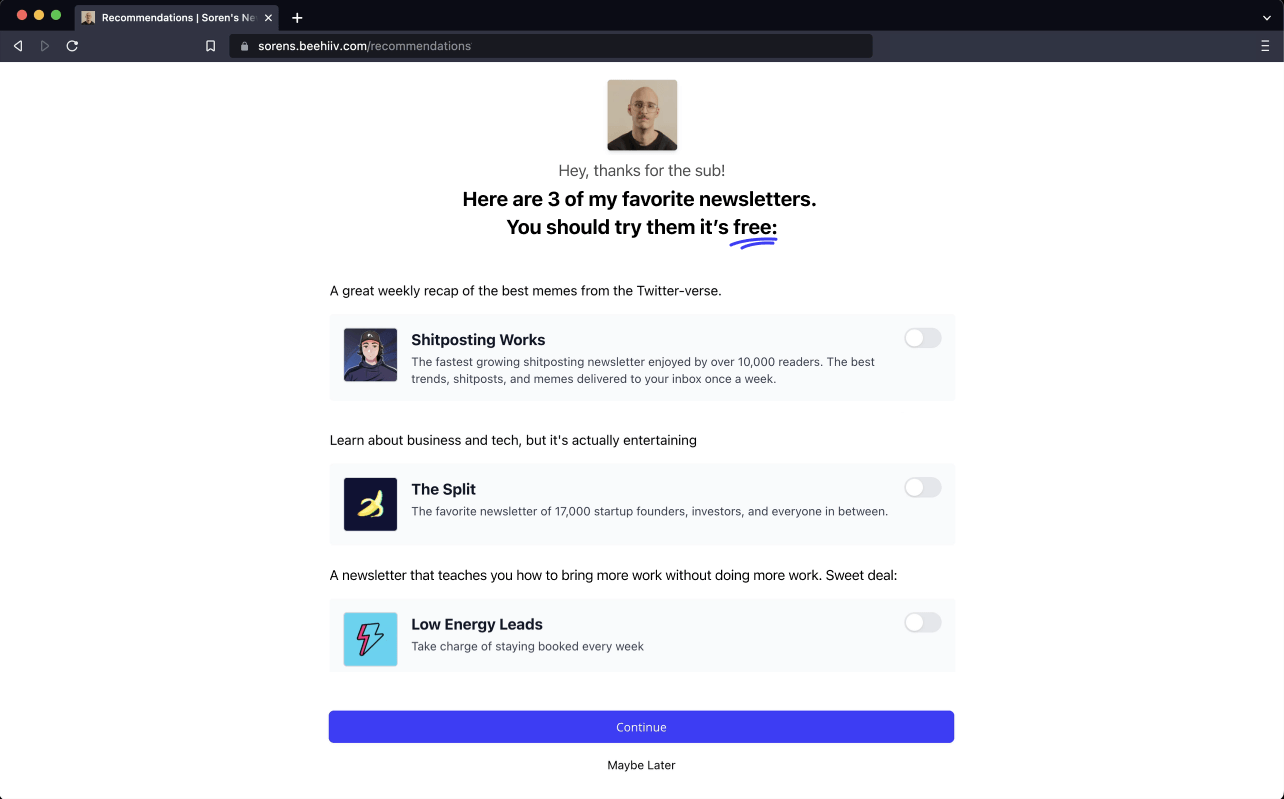 Soren's own picks
09
Redesign 1
Let Soren introduce three favorites himself, and say they are free.
The redesign puts Soren's photo at the top with 'Hey, thanks for the sub! Here are 3 of my favorite newsletters. You should try them, it's free.' The word 'free' is underlined, and the list stops at three.
What changed
- Soren's photo and a thank you open the page
- The copy says the picks are his favorites
- 'Free' is underlined as a visual anchor
- The list is capped at 3 newsletters
TakeawayA personal recommendation with a clear cost beats a generic list.
Singularity effect and the power of freeIntroducing the picks through one real person makes them feel genuine, with a halo from Soren. The word 'free' tips decisions positively and sets up the paid offer that follows.
Current Thin offerRedesign 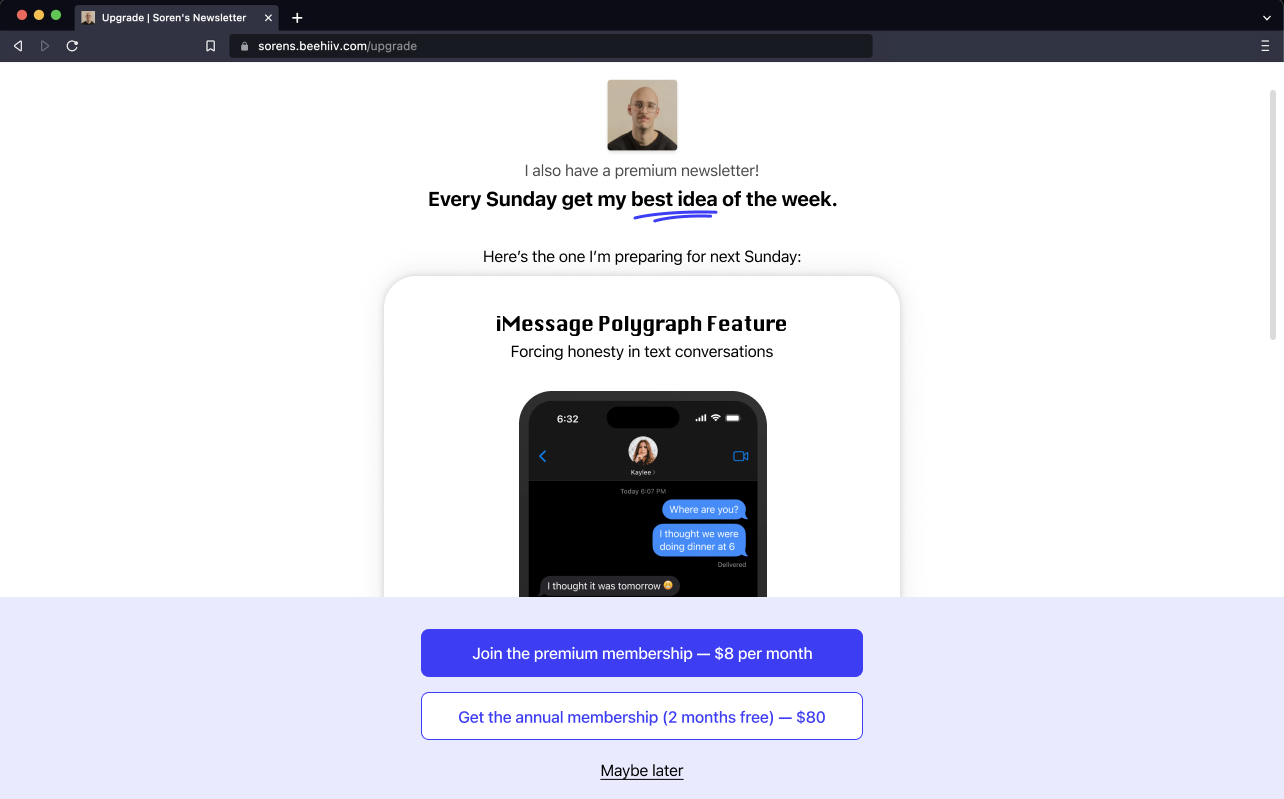 Next Sunday's idea
10
Redesign 2
Reframe premium as Soren's best idea of the week, with a preview.
The upgrade page now starts with Soren's photo and 'I also have a premium newsletter! Every Sunday get my best idea of the week.' Below, a preview card shows the idea he is preparing for next Sunday, followed by two clear buttons.
What changed
- Soren's photo keeps the context clear
- 'An extra idea' becomes 'my best idea of the week'
- A preview of next Sunday's idea replaces the empty table
- Buttons state the price and the annual saving
TakeawayMake a paid tier concrete by showing a real sample of what people will get.
Framing and primingThe same facts presented differently lead to different decisions. 'Best idea of the week' sounds far more valuable than 'an extra idea', and a short preview primes people for what is coming.
Recommendations Personal and freeUpgrade Clear upgrade11
The result
Small edits turn a dry detour into a flow that feels like Soren all the way.
Nothing about the product changed: the same newsletters, the same prices. With Soren visible on every screen, fewer choices and a concrete preview, the reader always knows who is talking and what they are being offered.
What changed
- Context: the creator appears on every step
- Choice: three picks instead of seven
- Value: a framed, previewed premium tier
TakeawaySmall changes to context, copy and order can decide whether an upgrade feels confusing or compelling.
Every takeaway, in one place
- The setupPeople subscribe to a person first. The flow should keep that person visible.
- Step 1A clean first step builds goodwill that the next steps can either keep or spend.
- Mistake 1Recommendations feel trustworthy when they come from the person people just chose.
- Mistake 2Every extra option dilutes attention from the one that matters most.
- Mistake 3Never make people remember where they are. Show them.
- The realizationContext that appears after the decision does not help the decision.
- Mistake 4The layout sets expectations. An empty table signals an empty offer.
- Mistake 5Put the main offer where interest is highest, then add extras.
- Redesign 1A personal recommendation with a clear cost beats a generic list.
- Redesign 2Make a paid tier concrete by showing a real sample of what people will get.
- The resultSmall changes to context, copy and order can decide whether an upgrade feels confusing or compelling.
Source: Growth.Design: Beehiiv subscription: 5 small UX mistakes that make a BIG difference
Turn a new subscriber into a paying one without the confusion.
The minutes after someone signs up are when they are most open to recommendations and upgrades, and most easily confused. Zyxware can review your signup, recommendation and upgrade screens, reorder the steps, and rewrite them so every offer is clear about who it comes from and what it gives.