Making Audible's Credit Purchase Clear From First Tap to First Listen
 +20 XP
Case study
Making Audible's Credit Purchase Clear From First Tap to First Listen
A subscriber about to leave on a road trip tries to get an audiobook with a credit they think they have, and ends up doing price math and waiting for credits that do not show up. We walk through each point of doubt and a redesign that is upfront, simple and reassuring.
+20 XP when you reach the endWhat you will learn
- Show account limits before people commit to a path
- Cut the math out of pricing choices
- Reassure and celebrate right after a purchase
Scroll to follow the story. The screen changes with you.
Based on the learnings from Growth.Design: Audible: Build seamless purchase experiences, presented in our own format.
Step 1 of 10
- The book they want
01
The setup
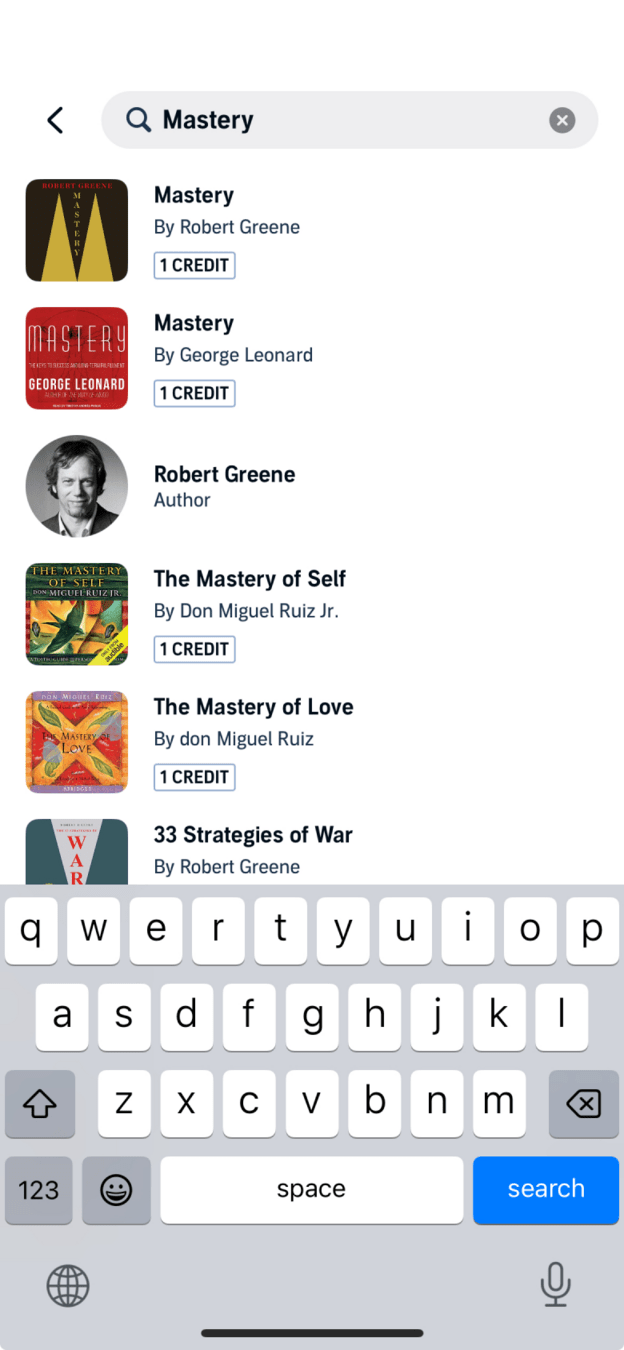
Before a road trip, a subscriber looks up a book a friend recommended.
They search Audible for 'Mastery' by Robert Greene. The result shows a '1 CREDIT' tag, and since they pay for a subscription, they expect to use a credit and start listening.
TakeawaySubscribers arrive with an expectation about what they have already paid for.
 Buy more?
02
Problem 1
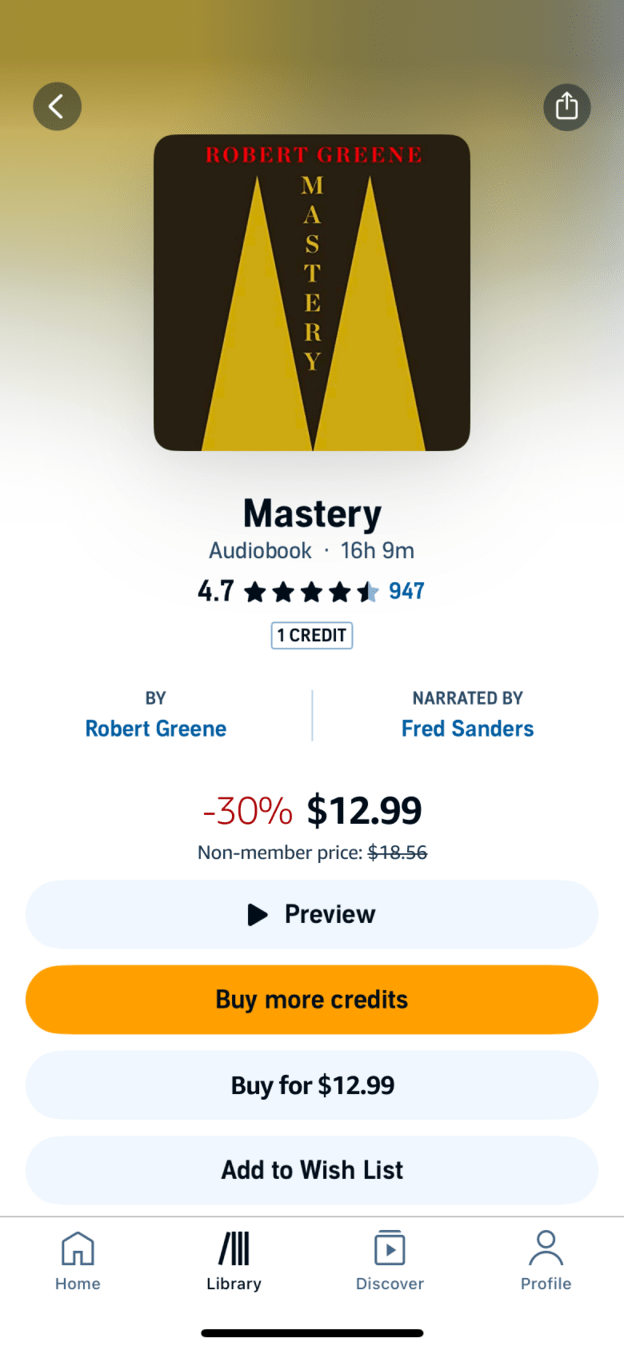
The main button says 'Buy more credits', which makes no sense to someone who thinks they have one.
The book page shows a discounted price of $12.99, then 'Buy more credits' as the primary action. Nothing on the page says the account is out of credits, so the user taps it to find out.
TakeawayIf the account state changes what someone can do, say so on the page.
 0 credits
03
Problem 2
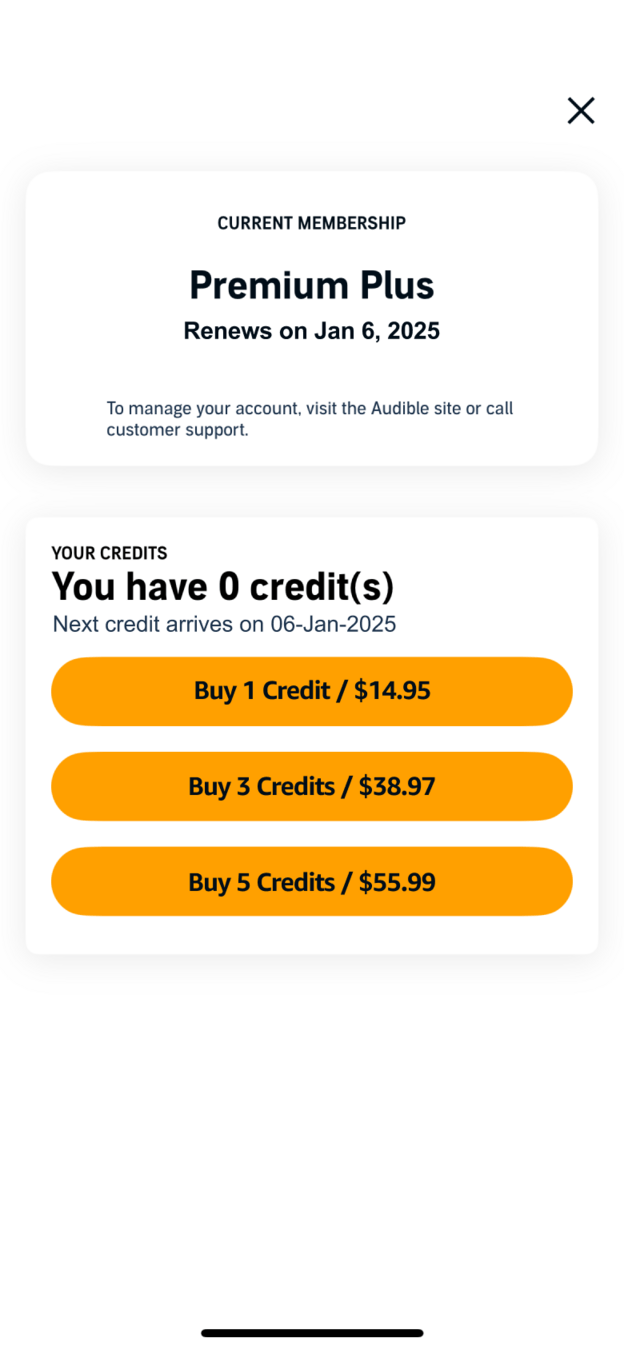
Only after tapping do they learn they have zero credits until next month.
The membership screen says 'You have 0 credit(s)' and the next one arrives on 06-Jan-2025. The user cannot wait that long for the trip, so they decide to buy one.
TakeawayBad news discovered late feels worse than bad news shared early.
Book page $12.99 hereCredits $14.95 there04
Problem 3
One credit costs $14.95, but the book itself costs $12.99.
The bundles work out to about $14.95, $12.99 and $11.20 per credit, and only the largest is cheaper than buying the book outright. To see that, the user has to go back, compare and divide, all while trying to leave.
TakeawayWhen a choice requires arithmetic, many people either guess or give up.
Reduce cognitive loadCut the mental effort a task needs: extra calculations, the number of decisions, the amount of information and complex navigation all add to it.
Current UnclearRedesign 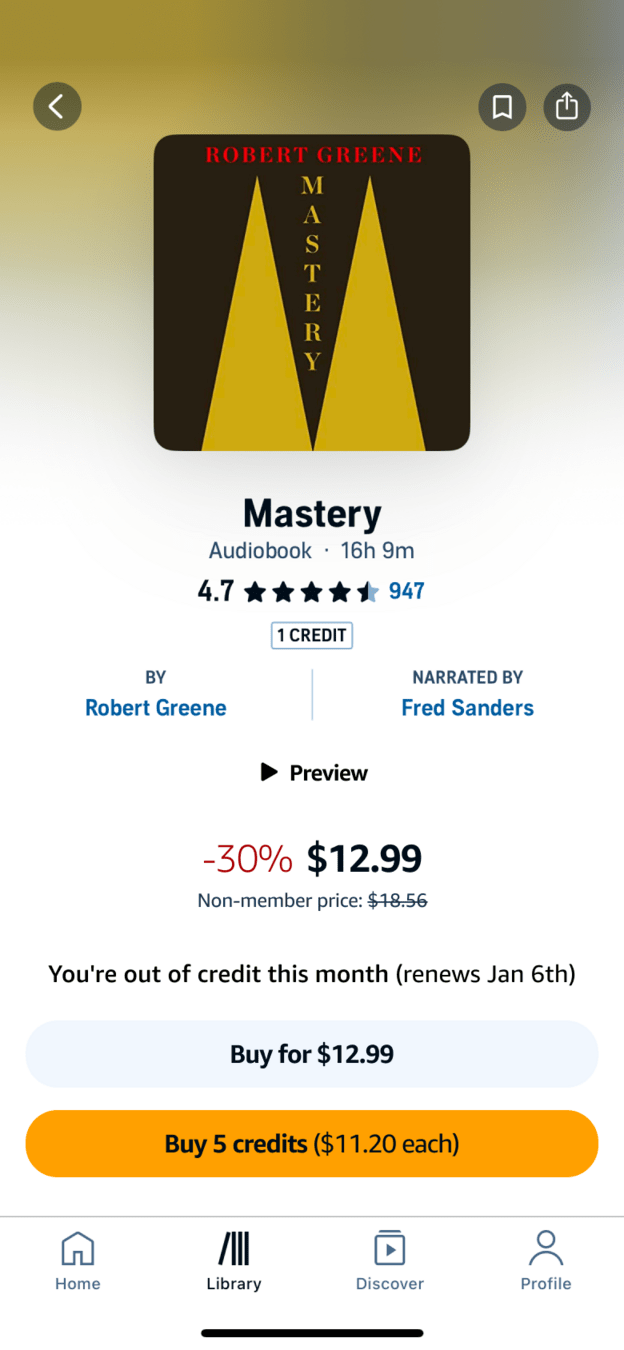 Said plainly
05
Fix 1
Say the account is out of credits and offer one clear bundle.
The redesign states 'You're out of credit this month (renews Jan 6th)' right on the book page. It then offers two options: buy the book for $12.99, or buy 5 credits with the per credit price shown.
What changed
- An out of credit message with the renewal date
- 'Buy more credits' is removed
- One bundle with '$11.20 each' spelled out
TakeawayBe transparent from the start and keep the options few and easy to compare.
Audible 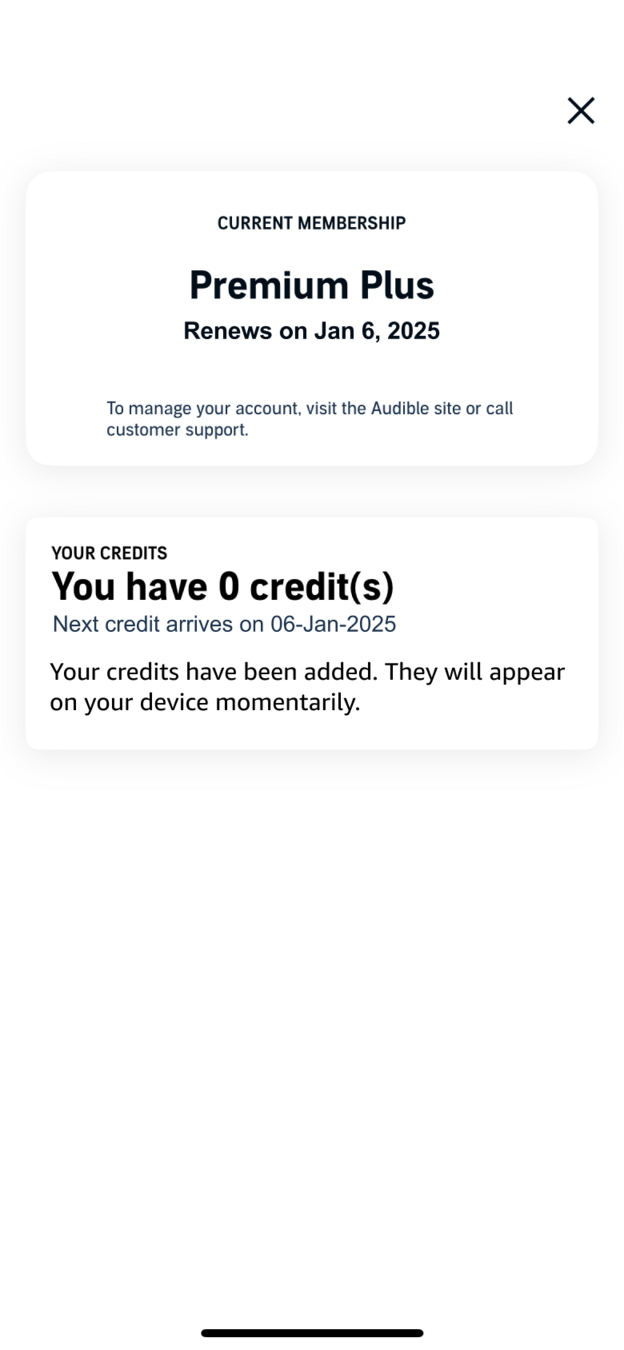 Still 0 credits
Bank alert  Money already gone
06
Problem 4
The card is charged $55.99, and the app still shows 0 credits.
After buying 5 credits, the screen says credits 'will appear on your device momentarily' while the balance stays at zero. Minutes later a bank notification confirms the charge, but the app shows nothing new.
TakeawayA gap between paying and receiving is where trust breaks.
 Finally, 5 credits
07
Problem 5
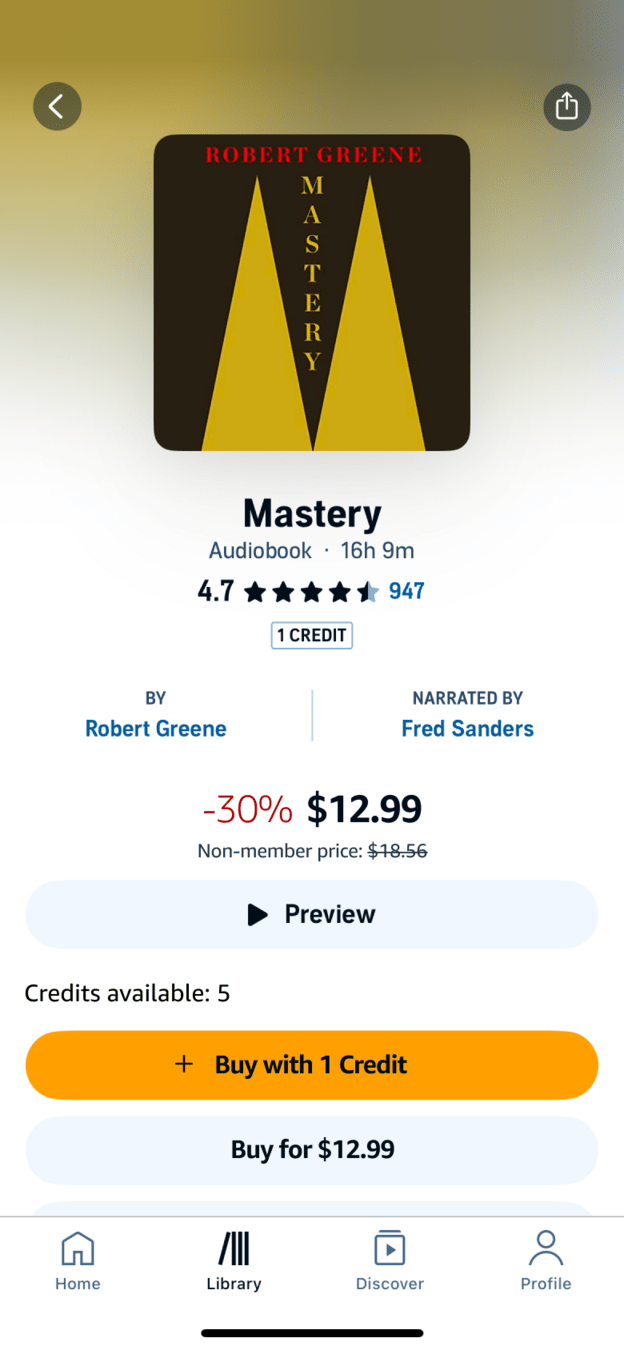
The credits only appear after going back and refreshing the page.
Back on the book page, 'Buy more credits' is still there. After a pull to refresh, 'Credits available: 5' and 'Buy with 1 Credit' finally show up. It works, but the user spent those minutes wondering if it was a bug.
TakeawayNever leave a paying customer to find out on their own whether it worked.
Post-purchase reassuranceIf people are not reassured after they buy, they feel uneasy, and that unease damages trust at the very start of the relationship.
Current Easy to missRedesign 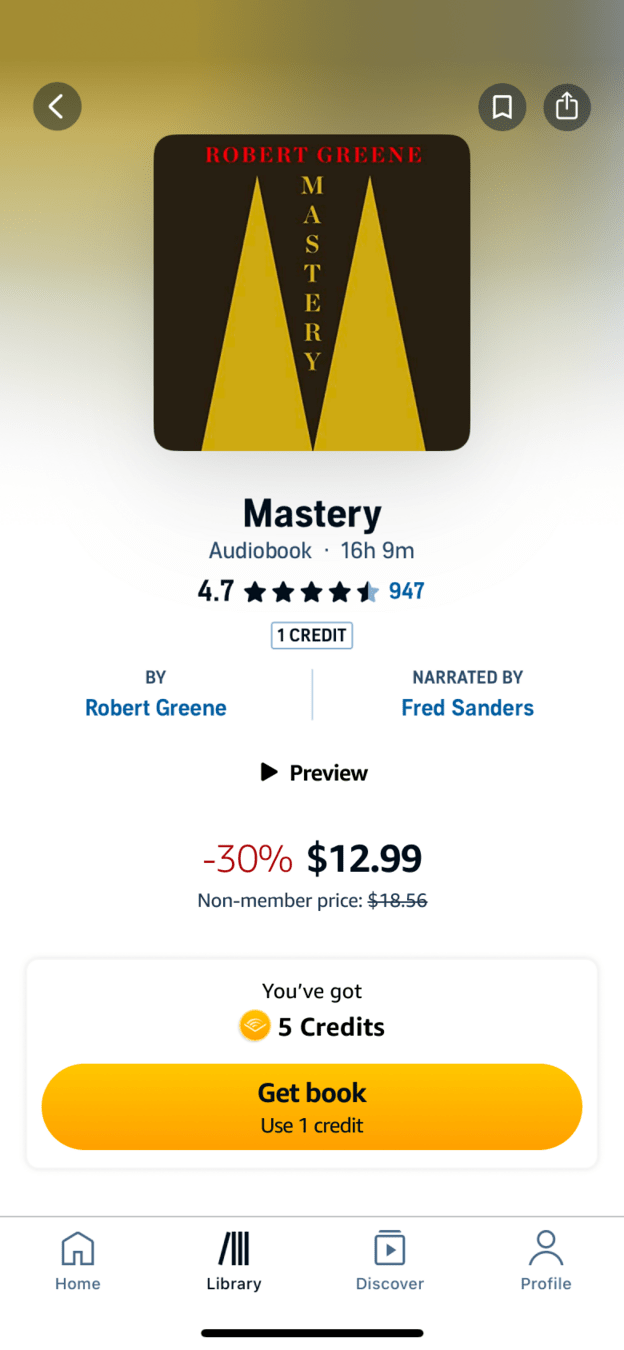 5 credits, celebrated
08
Fix 2
Show the new credits right away and put the book one tap from reach.
In the redesign, the purchase returns straight to the book with 'You've got 5 Credits' and a single 'Get book, use 1 credit' button. Buying credits feels like a small win, and the next step is obvious.
What changed
- Credits appear instantly, with no refresh
- A coin icon and 'You've got 5 Credits' mark the moment
- One primary action: 'Get book'
TakeawayAfter someone pays, focus the screen on the task they came to do.
Get book One tapSuccess 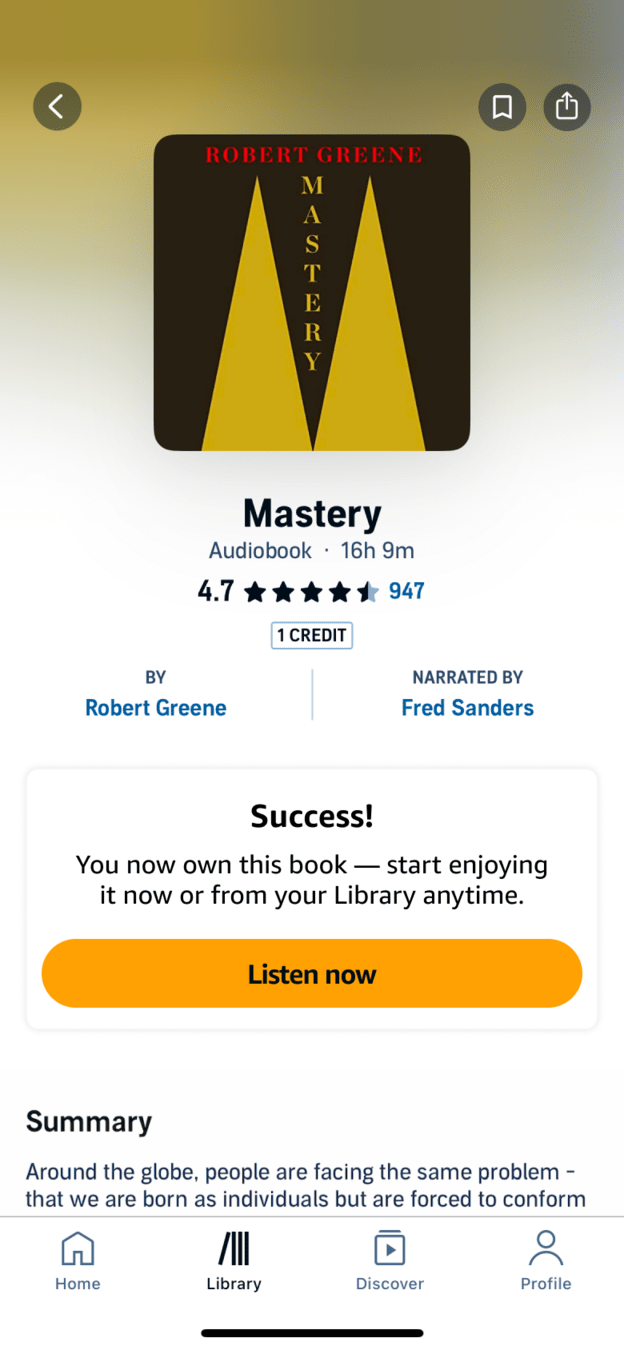 Success, then listen
09
Fix 3
A clear success message leads straight to listening.
After 'Get book', the card changes to 'Success! You now own this book' with a 'Listen now' button. The user knows it worked and can start the book before pulling out of the driveway.
TakeawayDesign the moment after the purchase as carefully as the purchase.
Successful transitionsProducts often forget the seconds right after a purchase, which leaves a big gap in the experience. That moment is a good chance to make the brand shine.
Current Three choices, math neededRedesign One clear action10
The result
From three price puzzles and a silent wait to one clear path.
The same credits and prices remain. What changes is that the account state is visible early, the math is done for the buyer, and every step after payment confirms what happened.
What changed
- Transparency: out of credit status on the book page
- Simplicity: one bundle with a per credit price
- Reassurance: instant credits and a success message
TakeawayConfidence in a purchase comes from clarity before it and feedback after it.
Every takeaway, in one place
- The setupSubscribers arrive with an expectation about what they have already paid for.
- Problem 1If the account state changes what someone can do, say so on the page.
- Problem 2Bad news discovered late feels worse than bad news shared early.
- Problem 3When a choice requires arithmetic, many people either guess or give up.
- Fix 1Be transparent from the start and keep the options few and easy to compare.
- Problem 4A gap between paying and receiving is where trust breaks.
- Problem 5Never leave a paying customer to find out on their own whether it worked.
- Fix 2After someone pays, focus the screen on the task they came to do.
- Fix 3Design the moment after the purchase as carefully as the purchase.
- The resultConfidence in a purchase comes from clarity before it and feedback after it.
Source: Growth.Design: Audible: Build seamless purchase experiences
Make every purchase feel certain.
Doubt during checkout shows up as abandoned carts, refund requests and support tickets. Zyxware can review your purchase and credit flows step by step, simplify the choices, and design the confirmation moments that tell people their money went where they expected.