Redesigning Apple's Bedtime Reminder So People Actually Wind Down
 +20 XP
Case study
Redesigning Apple's Bedtime Reminder So People Actually Wind Down
Late at night, Apple's bedtime reminder slides in over a video and disappears without a second look. We follow a proposed redesign that swaps nagging and friction for a clear benefit, a small first step, visible progress and a reward.
+20 XP when you reach the endWhat you will learn
- Recognize banner blindness in routine notifications
- Know when friction helps and when it backfires
- Use small commitments, progress and loss aversion to build a habit
Scroll to follow the story. The screen changes with you.
Based on the learnings from Growth.Design: One simple way Apple could improve your sleep habits, presented in our own format.

Step 1 of 10
- Fully absorbed
01
The setup
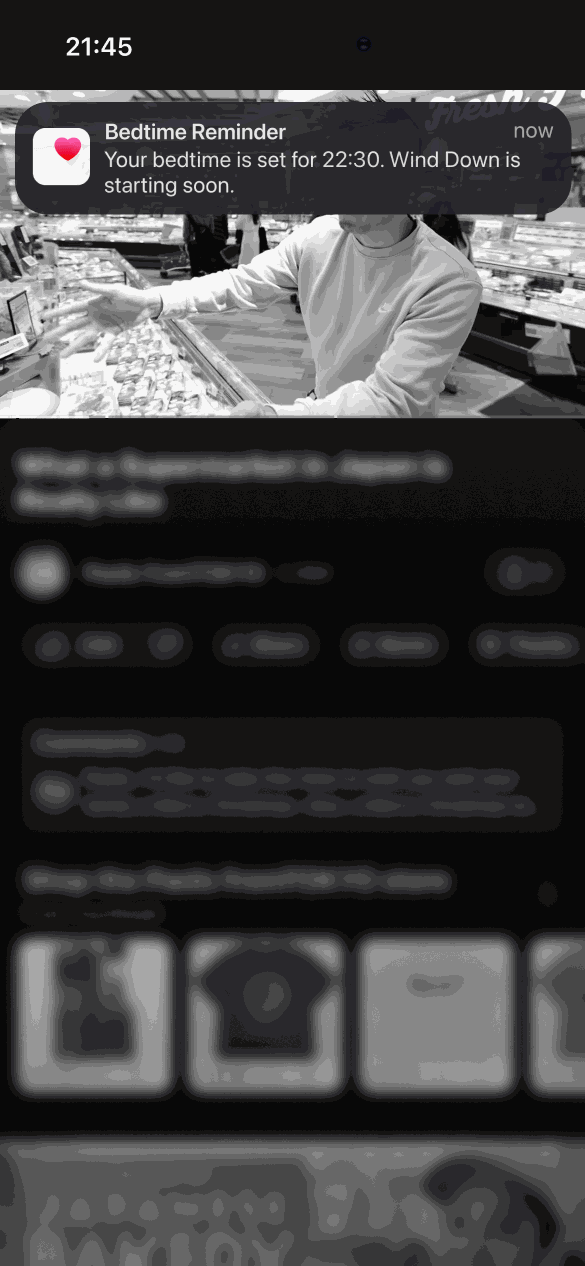
It is 21:45 and someone is deep into a video.
They are watching a travel video about a supermarket in Japan. Their attention is fully on the screen, and bedtime is 45 minutes away.
TakeawayAny reminder here competes with content designed to hold attention.
 Looks like any alert
02
The problem
The bedtime reminder appears as a small banner and is gone in seconds.
A standard notification slides in at the top: 'Your bedtime is set for 22:30. Wind Down is starting soon.' It looks exactly like every other alert, so it is ignored without being read.
TakeawayA reminder that looks like everything else gets treated like everything else.
Banner blindnessWe tune out things we see over and over. Notifications fall into this trap quickly because they always share the same format, especially when attention is already taken. Account for this when designing for a new behavior.
 One tap to dismiss
03
First idea
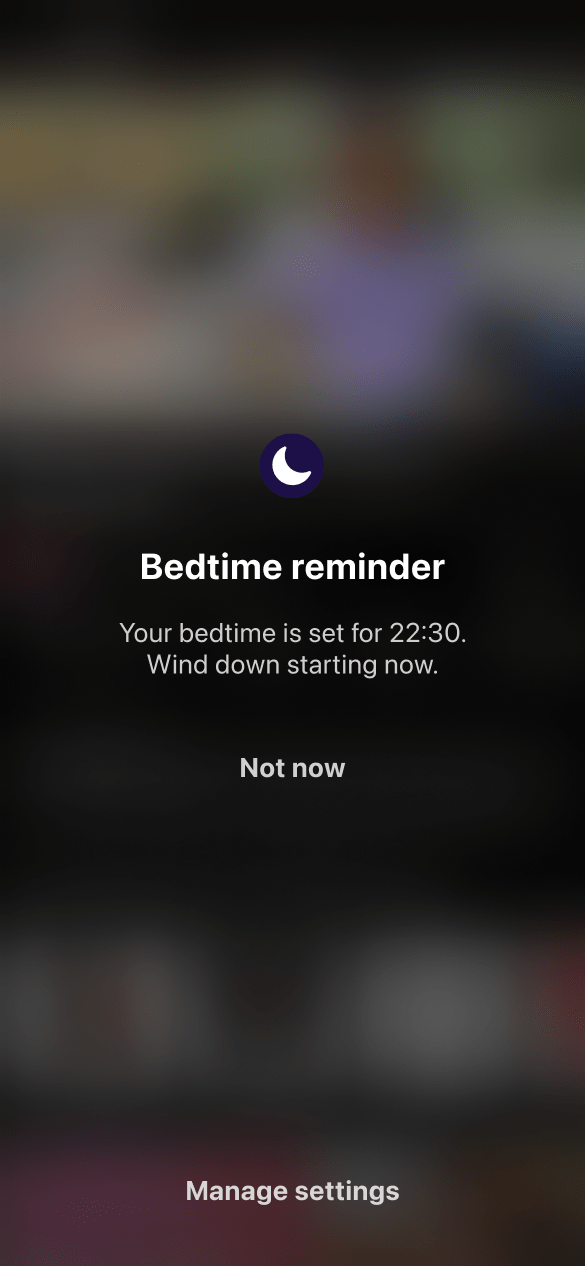
A full screen reminder is impossible to miss, but just as easy to close.
The redesign's first step replaces the banner with a screen that covers the video. That solves visibility, but a single 'Not now' still ends it in one tap, when the brain wants to get back to the video.
TakeawayBeing seen is only half the job. The reminder also has to give a reason to act.
 Punishing slider
04
A trap
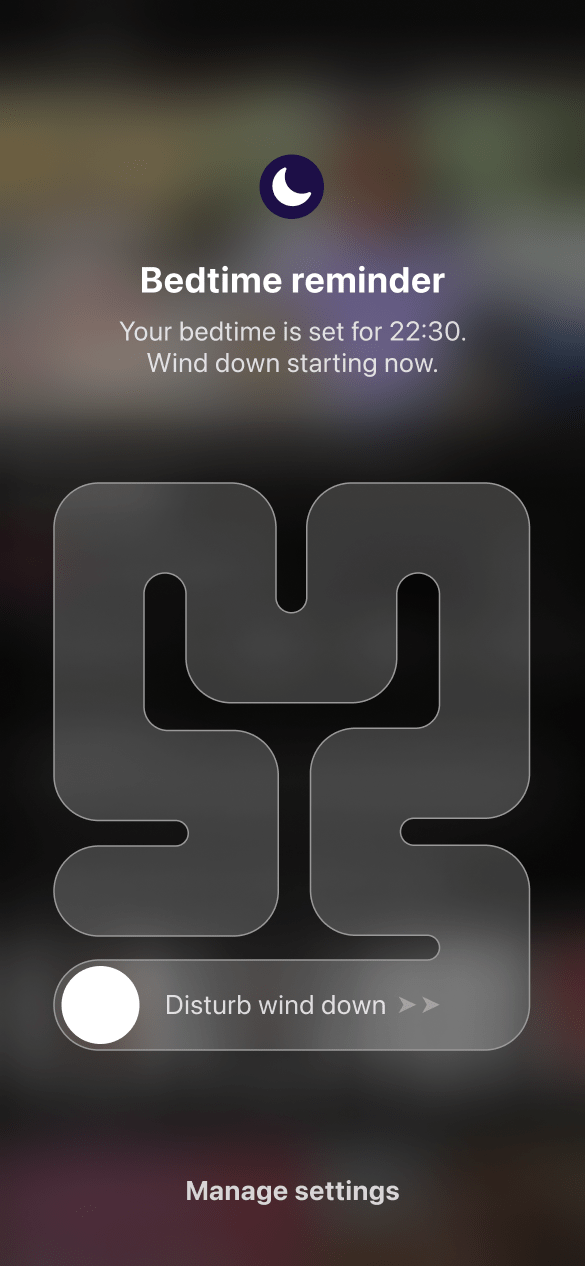
Forcing people through a maze to dismiss it would backfire.
One option is a 'Disturb wind down' slider that has to be dragged through a maze. It is harder to ignore, but people who feel blocked will simply turn the feature off for good.
TakeawayFriction that feels like punishment pushes people away from the goal.
Friction or no friction?Most experiences should have as little friction as possible, but friction is useful when it helps people think, make the right decision or avoid costly mistakes. Getting the balance right requires understanding how your users think.
Reminder A ruleRedesign 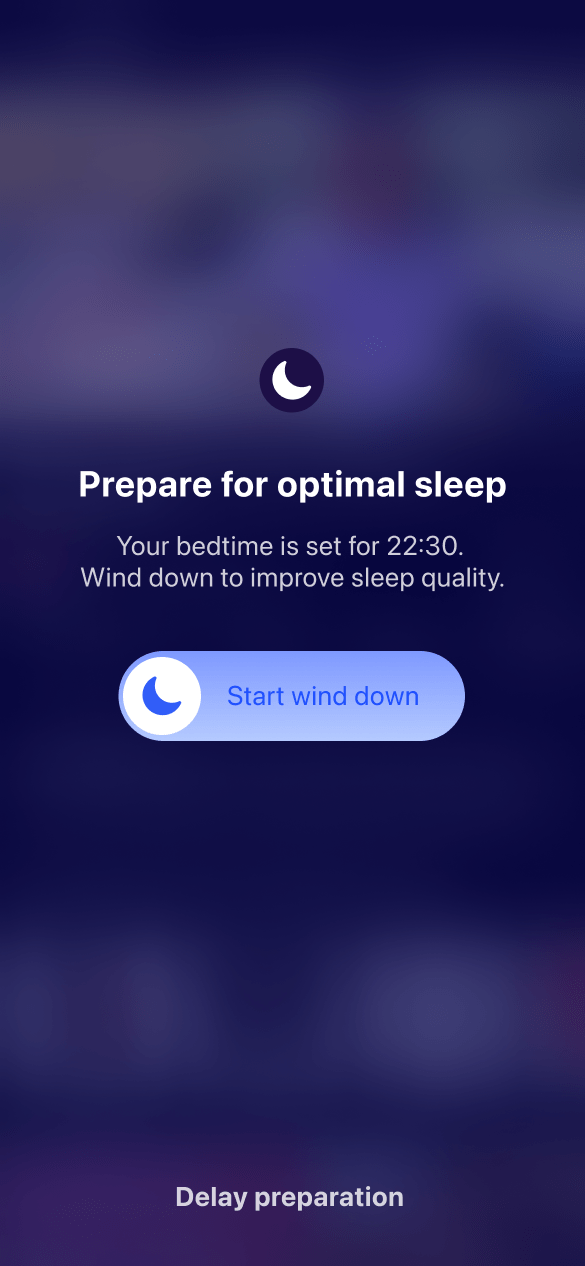 A benefit
05
Fix 1
Frame the moment around better sleep, not a bedtime rule.
The redesign's headline becomes 'Prepare for optimal sleep' and explains that winding down improves sleep quality. Like an electric car preconditioning its battery before fast charging, the body needs time to get ready for rest.
What changed
- 'Bedtime reminder' becomes 'Prepare for optimal sleep'
- The text explains why winding down matters
- 'Not now' becomes the softer 'Delay preparation'
TakeawayPeople act on what they gain, not on what they are told to do.
- Swipe to start
06
Fix 2
A single swipe starts the wind down.
Instead of a yes or no choice, the main action is a 'Start wind down' slider. It takes one small gesture, and that gesture is the first commitment to the routine.
TakeawayMake the first step so small that starting feels easier than skipping.
The spark effectWe are more likely to act when the effort is small. Even a tiny action like a swipe helps people commit and carry on with the rest of the routine.
1 minute 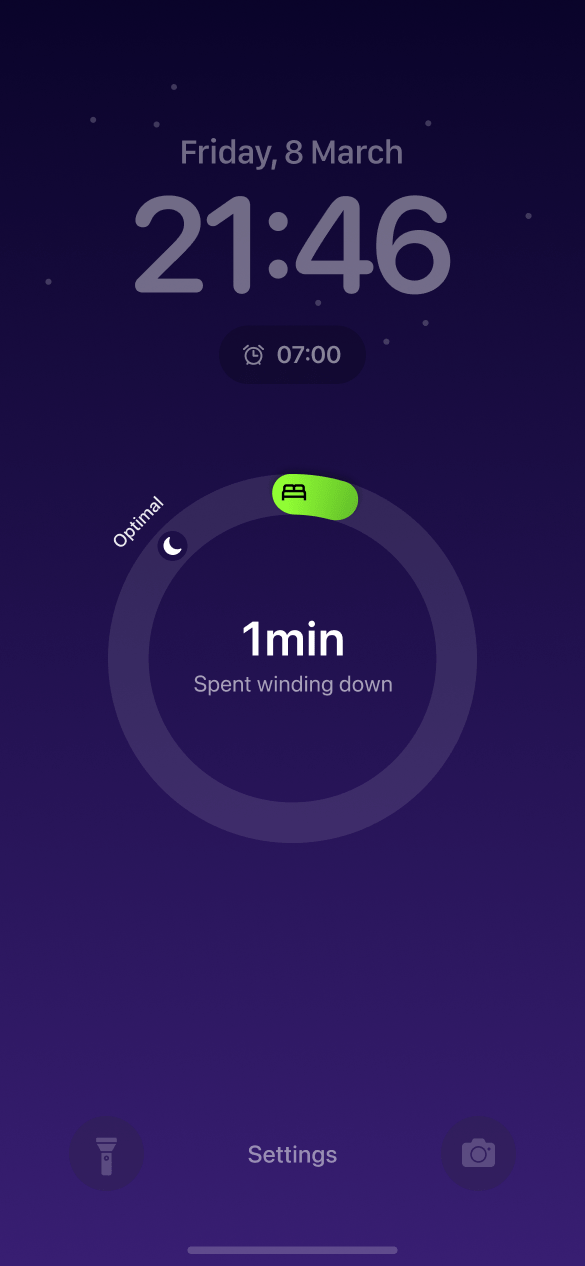 Just started
34 minutes 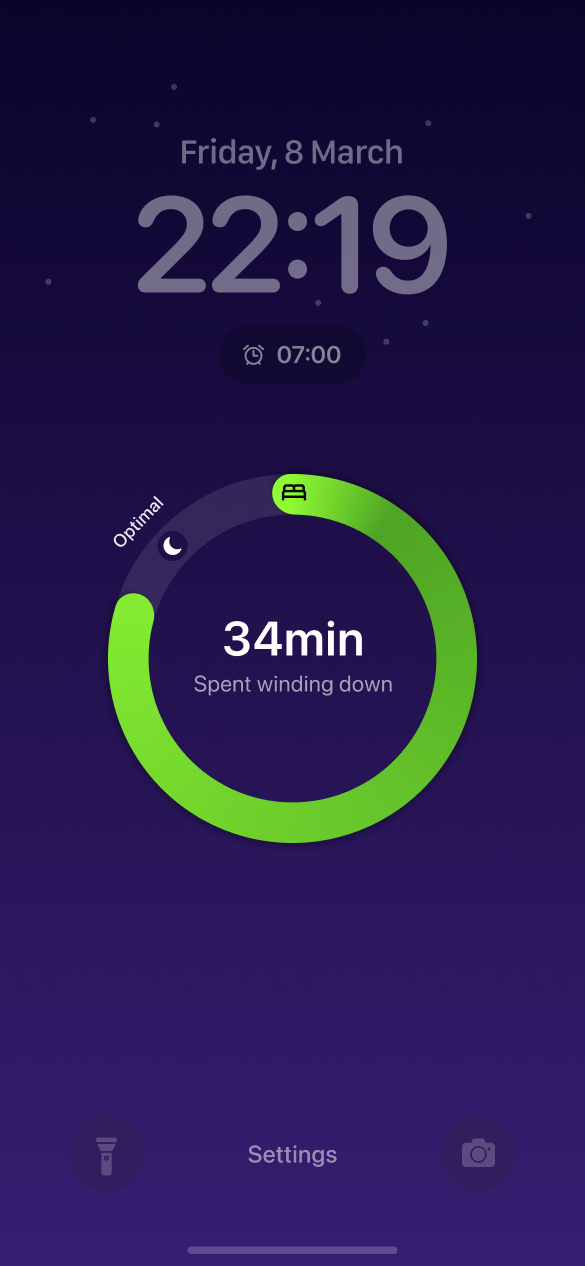 Nearly there
07
Fix 3
A progress ring on the lock screen shows the wind down filling up.
After the swipe, the lock screen shows minutes spent winding down in a ring that grows toward an 'Optimal' mark. At 1 minute it is a sliver, and by 34 minutes it is almost full.
What changed
- The lock screen shows time spent winding down
- An 'Optimal' marker shows the goal
- The ring turns green as it fills
TakeawayProgress that people can see keeps them going.
Technology that helpsGrowth.Design cites a CBS Evening News interview in which Apple CEO Tim Cook said Apple did not make the iPhone to be used all the time, but to make people's lives better.
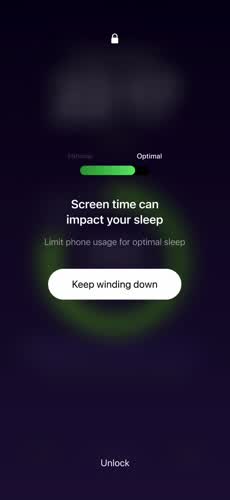 Keep winding down
08
Fix 4
Unlocking the phone shows what the user is about to give up.
If they want one last scroll, a gentle screen says 'Screen time can impact your sleep' and shows the wind down bar still short of its 'Optimal' mark. The main button is 'Keep winding down', and unlocking stays available.
TakeawayShow the cost of a choice honestly, and leave the choice with the person.
Loss aversionWe dislike losing what we have earned. This can encourage good behavior, but only if the loss is real, like the progress toward better sleep. A made up loss gets rejected and ignored.
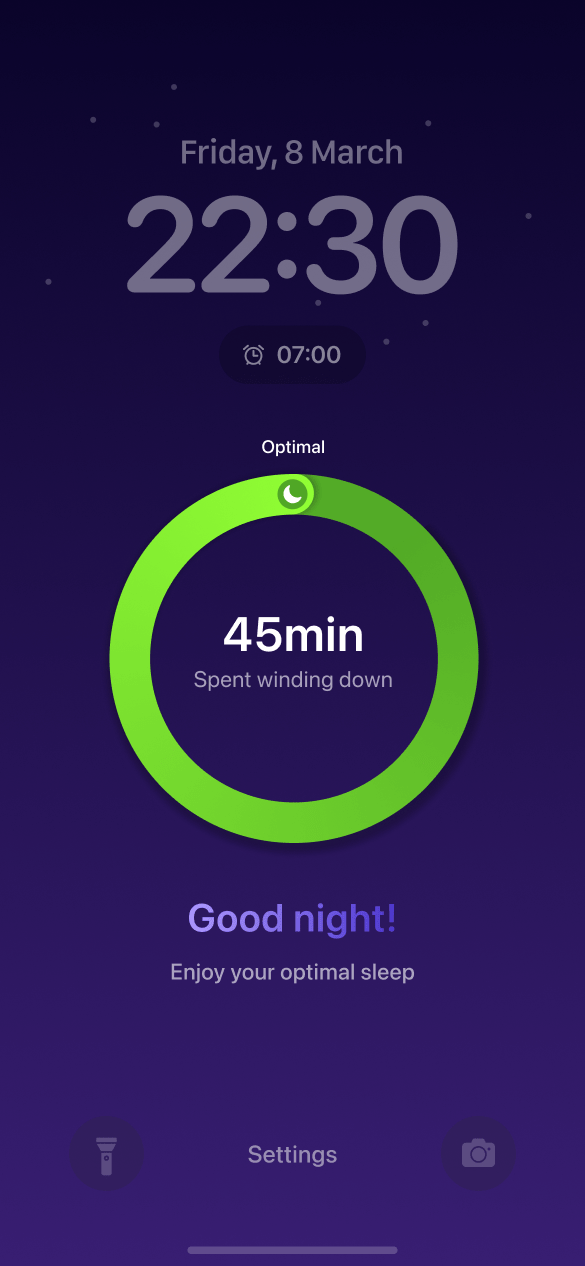 Positive close
09
Fix 5
At bedtime, a full ring and a 'Good night!' close the routine.
When 45 minutes of wind down is complete, the ring reaches optimal and the screen says 'Good night! Enjoy your optimal sleep'. Finishing feels like an achievement, not a restriction.
TakeawayEnd a new habit with a positive signal so people want to repeat it.
Current Easy to ignoreProposed Easy to start10
The result
Same goal, same bedtime. One version is ignored, the other starts a routine.
The current banner asks for attention and gets none. The proposed flow earns it with a clear benefit, a one swipe start, visible progress, an honest trade-off and a reward at the end.
What changed
- Visibility: a full screen moment instead of a banner
- Motivation: benefit first wording
- Commitment: one swipe to begin
- Feedback: progress, a fair warning and a reward
TakeawayTo change a habit, design the whole routine, not just the reminder.
Every takeaway, in one place
- The setupAny reminder here competes with content designed to hold attention.
- The problemA reminder that looks like everything else gets treated like everything else.
- First ideaBeing seen is only half the job. The reminder also has to give a reason to act.
- A trapFriction that feels like punishment pushes people away from the goal.
- Fix 1People act on what they gain, not on what they are told to do.
- Fix 2Make the first step so small that starting feels easier than skipping.
- Fix 3Progress that people can see keeps them going.
- Fix 4Show the cost of a choice honestly, and leave the choice with the person.
- Fix 5End a new habit with a positive signal so people want to repeat it.
- The resultTo change a habit, design the whole routine, not just the reminder.
Source: Growth.Design: One simple way Apple could improve your sleep habits
Build reminders that change behavior, not just interrupt it.
Notifications, nudges and habit features only work when they fit how people think at that moment. Zyxware can map the moments where your product asks people to change a behavior and redesign them around clear benefits, small steps and honest feedback.