How Adobe Makes Canceling a Subscription Feel Like a Fight
 +20 XP
Case study
How Adobe Makes Canceling a Subscription Feel Like a Fight
A Creative Cloud customer who has not opened Photoshop in six months tries to cancel before his plan renews, and runs into a vague email, a repeat login, a forced survey, untailored offers and a confusing confirmation. Follow each step to see where offboarding breaks trust and how a few changes would let customers leave on good terms.
+20 XP when you reach the endWhat you will learn
- Write renewal reminders that state the date, plan and cost
- Match retention offers to the reason the customer gave
- End the cancellation with a clear confirmation and an easy undo
Scroll to follow the story. The screen changes with you.
Based on the learnings from Growth.Design: Adobe: The Psychology of User Offboarding, presented in our own format.
Step 1 of 11
- Unclear preview
01
The setup
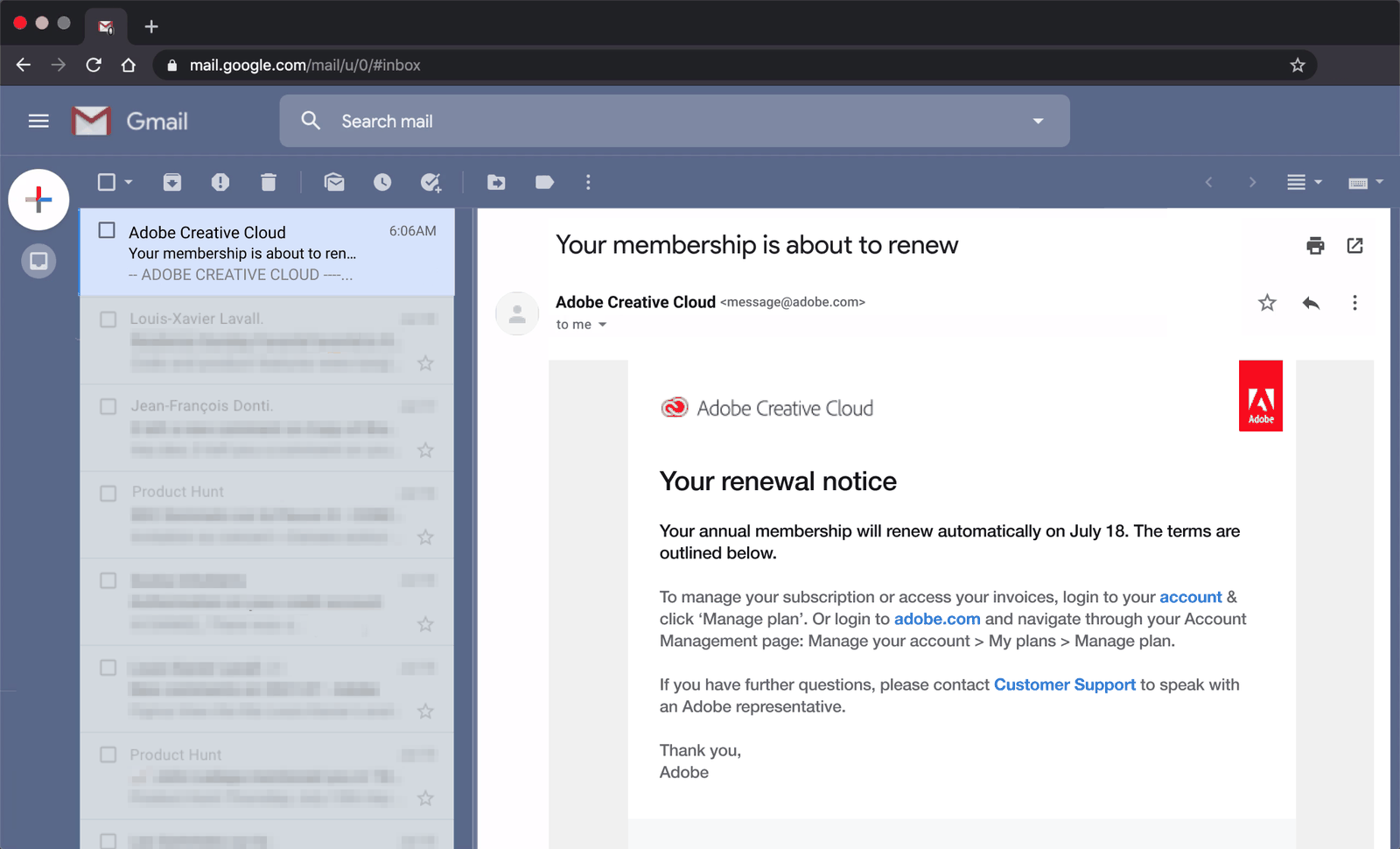
A renewal notice arrives looking like a marketing email.
In the inbox, the sender line reads 'Adobe Creative Cloud' and the preview trails off before the word 'renew'. Under it sits a line in all caps that looks like promotional filler. The customer nearly archives it without opening it.
TakeawayIf the preview does not say what the email is about, important notices get treated as spam.
- Buried instructions
02
Problem 1
The email never says what the plan costs or how to act.
The body names a renewal date, July 18, but no price. The route to cancel is buried in a paragraph as a chain of menu steps: Manage your account, My plans, Manage plan. The customer has not used Photoshop in six months and wants out, but cannot quickly tell what to click.
TakeawayA renewal notice should make the date, the cost and the next step obvious at a glance.
Status quo biasPeople tend to leave things as they are to avoid effort and stressful choices. Some subscription businesses exploit this by hiding reminders, costs and cancel shortcuts, which keeps 'zombie customers' paying for things they no longer use. Growth.Design cites ProfitWell on zombie customers.
Original Hard to act onRedesign 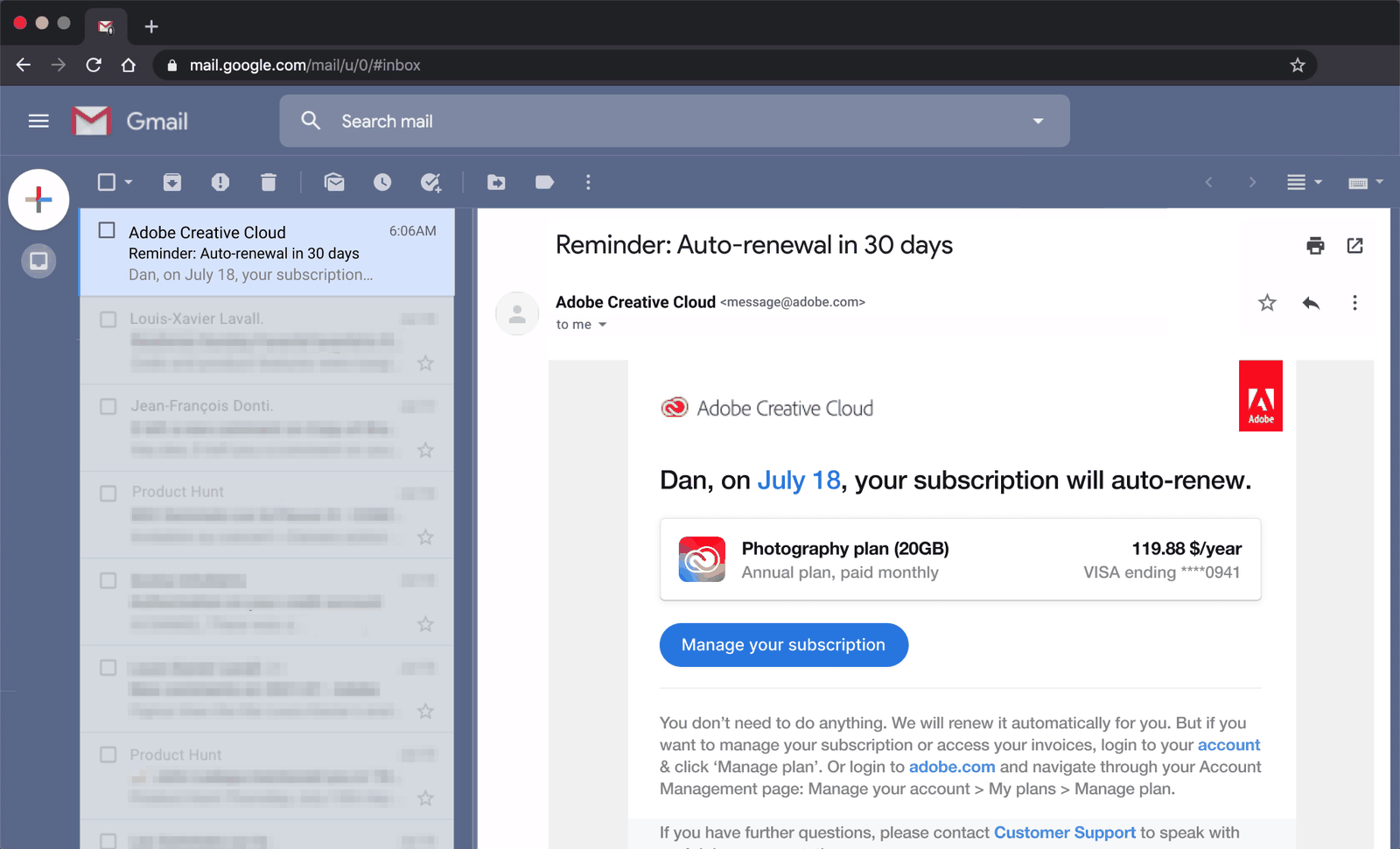 Plan and cost
03
Repair 1
Put the date, the plan and the price in plain view.
The redesigned email leads with 'Reminder: Auto-renewal in 30 days', so the inbox preview says it all. Inside, a card shows the Photography plan, the yearly price and the card on file, followed by a single 'Manage your subscription' button.
What changed
- Subject and preview state the renewal and the timing
- Date, plan name and cost appear in one card
- One clear button replaces the menu directions
TakeawayHonest reminders cost a few renewals and earn a lot of trust.
 Monthly or annual?
04
Problem 2
The account page shows a monthly price for an 'annual' plan.
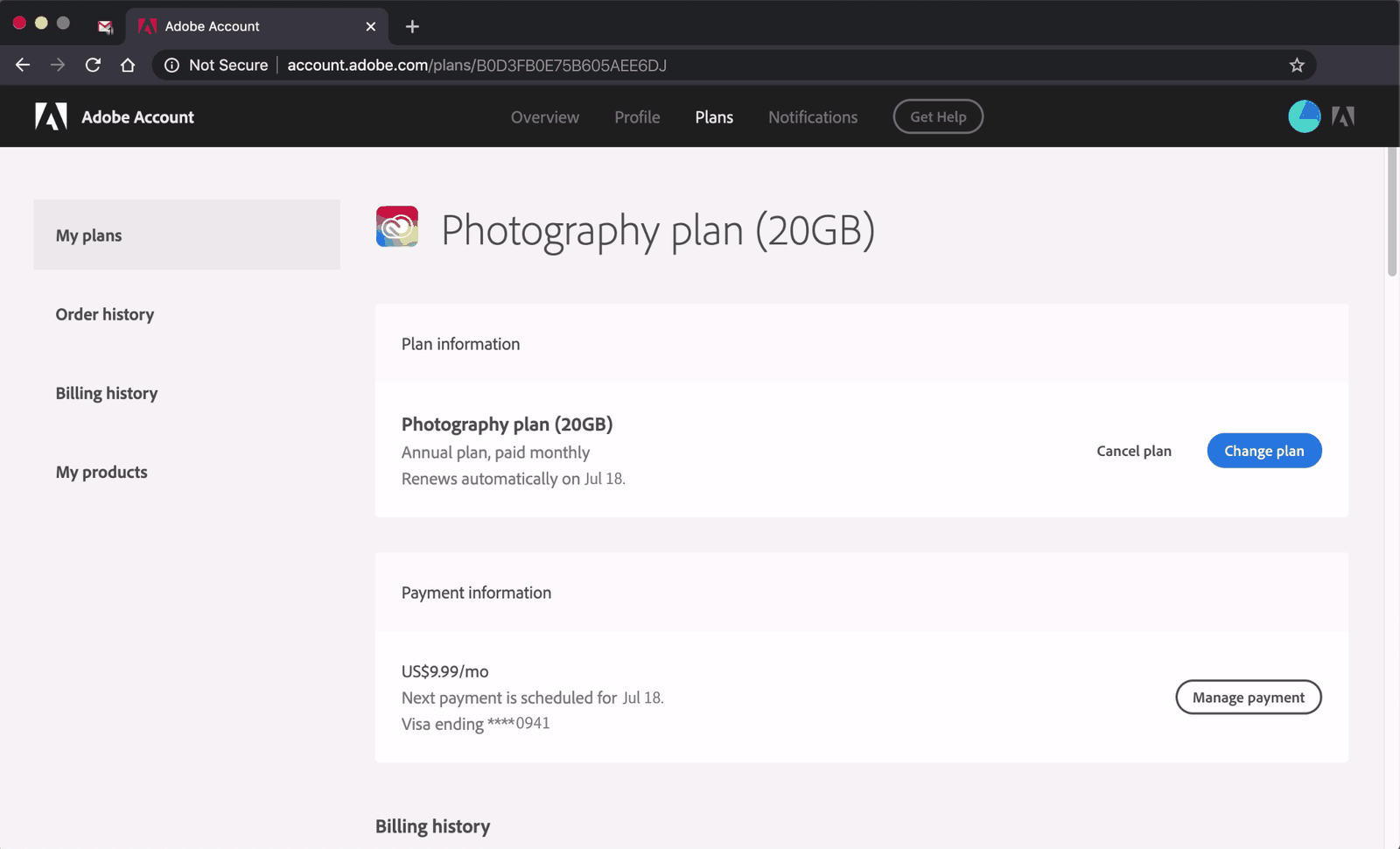
The email link logs the customer straight into their account, which is a nice touch. But the plan page lists 'Annual plan, paid monthly' at US$9.99 a month, while the email said annual membership. The small 'Cancel plan' link sits next to a bold blue 'Change plan' button.
TakeawayPricing terms that customers cannot explain in their own words create suspicion at the exit.
The cost of revenue tacticsAnnual plans paid monthly let Adobe charge an early cancellation fee. Growth.Design notes the extra revenue came with a cost to the brand: viral complaints on Twitter and Hacker News, angry YouTube comments and popular videos explaining how to avoid the fees. Short term growth tactics carry long term trade-offs.
 Disabled button
05
Problem 3
After a second login, a survey blocks the way forward.
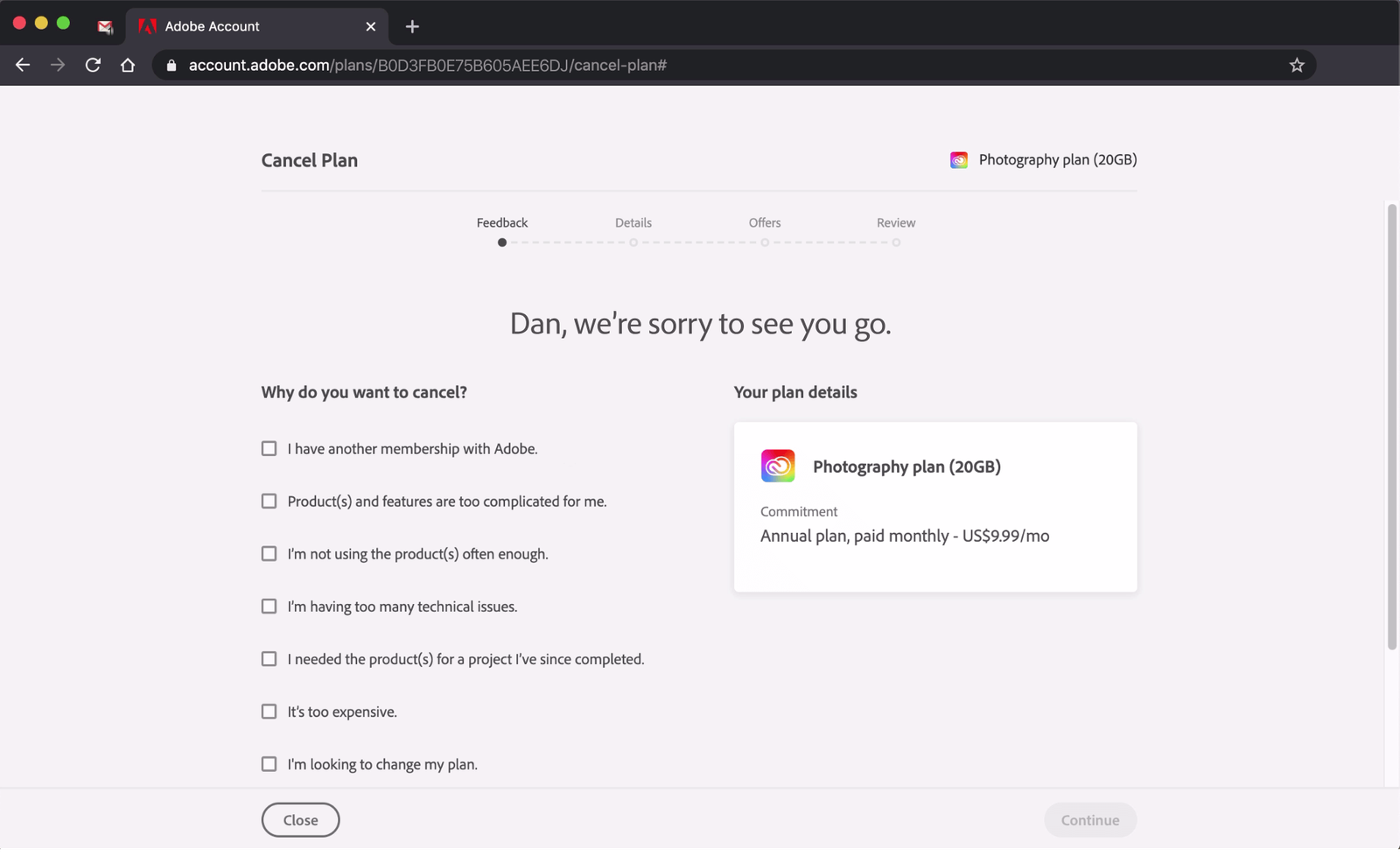
Clicking 'Cancel plan' asks for the password again, even though the customer was already inside the account. Next comes 'Why do you want to cancel?' with seven checkboxes, and the Continue button stays disabled until at least one is ticked. He picks too complicated, not used often enough and too expensive.
TakeawayAsking for feedback is fine. Requiring it before someone can leave feels like a toll.
 Unused 'favourites'
06
Problem 4
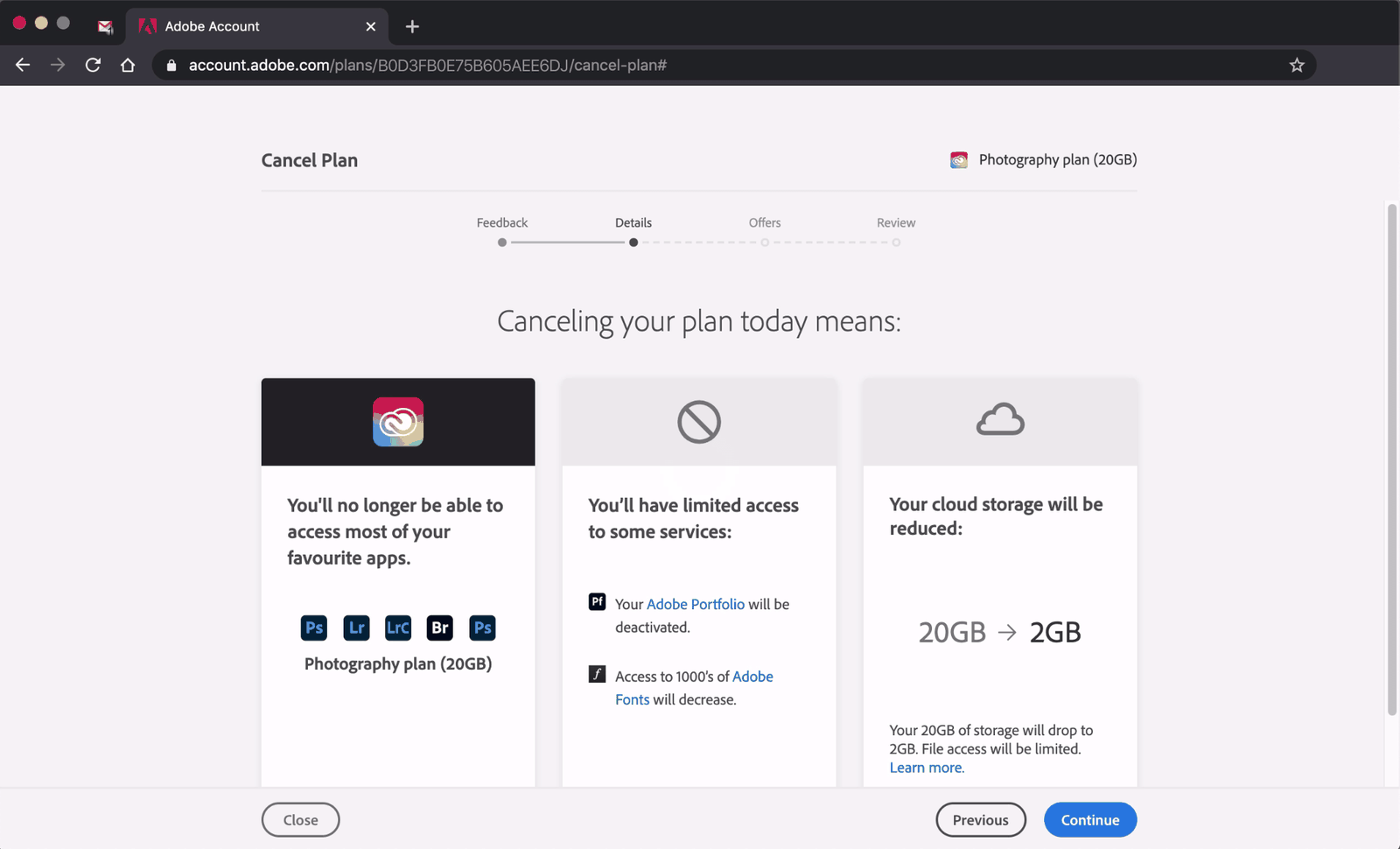
A warning says he will lose his 'favourite apps'.
The next page lists what canceling means: no access to Photoshop and Lightroom, limited services, and storage dropping from 20GB to 2GB. Calling apps he has not opened in six months his favourites is odd, especially since he just said so, and Adobe can see his usage.
TakeawayLoss framing that ignores what the customer just told you reads as manipulation.
 Pricier plans
07
Problem 5
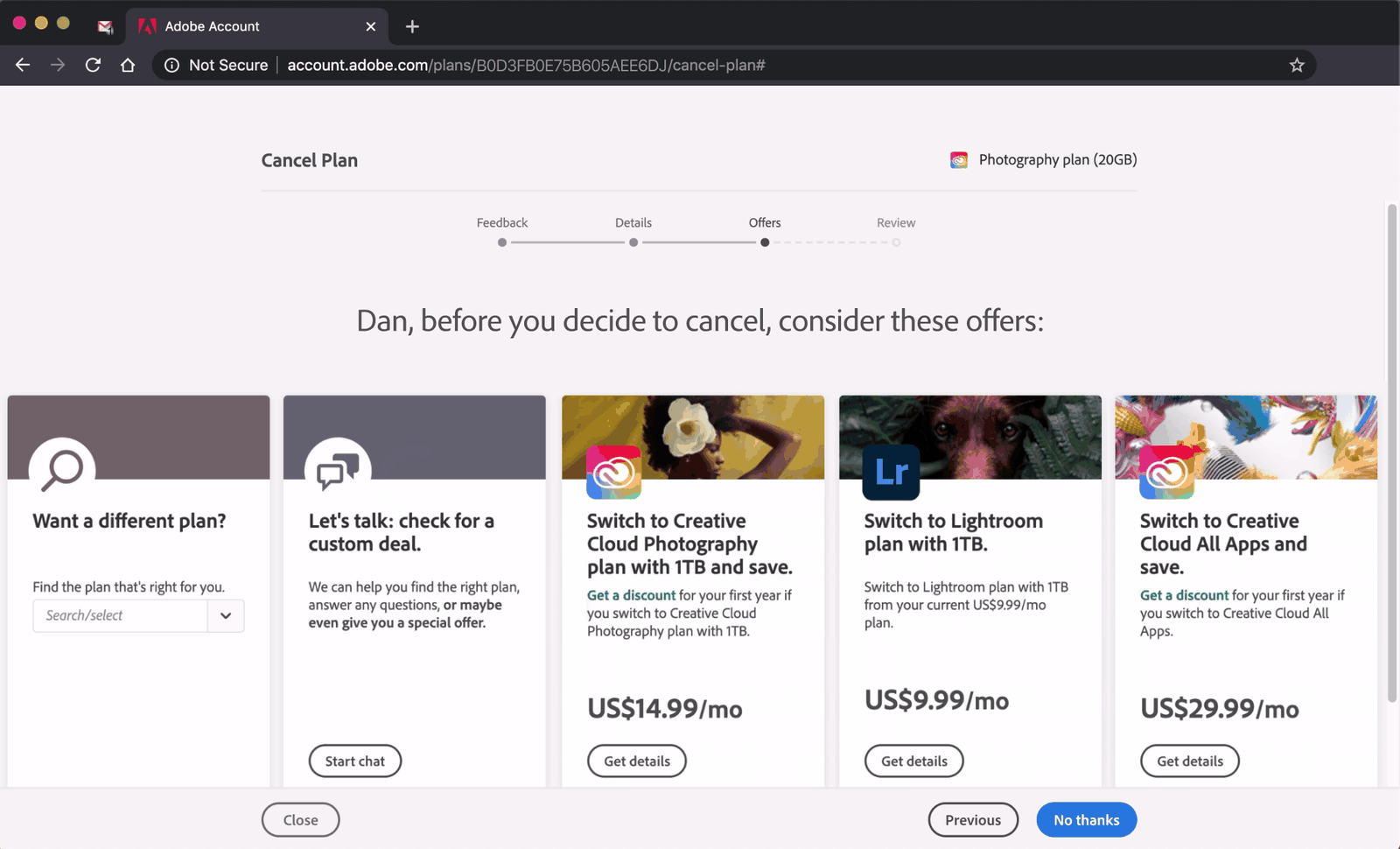
Five offers appear, and none match the reasons he gave.
He said the product was too complicated, unused and too expensive. The offers page answers with a plan finder, a chat for a custom deal and three plan switches at US$14.99, US$9.99 and US$29.99 a month, most of them pricier than what he pays now.
TakeawayA retention offer only works when it responds to the reason the customer is leaving.
The downside of discountsReasonable discounts can help sales, but unjustified ones hurt brand perception over time. Growth.Design cites B. Gaille: they teach customers to doubt regular prices, wait for deals, hunt for loopholes and mistrust the brand.
Original Generic upsellsRedesign 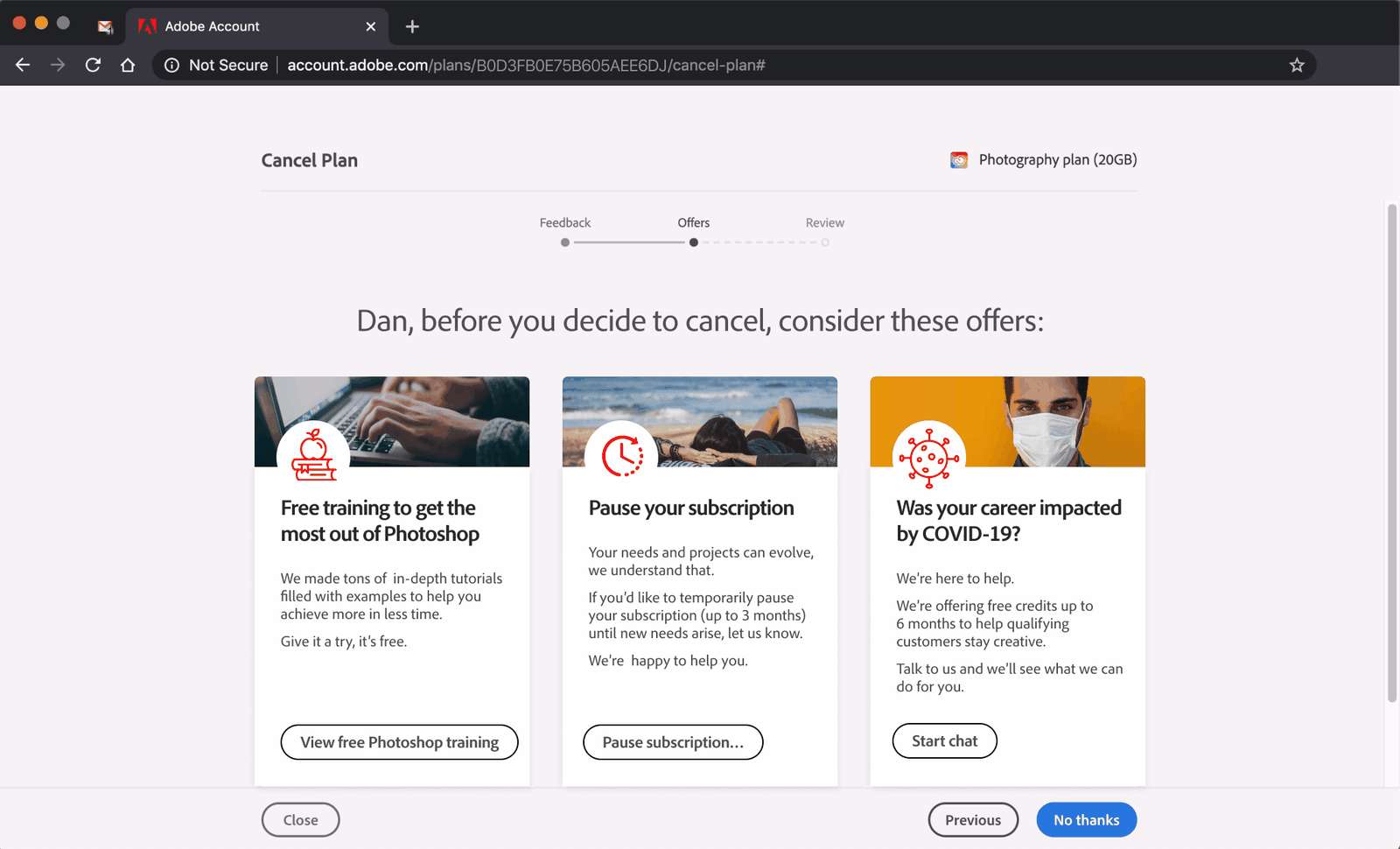 Pause instead
08
Repair 2
Answer each exit reason with an offer that fits it.
The redesign shows three cards, one per reason given in the survey: free Photoshop training for 'too complicated', pausing the subscription for up to three months for 'not using it', and free credits for customers whose careers were hit by COVID-19. The separate details step is gone.
What changed
- Free training answers 'too complicated'
- A pause option answers 'not using it enough'
- Hardship credits answer 'too expensive'
- The flow drops from four steps to three
TakeawayWhen the survey shapes the offers, the customer can see they were heard.
Noble edge effect and empathyCompanies that show genuine care tend to earn loyalty. Growth.Design contrasts 225 million jobs lost to COVID-19 with Adobe's 5.3 billion US dollars in 2020 profit. It also cites HubSpot: forcing feedback and then ignoring it can be worse than never asking.
- Four stages
09
Problem 6
A final review page repeats everything he has already read.
The progress bar across the top shows four stages: Feedback, Details, Offers and Review. After declining the offers, the Review page lists again what he will lose, with one more confirm button to press. By now the customer is simply pushing through.
TakeawayEach extra step at the exit should protect the customer, not wear them down.
Friction as a dark patternAdding unreasonable friction to make leaving hard is unethical. The contrast with Adobe's quick express checkout makes it obvious. If the goal is to prevent accidental cancellations, a simple undo button afterwards would do the job.
 Easy to miss
10
Problem 7
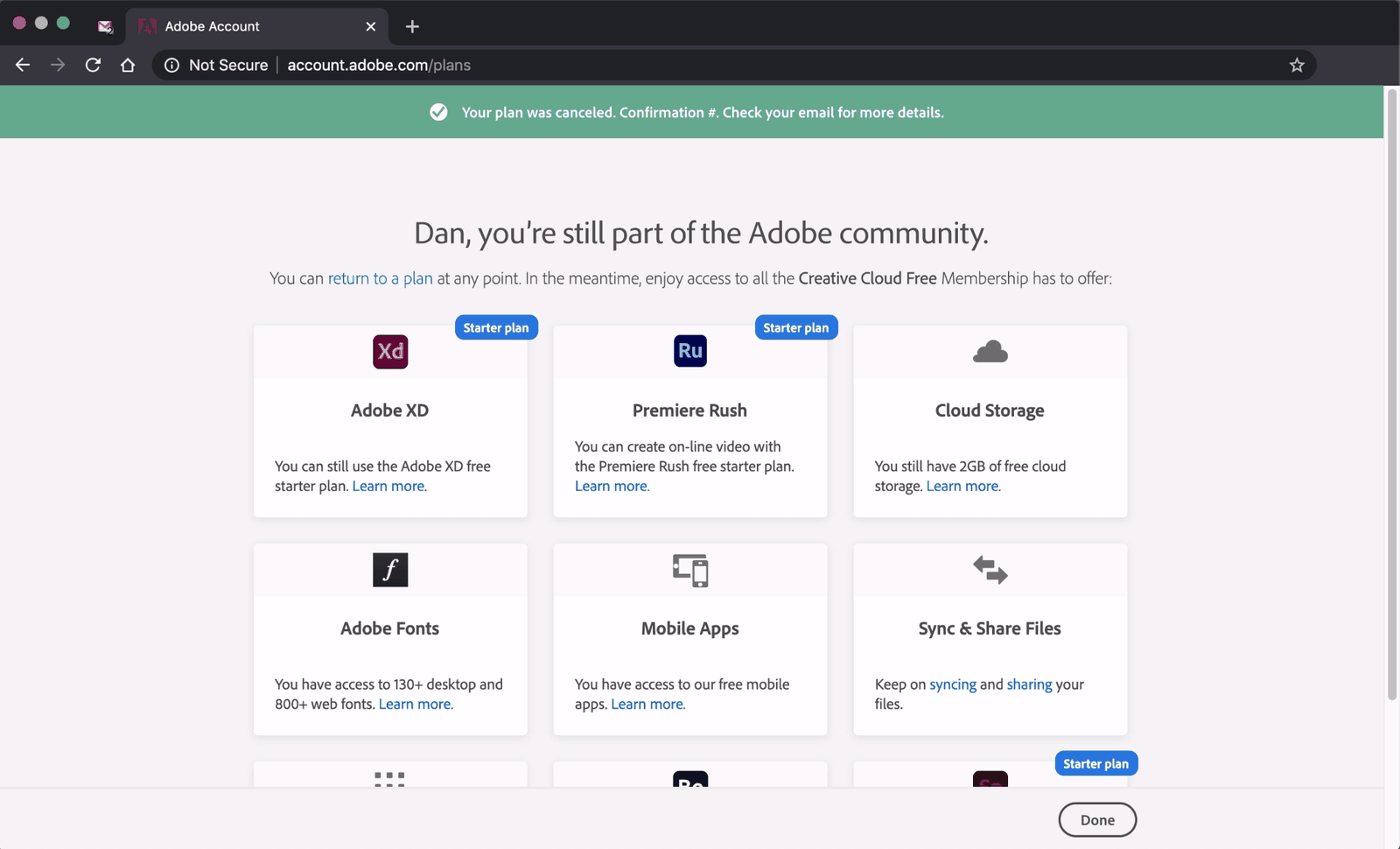
The last page leads with 'you're still part of the Adobe community'.
The actual confirmation is a thin green banner at the top that is easy to miss. The headline and a grid of free products, Adobe XD, Premiere Rush and more, make him wonder if he canceled at all, or signed up for something new. Growth.Design scores the whole offboarding an E.
TakeawayHiding the confirmation behind a cross-sell leaves people unsure what just happened.
Original Buried confirmationRedesign 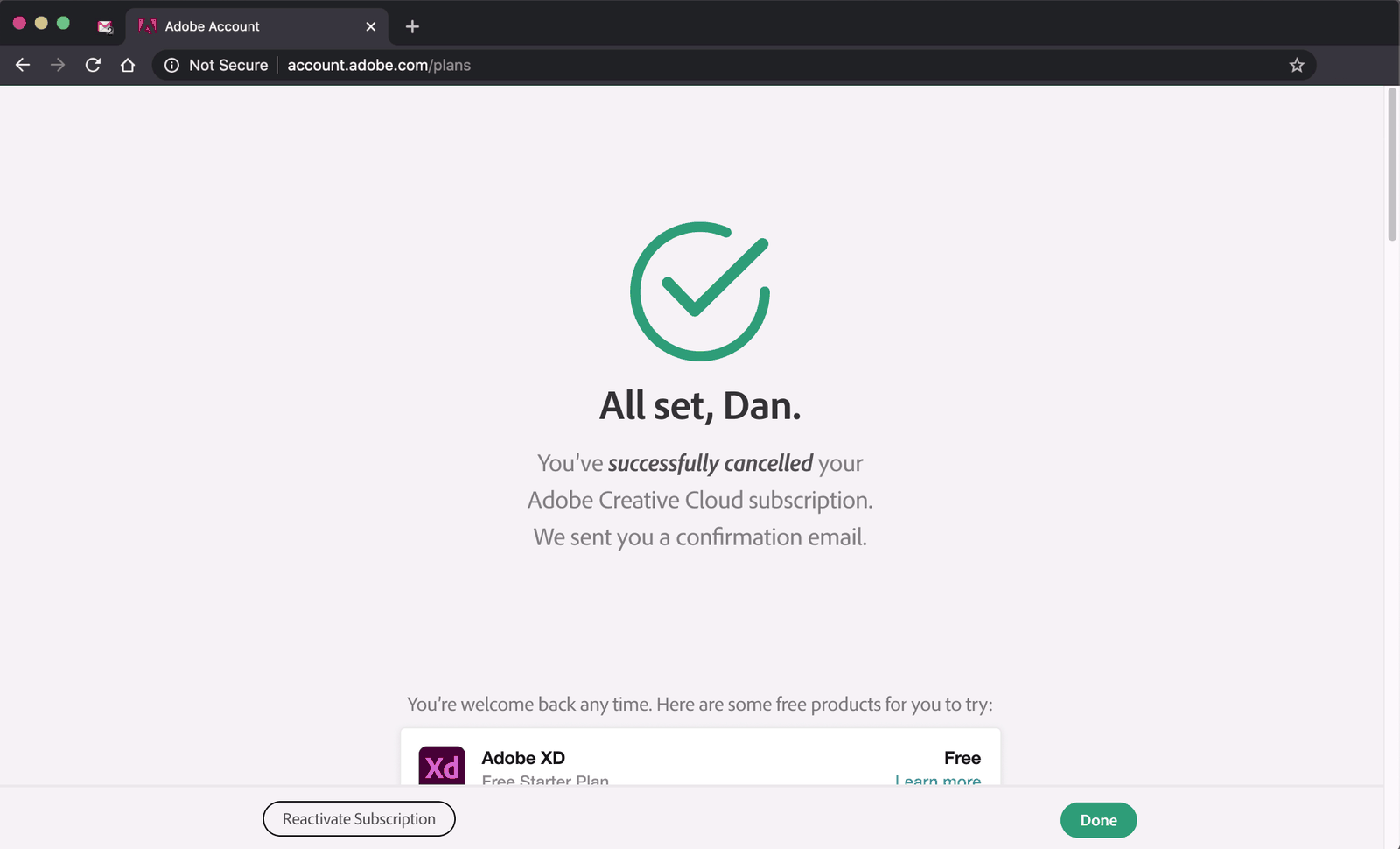 Clear confirmation
11
Repair 3
Confirm the cancellation first, then offer a way back.
The redesigned page opens with a large check mark and 'All set, Dan. You've successfully cancelled.' It mentions the confirmation email, offers a 'Reactivate Subscription' button as an undo, and only then lists free products he might try.
What changed
- A clear success message leads the page
- The confirmation email is mentioned
- A reactivate button works as an undo
- Free products move below the confirmation
TakeawayHow you say goodbye shapes whether a customer ever comes back.
Peak-end rulePeople judge an experience largely by its peak and its end. Customers leave for many reasons you cannot control, so give them a sense of completion when they go.
Every takeaway, in one place
- The setupIf the preview does not say what the email is about, important notices get treated as spam.
- Problem 1A renewal notice should make the date, the cost and the next step obvious at a glance.
- Repair 1Honest reminders cost a few renewals and earn a lot of trust.
- Problem 2Pricing terms that customers cannot explain in their own words create suspicion at the exit.
- Problem 3Asking for feedback is fine. Requiring it before someone can leave feels like a toll.
- Problem 4Loss framing that ignores what the customer just told you reads as manipulation.
- Problem 5A retention offer only works when it responds to the reason the customer is leaving.
- Repair 2When the survey shapes the offers, the customer can see they were heard.
- Problem 6Each extra step at the exit should protect the customer, not wear them down.
- Problem 7Hiding the confirmation behind a cross-sell leaves people unsure what just happened.
- Repair 3How you say goodbye shapes whether a customer ever comes back.
Source: Growth.Design: Adobe: The Psychology of User Offboarding
Let customers leave well, and more of them come back.
A cancellation flow is often the last thing a customer remembers about your product. Zyxware can review your renewal emails, account pages and cancel flow, remove the friction that reads as a trap, and design retention offers that respond to what customers actually tell you.